Jira is the world’s most used project management software solution – adopted by over 300,000 businesses around the world to manage issues, sprints, and development workflow. However, calculating the true cost of Jira in 2026 goes way past the superficial price tags published on Atlassian’s official website.
The price for using Jira for a team of 12 people is not limited to buying only 12 Jira licenses. The pricing plans of Jira, the use of various add-ons, the need for additional Confluence licenses, and the limits on automation make the true cost of Jira between 2x and 3x the price suggested by the base license.
Key Takeaways: Jira Pricing Overview
| Plan | Annual Price | Monthly Price | Best For |
|---|---|---|---|
| Free | $0 | $0 | Teams of up to 10 users |
| Standard | From $7.91/user/month | From $8.60/user/month | Teams of 11–300 needing audit logs and permissions |
| Premium | From $14.54/user/month | From $15.80/user/month | Teams needing Advanced Roadmaps and 99.9% SLA |
| Enterprise | Custom (est. $20–$25/user/month) | Annual only | 801+ user orgs needing multi-site management |
Critical pricing note: Jira uses a user-tier pricing model, not exact per-seat billing. A 12-person team pays the 11–25 user tier rate applied across all 25 slots — not just 12 actual users. This means growing teams routinely pay for unused capacity.
What Is Jira Mainly Used For? Features, Benefits, and Shortcomings
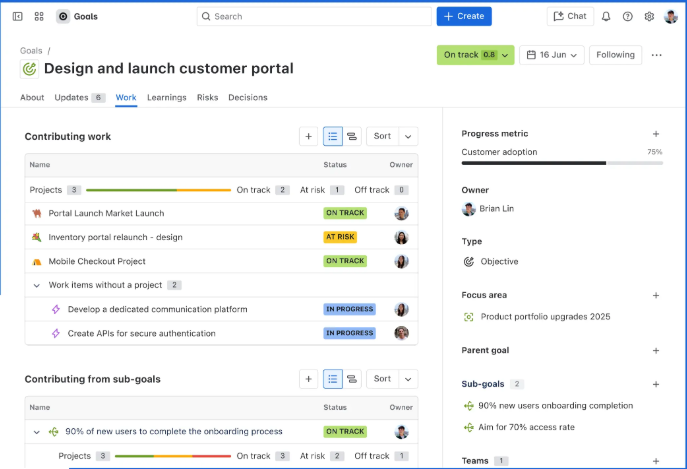
Jira is tailored to software developers and IT professionals who use agile techniques. The scrum boards, kanban boards, sprint planning features, and seamless integration with GitHub, Bitbucket, and Confluence ensure that Jira is the go-to platform for engineering organizations across the globe.
Primary use cases:
- Sprint planning and backlog management for agile development teams
- Bug and issue tracking across software products
- Release management and version tracking
- IT service management (via Jira Service Management — a separate product)
- Cross-team roadmap planning (Premium and Enterprise tiers)
Benefits of Jira:
- Scrum and kanban boards built specifically for engineering workflows — not adapted from a generic task manager
- 3,000+ Marketplace integrations including GitHub, Slack, PagerDuty, Confluence, and Bitbucket
- Advanced Roadmaps (Premium) for multi-team dependency and epic planning across sprints
- Deep customization via custom workflows, issue types, and field configurations
- Velocity charts, burndown charts, and sprint retrospective metrics built into the platform
- Atlassian Intelligence AI for work summaries, sprint risk identification, and task breakdown
Shortcomings:
- Steep learning curve — Jira’s terminology (epics, stories, sprints, components) is unfamiliar to non-development teams
- Not designed for marketing, HR, or operations workflows — it is engineering-first by architecture
- Add-on dependency: most teams need Confluence, Zephyr (test management), and Tempo Timesheets on top of the base license
- User-tier billing model creates overpayment for teams between tier thresholds
Who Gets the Most Value from Jira?
Jira is the right platform for:
- Engineering teams of 10+ running formal agile ceremonies (sprint planning, retrospectives, standups)
- Software product organizations tracking bugs, features, and releases simultaneously
- DevOps teams that need native GitHub/Bitbucket/GitLab integration in their issue tracker
- Organizations already using Confluence and other Atlassian products
Jira is the wrong platform for non-technical teams, small startups evaluating lean project management, and organizations where the administrative overhead of Jira configuration exceeds its productivity benefit.
Jira Pricing Structure Explained
The tiers used by Jira Cloud follow a structure of four tiers based on yearly or monthly plans. However, for Jira Data Center, which is an on-premises option, there was a different pricing plan that came to a close on March 30, 2026.
Jira’s volume discount structure reduces per-user cost at defined thresholds:
| User Range (Standard) | Per User/Month (Annual) |
|---|---|
| 1–100 users | $7.91/user |
| 101–250 users | $7.00/user |
| 251–300 users | $6.53/user |
| Annual flat rate (300 users) | Approx. $23,500/year |
Annual billing saves approximately 8% versus monthly on Standard and Premium plans for most user counts.
Jira Free Plan: Can I Use Jira for Free Forever?
Yes. The Jira Free plan in 2026 supports up to 10 users with no time limit. It requires no credit card, has no expiration, and provides sufficient functionality for very small development teams getting started with agile workflows.
What’s included in Jira Free:
- Unlimited projects with scrum and kanban boards
- Backlog management with sprint planning
- Basic issue tracking (bugs, tasks, stories, epics)
- 2GB file storage
- Community support only — no Atlassian customer support access
- Limited automation: 100 rule runs per month
- Single-region data residency only
- No audit logs, no user roles beyond basic permissions
Who gets value from the Free plan: Freelance developers, open-source projects, and teams of 2–9 who need basic sprint tracking without compliance requirements. The 10-user ceiling is a hard limit — the moment user 11 needs access, the team moves to Standard billing for all seats.
Jira Standard Plan: Features and Limitations
Jira’s Standard plan starts at $7.91 per user, per month for up to 300 users. Annual billing for a 300-user team runs approximately $23,500/year.
What’s included in Jira Standard:
- Everything in Free, plus:
- 250GB file storage (vs. 2GB on Free)
- User roles and permissions — control who can view, edit, and administer each project
- Audit logs for compliance and security review
- Data residency selection (choose which region stores your data)
- 1,700 automation rule runs per month per user
- Jira Service Management integration for basic IT workflows
- Business hours Atlassian support (not 24/7)
- No Advanced Roadmaps, no sandbox, no guaranteed uptime SLA
Who gets value from Standard: Engineering teams of 10–150 that need audit logs, proper storage, and moderate automations — the right default for most SMBs.
Key limitation: Standard has no Advanced Roadmaps for cross-team planning. Teams managing multiple simultaneous projects with shared dependencies will need Premium or expensive Marketplace add-ons to bridge the gap.
Jira Premium Plan: Features and Limitations
Premium jumps to $14.54 per user per month and unlocks unlimited storage, 24/7 support, advanced roadmaps, sandbox environments, and a 99.9% SLA guarantee.
What’s included in Jira Premium:
- Everything in Standard, plus:
- Advanced Roadmaps — multi-team, multi-project dependency mapping and cross-sprint planning
- Unlimited file storage
- 99.9% uptime SLA — contractual guarantee with financial remedies for downtime
- Sandbox environment — test configuration changes before applying to production
- 24/7 premium support with response time guarantees
- 1,000 automation rule runs per user per month (plus 500 global runs)
- IP allowlisting for network-level access control
- Atlassian Intelligence AI features: sprint risk flagging, work summaries, and issue classification
Who gets value from Premium: Teams running 3+ simultaneous projects with complex dependencies, or orgs actively using AI-assisted planning. Worth it above 50 users.
The 99.9% SLA is the primary reason compliance-sensitive organizations choose Premium over Standard — it provides contractual uptime accountability that Standard cannot offer.
Jira Enterprise Plan: Features and Limitations
Enterprise pricing is not made public and must be acquired through Atlassian’s sales team. According to reports from industry professionals and contractual agreements, prices for an Atlassian Enterprise plan will range between $20-$25 per user per month; however, this greatly depends on the number of team members.
What’s included in Jira Enterprise:
- Everything in Premium, plus:
- Up to 150 Atlassian sites (multi-instance management)
- Atlassian Analytics — cross-product BI dashboards pulling from Jira, Confluence, and other Atlassian products
- Dedicated Customer Success Manager
- 99.95% uptime SLA (vs. 99.9% on Premium)
- Enterprise-grade security: SCIM provisioning, SAML SSO, and advanced data loss prevention
- Centralized user management across all Atlassian products
- Custom contract terms and volume pricing negotiation
Enterprise value to whom: Premium will usually provide equivalent functionality as Enterprise for user counts below 500, whereas the Enterprise-level Jira licenses are intended for companies which require features that Premium doesn’t have. Enterprise becomes worthwhile above 801 users due to the added value provided by the included Atlassian Access, cross-site analytics, and success management compared to Standard/Premium licenses.
Watch out for hidden expenses! Confluence is not covered — Jira is usually bought with Confluence. The latter will cost you extra $6.05/user/month (in Standard). In other words, the overall cost of a “Standard” Jira solution will come to about $14.20/user/month. Additional third-party plugins on the Marketplace, including test management tool Zephyr Scale ($10/user/month), time-tracking app Tempo Timesheets ($12/user/month), and various dashboards (~$5–$15/user/month), add even more to this price tag.
What Is the Best Jira Alternative?
However, Jira’s strength is also accompanied by intricacy, administration hassle, and a price tag that often shocks new buyers. If there are no requirements for advanced engineering issues management and agile sprints within an organization’s workflows, then the following three options are always good choices.
Trello

Best for Simple, Visual Kanban Boards for Easy Tracking
Trello is the fastest Jira alternative to deploy. Its card-based kanban interface requires no onboarding program and produces a working project board in under 60 minutes. For teams that need visual task tracking without sprint ceremonies, velocity charts, or custom workflow schemes, Trello’s Standard plan at $5/user/month (annual) costs 37% less than Jira Standard.
The fundamental difference: Trello tracks tasks visually. Jira tracks issues technically. If your team does not need bug severity classification, story point estimation, or release versioning, Trello handles the workflow at a fraction of Jira’s complexity and cost.
Best for: Small teams, marketing and operations workflows, freelancers, and non-technical teams who need kanban boards without engineering-specific terminology.
Pricing: Free (10 boards), Standard $5/user/month, Premium $10/user/month.
Notion
Best for Teams Which Are Flexible All-in-One Workspaces
Notion is the right choice to use for Jira instead when you need both documentation and project management in one place, and you don’t need another separate Confluence license to make that happen. While Jira needs an extra subscription to Confluence to integrate documentation with development, Notion integrates them into the same workspace for free.
The versatility of Notion lets you organize your workspace for software engineering, products specifications, and company wiki all at once using a single platform that non-tech workers can easily use even if they have never worked with it before. But Notion lacks some features such as sprint planning, tracking of velocity, and developer tools integration.
Use case: Startups at an early stage, product development teams, cross-functional groups including tech and non-tech participants.
Pricing: Free (up to 10 guests), Plus $10/user/month, Business $18/user/month.
ClickUp

Comprehensive Project Management Tool with Extensive Automation
ClickUp remains the best Jira alternative for those looking to achieve engineering-ready project management at an affordable price point. ClickUp comes at a price of $12 per user per month (for the Business plan paid annually) and comes with native sprint management, Gantt charts, time tracking, automation, Docs, and AI support – all of which would otherwise be achieved through separate Jira plugins, often at greater expense.
Cost difference: While a 25-member software development team using Jira Standard + Confluence will pay around $363 per month ($14.52/user, effectively) for its needs, the exact same team using ClickUp Business will only have to pay $300/month, while still getting access to time tracking and whiteboards, plus 25,000 automated actions.
Useful for: Engineers who desire project management but do not want the hassle of using Jira.
Pricing: Free forever (unlimited users), Unlimited $7/user/month, Business $12/user/month.
Wrapping Up: Is Jira Worth Paying For?
Jira is worth paying for — specifically for engineering and software development teams running formal agile workflows at scale. Its depth of customization, developer tool integrations, and Advanced Roadmaps capabilities are genuinely unmatched in the market.
But the total cost picture is more complex than Atlassian’s published per-user rates suggest:
| Plan | Best for | Honest verdict |
|---|---|---|
| Free | Solo devs, teams ≤10 with basic sprint tracking | ✅ Yes — strong free tier |
| Standard | Engineering teams 11–150 needing audit logs and permissions | ✅ Yes — right default for most SMBs |
| Premium | 50+ user teams with multi-project dependencies and 99.9% SLA | ✅ Yes — when Advanced Roadmaps justify the 2× price step |
| Enterprise | 801+ user orgs needing multi-site and centralized governance | ⚠️ Evaluate carefully — cost compounds quickly |
For teams whose primary need is visual task management, async collaboration, or documentation-driven workflows — Trello, Notion, or ClickUp will deliver more usability per dollar without Jira’s complexity and add-on overhead.
Jira Pricing: FAQs
Is Jira Actually Free?
Yes. The Jira Free plan in 2026 supports up to 10 users with no time limit — no credit card required. It includes scrum and kanban boards, backlog management, and 100 automation rule runs per month at zero cost.
How Much Does Jira Cost Per User?
Jira costs Free to $14.54 per user/month as of June 2026. Standard is $7.91/user/month (annual), Premium is $14.54/user/month (annual), and Enterprise pricing is available on request. Monthly billing runs approximately 8% higher than annual rates.
Who Are Jira’s Biggest Competitors?
Jira’s primary competitors in 2026 are Linear (developer-first, modern UI), ClickUp (all-in-one workflow management), Asana (structured cross-functional project management), monday.com (visual team workflows), and GitHub Projects (native code repository integration). For pure agile development teams, Linear is the fastest-growing Jira alternative in 2026.
Disclaimer: Content on Next Byte Blog is for informational purposes only. Pricing and features mentioned are based on data available at the time of writing and may have changed. We are not affiliated with any tools or platforms mentioned unless stated. Some links may be affiliate links. Always verify information directly with the official source before making decisions.

Muneeb Azhar is the founder, publisher, and lead author of Next Byte Blog. A full-time professional freelancer specializing in SaaS, developer tools, and software reviews, he brings hands-on product experience to every piece he writes. His work covers best-of tool roundups, in-depth comparisons, and honest reviews of both free and paid software — helping readers make smarter decisions without the guesswork.
One thought on “Jira Pricing Explained in 2026: Free Plan, Paid Plans, and Add-ons”