It is an unfortunate reality that every team faces at some point: key business decisions lost in a WhatsApp thread with friends, crucial documents lost in an email chain, and no proper way to draw a line between work and life outside of work. While this issue can be solved by using Slack, it is not the most practical approach for smaller teams due to its cost per seat and unnecessary features.
This is why Zenzap was created. This app provides both the simple mobile-first experience of instant messaging apps as well as the functionality which businesses require: organization through group chat, file management, message-based task delegation, and automatic notification muting once the work day is over.
This Zenzap Review will provide insight into everything you need to know about using Zenzap after using it yourself.
Key Takeaways: What Really Stood Out To Me
| Feature | Verdict |
|---|---|
| Interface | ✅ Clean, modern, Slack-like — low learning curve |
| Free plan | ✅ Unlimited users — genuinely usable without paying |
| Task management | ✅ Message-to-task conversion is fast and practical |
| Working hours control | ✅ Automatic notification pause — rare in this category |
| Security | ✅ HIPAA compliant, company-owned data, end-to-end encryption |
| Integrations | ⚠️ Fewer than Slack — growing ecosystem |
| Video/voice calls | ✅ Built-in, no third-party app needed |
| File storage | ⚠️ Plan-dependent caps |
| Mobile app | ⚠️ Good, but desktop experience is stronger |
| Pricing transparency | ✅ No storage overage fees or per-feature upsells |
Bottom line: Zenzap is one of the top Slack alternatives suitable for use by small-to-medium-sized teams seeking a professional environment for communication without all the hassle. Zenzap certainly has what it takes to be included among the top Slack alternatives in 2026; not because it offers all that Slack offers but because it offers the essentials faster and cheaper.
What Is Zenzap?
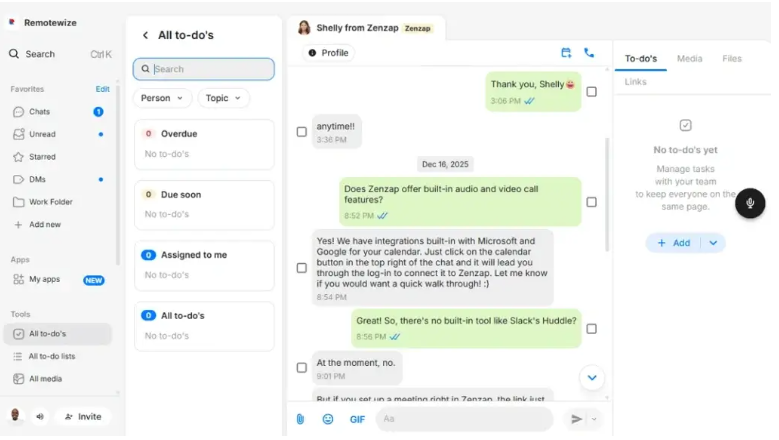
The Zenzap is a business communication application, specifically designed for use by communities or businesses that use WhatsApp or other personal messaging applications for their professional communications. This is because the product has a clear advantage that it has the speed and ease of use as WhatsApp, but also includes the organization, control, and structure that are necessary for professional business interactions.
The application is marketed as a professional services application designed to enable the user to manage their tasks, exchange files, and communicate via one platform. The tool offers a full suite of professional features such as HIPAA compliance and one-click offboarding feature. Additionally, the Zenzap has the ability to turn any message into a task without leaving the app.
What sets apart the Zenzap from other chat applications available is the fact that it emphasizes the work-life balance. For example, Zenzap’s working hours feature enables automatic pause in sending messages to an employee once their work hours are over. A feature that is not available even in popular platforms like Slack and Microsoft Teams.
Zenzap works best for small to mid-size teams that need a tool that is professional yet straightforward to use and inexpensive. Specifically.
How Much Does Zenzap Cost?
Zenzap uses a four-tier pricing structure with a genuinely free plan that does not cap users.
| Plan | Price | Best For |
|---|---|---|
| Free | $0 (unlimited users) | Small teams, communities |
| Pro | Available on request | Remote teams replacing Slack |
| Business | Available on request | Agencies and service firms |
| Enterprise | Custom pricing | Large orgs, white-label, custom security |
Zenzap is different from other players who charge extra fees for exceeding storage limits or for adding more features during your subscription period. You only pay for what you see.
To find out the pricing for Pro and Business Plans, you would need to speak directly with the Zenzap sales team since this information isn’t made public on their website.
Zenzap Usability and Interface
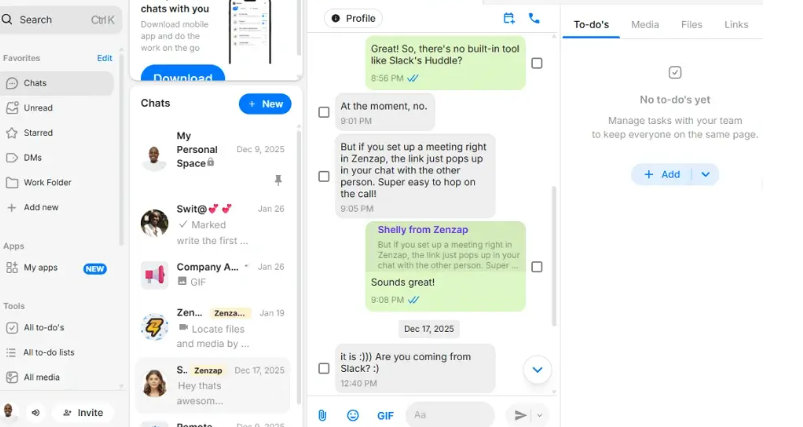
If you have experience using another popular chat application like Slack and Pumble, you will be able to get started using Zenzap without much of a problem because of its modern user-friendly interface and essential features that are expected of a corporate-level messaging platform.
On the left-hand side of the app, users will see all workspaces and channels along with direct messages organized in a manner similar to Slack where channels in Zenzap are referred to as “group chats,” which means that the same principle applies here.
Sign-up process for Zenzap is more rapid than in Slack. It does not take more than three minutes to sign up. Team members may be invited either through an e-mail invitation, QR code, or invite link without the need for any kind of installation or setting.
The clean interface is maintained as Zenzap does not include unnecessary clutter in its design. There are no 47 sidebars, workspace settings hidden behind five menus, and endless notification options which would require a PhD in Slack management to set properly.
Zenzap has proven helpful to teams by improving their organization and communication efficiency while eliminating communication gaps. As an all-inclusive communication tool, it includes a clean interface, an easy set-up process, and the ability to save time by avoiding application switching.
One thing that users have always complained about is the lack of color options to make everything more organized. When dealing with multiple group chats, it becomes difficult to organize things due to the high number of discussions going on daily.
Zenzap’s Key Features: Our Hands-On Testing Results
1. Zenzap Workspaces
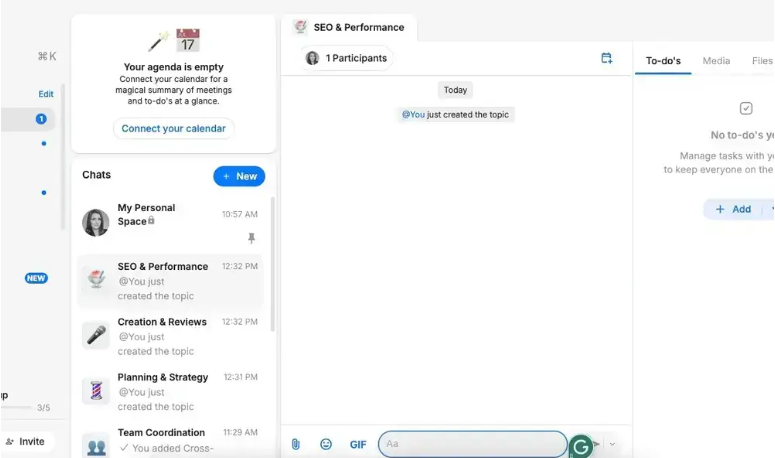
Zenzap uses the idea of Workspaces, which is similar to the Slack workspace idea. Each Workspace is a unique environment where its own set of users, channels, files, and admin settings can exist.
For organizations operating multiple departments, projects, or clients, Workspaces enable the clear organization of work and do not require additional accounts. For example, an organization may operate Client A and Client B Workspaces within the same Zenzap account while having different members in each.
Using Zenzap, you can create a unique group of chats that cover certain topics, projects, and locations. This will help to keep all the important information always accessible.
In terms of Workspaces, it is possible to control all your members, access to content, and use the company-owned data approach, which means that all communication history, files, and contact list belong to the company rather than to an individual. In case someone leaves the team, he or she can be removed from the team without losing any company communication history.
2. Team Messaging
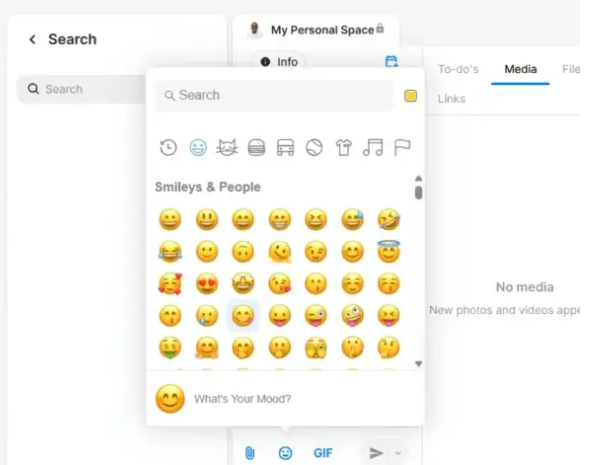
It should not come as any surprise that team messaging is at the center of Zenzap’s functionality. In addition to basic features like reply threads, reaction options, mentions, and pinned messages, users can also benefit from the working hours feature, which makes Zenzap a step above most other similar services.
Zenzap truly distinguishes itself with its working hours feature. The tool’s admin can define working hours on a per-user or per-team basis. After such hours have been reached, all work-related notifications are automatically disabled. No need to manually activate DND mode; Zenzap will take care of that for you.
In order to prevent employees from burning out, Zenzap offers the possibility of setting working hours, so notifications will be automatically paused after such hours are reached.
This function comes in handy for US-based teams accustomed to constant working and offers tangible benefits to their employees’ health.
3. File and Document Sharing
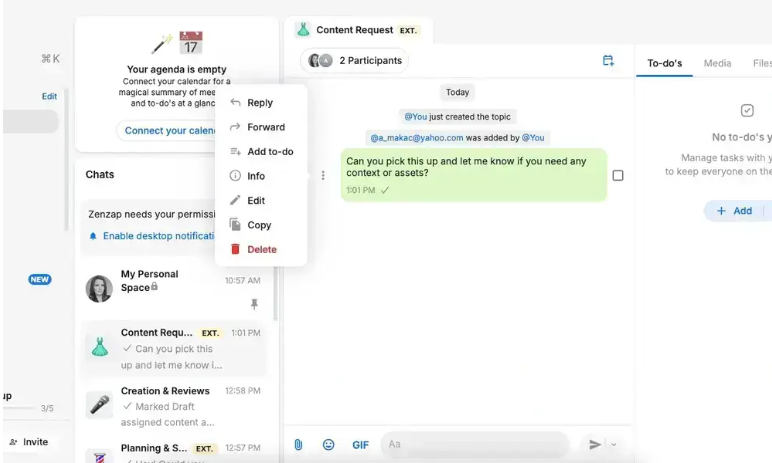
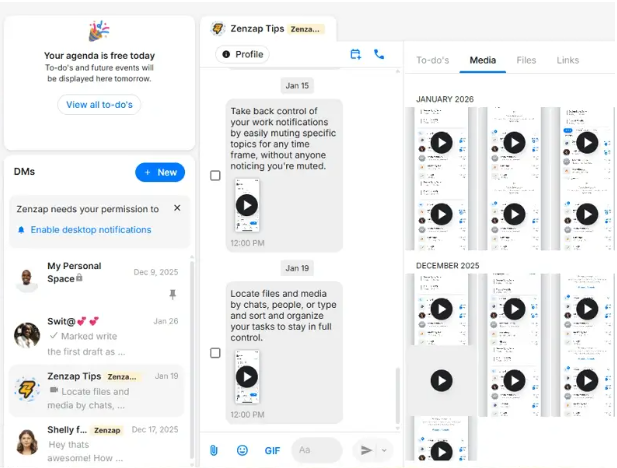
Zenzap facilitates file-sharing activities directly from conversations between users, whether through group chats or private messages. File sharing is done within the conversation and automatically arranged in the Files tab within each individual channel.
One of the most useful features of Zenzap is its Files tab. In contrast to Slack, where uploaded files become lost in conversation history and cannot be accessed until searched for, Zenzap ensures that all files remain visible at all times.
Previewing capabilities are offered on common file formats, while any revisions made will have a version history maintained.
File Storage Space
| Plan | Storage Included |
|---|---|
| Free | Limited (plan-dependent) |
| Pro | Expanded storage |
| Business | Business-grade storage |
| Enterprise | Custom storage allocation |
Storage capacities for each plan are not known to the public and need to be contacted directly to Zenzap for more information. In Zenzap, they do not charge any additional charges for going over the set limit for a particular plan.
4. Video and Voice Calls
The app has integrated video and voice calling features without the need to use Zoom, Google Meet, or any third party conference software. This enables one to make a call from any direct message and/or group chat just by a single tap without creating a link or generating the “join the meeting” link.
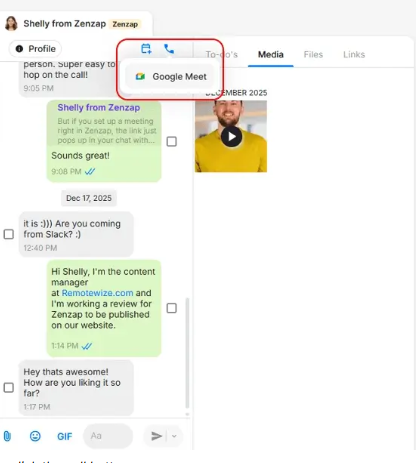
In case one wishes to have a conversation regarding project updates or any important decisions or just wants to check-in on his team, he may want to consider using the integrated video call feature as opposed to organizing a Zoom meeting each and every time.
All paid tiers on Zenzap offer screen sharing during video calls. This feature would come in handy for small teams that need to conduct code review meetings or client demos among others.
5. Task Management
Zenzap offers a direct way of managing tasks via chats, where you can convert a message into a task, add an assignee, set deadlines, and manage the progress of the project without leaving the chat itself.
The ability to make a message into a task is the feature that makes many users impressed once they start working with the platform. In group conversations, you have to hover over the message, click “Convert to Task,” add the person who will handle the issue and the deadline, and it becomes a task that you will see under the Tasks section together with other tasks.
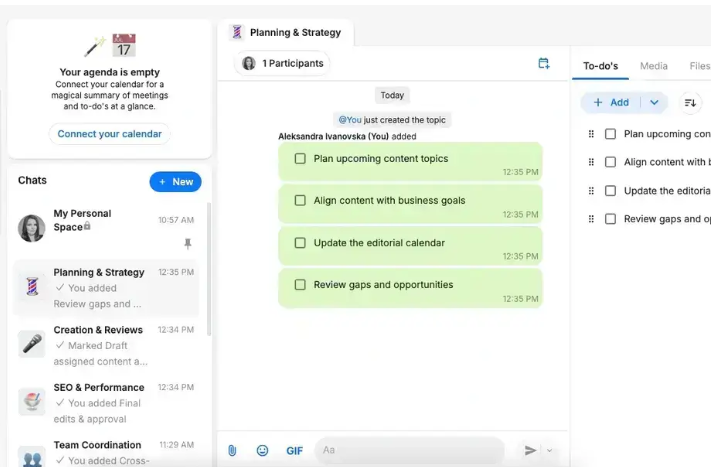
This built-in functionality allows avoiding switching between platforms, which is great for people who spend much time on communication and project management. While it is not an alternative to an advanced project management system for large-scale projects, it does a better job than any other messaging app when it comes to converting messages into task items.
While task management offered by Zenzap may be rather simple compared to full-fledged task trackers and incompatible with your existing tools, people with active ClickUp or Asana projects should think twice before using the feature.
Zenzap Integrations
Zenzap’s integration ecosystem is functional but not yet as broad as Slack’s App Directory. Current integrations connect Zenzap to third-party tools for automated updates and workflow notifications.
Available integration categories include:
- Project management tools (for task status updates in Zenzap channels)
- CRM platforms (for customer activity notifications)
- Calendar integrations (Google Calendar and Outlook sync for working hours management)
- Developer tools (for build and deployment notifications)
System integrations connect with other tools to get automated updates right in the team chat, keeping workflows smooth.
The integration library keeps getting better; Zenzap creates new connectors depending on user needs and keeps building out its connector library. In cases where users need niche integrations, Zapier connectors can be used in premium plans to fill in the gaps where Zenzap does not have the required connectors.
This is an honest drawback: in cases where a team requires more than 30 Slack integrations for their workflow, then the current number of integrations in Zenzap will result in some migration pain. Teams that primarily use Google Workspace, Outlook, and a project management application will find it adequate.
Security and Privacy
Security is one of Zenzap’s strongest selling points — particularly for US teams in regulated industries.
Security credentials and features:
- End-to-end encryption on all messages and file transfers
- HIPAA compliance — making Zenzap usable for healthcare teams and adjacent industries handling protected health information
- Company-owned data model — all chat history, files, and contact lists belong to the organization, not individual employees
- One-click offboarding — instantly remove a departing employee’s access while preserving all company communication data
- Admin access controls — granular permissions controlling what each user can view, share, and export
- Enterprise custom security rules — available on the Enterprise plan for organizations with specific compliance requirements
The platform ensures that all chat history, files, and contact lists belong to the company, not the employee.
For small businesses that previously used WhatsApp for work communication, the security upgrade from consumer messaging to Zenzap is significant. WhatsApp’s end-to-end encryption does not protect the organization’s data if an employee leaves — Zenzap’s company-owned model does.
Budget-conscious organizations that want enterprise-grade security without enterprise-grade pricing will find it attractive.
Zenzap Customer Support
Zenzap’s support infrastructure is appropriate for its position as a growing platform — sufficient for most users, with clear room for expansion.
Available support options:
- In-app help center with documentation
- Email support (all plans)
- Live chat support (paid plans)
- Dedicated onboarding support (Enterprise plan)
Different Support Options Across Plans
| Plan | Support Type |
|---|---|
| Free | Help center, community, email |
| Pro | Email + live chat support |
| Business | Priority email + live chat |
| Enterprise | Dedicated Customer Success Manager + custom onboarding |
Response times for email support are reported as 24–48 hours on standard plans. Users on paid plans report faster response times through live chat. The documentation covers setup, administration, and common troubleshooting scenarios adequately.
The limitation worth noting: Zenzap does not currently offer phone support or 24/7 coverage on standard plans. For mission-critical communication infrastructure at enterprise scale, this may be a gap — though the Enterprise plan’s dedicated CSM partially addresses this for larger organizations.
Wrapping Up: Is Zenzap Good?
Zenzap delivers on its core promise: it is a clean, secure, professional work chat platform that fills the gap between consumer messaging apps and complex enterprise platforms like Slack.
Where Zenzap genuinely excels:
- Working hours notification controls — genuinely unique and immediately valuable
- Message-to-task conversion — reduces context-switching meaningfully
- Company-owned data model — solves a real pain point for growing businesses
- HIPAA compliance at non-enterprise pricing
- Free unlimited-user plan that is actually usable
Where Zenzap has room to grow:
- Integration ecosystem needs expansion to match Slack’s App Directory
- Mobile experience trails the desktop app in polish
- Task management depth is limited compared to dedicated PM tools
- Pricing transparency requires a contact form rather than a public pricing page
For US teams of 5–50 people who want to professionalize their communication without Slack’s per-seat cost and complexity, Zenzap is a strong, well-designed choice. The Pro plan hits the sweet spot for most remote teams looking to replace Slack and Trello with a single async-first workspace.
For larger organizations with extensive integration requirements or 24/7 enterprise support needs, evaluate whether Zenzap’s current feature set covers your specific requirements before switching from Slack or Teams.
FAQs: Zenzap Review
What Is Zenzap?
Zenzap is a professional work chat app that helps you separate work from personal life by providing a secure, organized space for team communication. It combines messaging, task management, file sharing, and video calls in one platform.
Is Zenzap Encrypted?
Yes. Zenzap uses end-to-end encryption for all messages and file transfers. The platform is also HIPAA compliant, making it suitable for healthcare teams and organizations handling sensitive data.
Does Zenzap Have a Desktop App?
Yes. Zenzap is available as a desktop application for Windows and Mac, as a web app accessible through any browser, and as a mobile app for iOS and Android. The desktop experience is the most polished of the three.
Disclaimer: This review is based on publicly available information, verified user feedback, and hands-on testing conducted in 2026. Pricing and feature details may have changed after publication. Always verify current pricing and plan details directly at zenzap.com before making any purchasing decisions. Next Byte Blog is not affiliated with or sponsored by Zenzap.

Muneeb Azhar is the founder, publisher, and lead author of Next Byte Blog. A full-time professional freelancer specializing in SaaS, developer tools, and software reviews, he brings hands-on product experience to every piece he writes. His work covers best-of tool roundups, in-depth comparisons, and honest reviews of both free and paid software — helping readers make smarter decisions without the guesswork.