Since 2014, Flock has been quietly catering to small and mid-sized businesses, lacking in name recognition compared to Slack and Microsoft Teams, but charging a fee that consistently appeals to budget-conscious companies. The platform combines messaging, video calling, file sharing, and productivity tools such as To-Dos and Notes in one space to become an alternative to the makeshift solution that combines a chat application, task manager, and note-taking program.
To see whether Flock deserves its dedicated customer base through complete flock review, I took it for a spin myself in messaging, file sharing, video calls, task management, and more than 40 third-party applications. In this review, you will learn what is good about Flock, what fails it, and if Flock is a communication tool your team needs in 2026.
How I Tested Flock
I had a systematic method for assessing the functionality and usability of Flock in a practical setting on both desktop and mobile devices. I created a workspace simulation, which is basically what you would see in a practical working environment, in which I tested functions such as creating channels and sending direct messages.
My testing covered:
- Setting up channels, direct messages, and guest access
- Sending and receiving files of varying sizes
- Running one-on-one and group video/audio calls
- Creating and assigning To-Dos across team members
- Testing Notes for shared documentation
- Connecting and using 5+ third-party integrations
- Comparing the desktop app experience against the web and Android apps
I cross-referenced my findings against verified user feedback from G2, Capterra, TrustRadius, and GetApp — representing hundreds of real business users — to confirm whether my experience reflected broader patterns or was an isolated case.
Flock Pricing
Flock offers three pricing plans, charged per user, positioned specifically as a budget-friendly alternative to Slack and Microsoft Teams.
| Plan | Price | Users | Key Limits |
|---|---|---|---|
| Free | $0 | Up to 20 members | 5GB storage/team, 10 public channels, 10,000 searchable messages, 1:1 video calls only |
| Pro | $4.50–$6/user/month | Up to 100 members | Unlimited channels, group video calls, 10GB storage/member, unlimited searchable messages |
| Enterprise | Custom | 100+ members | Custom limits, dedicated support, advanced admin controls |
What’s included on Free:
- Unlimited messages
- 5GB of storage per team
- Up to 10 public channels
- One-on-one video calls only (no group calls)
- 10,000 searchable messages — older messages become unsearchable past this cap
What Pro adds:
- Unlimited public and private channels
- Group video calls and screen sharing
- 10GB storage per team member (not per team)
- Unlimited searchable message history
- Guest access without additional cost
Price comparisons done fairly: The pricing of $4.50-$6 per user per month for Flock is considerably lower than $8.75 per user per month for Slack’s Pro plan. Some competitors are more aggressive in terms of pricing, however; while offering comparable features, Pumble goes as low as $2.49 per user per month.
One shortcoming of the free plan: Only one administrator can post into the Announcements channel using the free plan. Several reviewers had to create their own workaround channel.
Flock Compatibility and User-Friendliness
Flock is built to run seamlessly without the need for any configuration or setup. As soon as you have added your team members and made some channels, your teams can begin to collaborate straight away by adding To-Do lists, notifications, and integrating apps.
The application comes with desktop applications for Windows and Mac, as well as web applications and mobile applications for iPhone, iPad, and Android. Flock supports English, Spanish, and Portuguese languages.
This is where the testers differ in opinion. While some users admire the user-friendly interface, citing that it does not have the usual messy layout found in functional tools like Slack, others have the complete opposite reaction to the web application interface, which, with five columns of icons and other information becomes cluttered, especially when the sixth column pops up after clicking on a menu item.

What I found in testing:
- Initial setup (creating a workspace, inviting team members) took under 10 minutes — genuinely fast
- The mobile Android app is clean and functional for messaging, calls, and to-do creation
- The desktop and web apps have noticeably different layouts, which creates inconsistency for teams using multiple devices
- Drag-and-drop menu customization is a nice touch — you can reorder which features appear first based on your team’s actual usage
- Dark mode is available, a welcome detail for users sensitive to bright screens
Bottom line on usability: Flock’s learning curve is low for core messaging functions. The broader interface experience is more polarizing — some users adapt within a day, others find the layout genuinely confusing compared to Slack’s more standardized design.
Core Functionalities: Strengths, Weaknesses, and Use Cases
1. Direct and Team Messaging
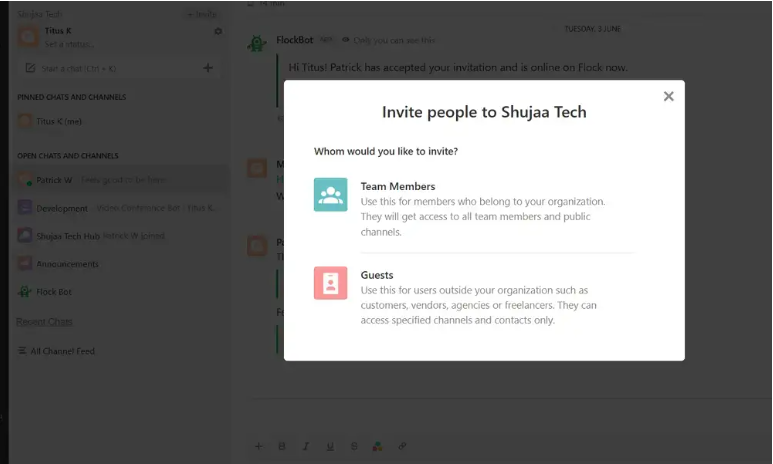
Flock has one-on-one messaging and group chat capabilities through channels. Initiating one-on-one chat requires just one click from the dashboard, and you are able to send messages to anyone who is in the organization or even guests outside the organization.
Strengths:
- Channels support both public (team-wide) and private (invite-only) configurations
- Threaded replies keep conversations organized within busy channels
- The persistent search bar makes locating old messages and files fast
- “Bubbling up” of recent conversations and last-message previews help users track active discussions without clicking into every tab individually
- Magic Search automatically surfaces relevant private channels and contacts as you type
Weaknesses:
- The free plan’s 10,000 searchable message cap means older conversations become unsearchable once you exceed it — a real constraint for active teams
- Notification management received consistent criticism in user reviews, with some reporting “notification overload” and unwanted follow-up emails for missed messages
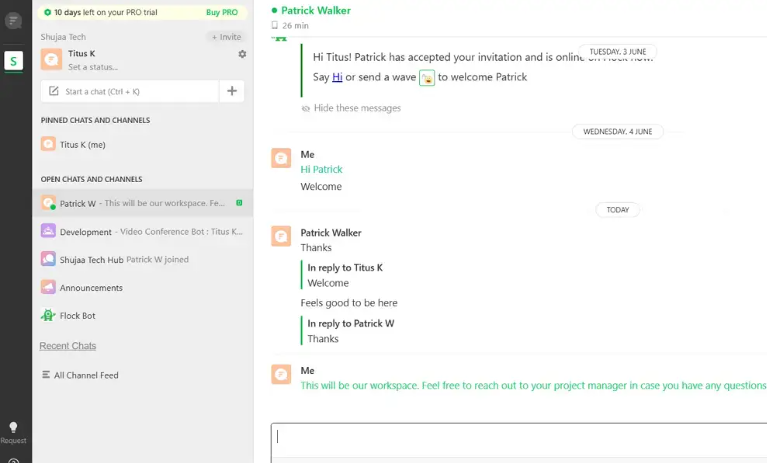
Best use case: Internal team communication replacing email threads and reducing the scattered-tool problem most small businesses face.
2. File Sharing
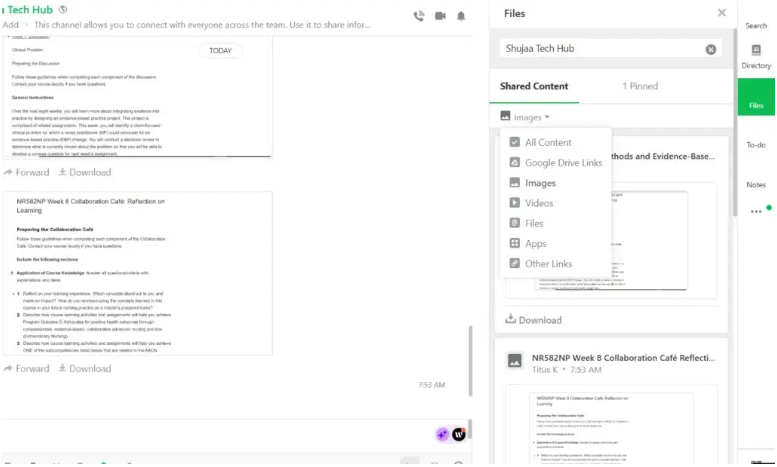
Sharing files in Flock is straightforward — drag and drop files directly into a conversation, or upload from your local machine or connected cloud storage like Google Drive.
Strengths:
- Automatic file previews for documents, images, and videos shared in-channel
- Deep Google Drive integration for teams already using Google Workspace
- Persistent search makes recovering shared files significantly easier than scrolling through chat history
Weaknesses:
- Some reviewers reported slow download speeds and reconnection issues on weaker internet connections
- Upload file size limits were flagged by multiple users as needing improvement, especially for teams sharing larger design files or videos
Best use case: Teams that need to centralize document sharing without relying on separate cloud storage links pasted into chat.
3. Audio and Video Conference Calls
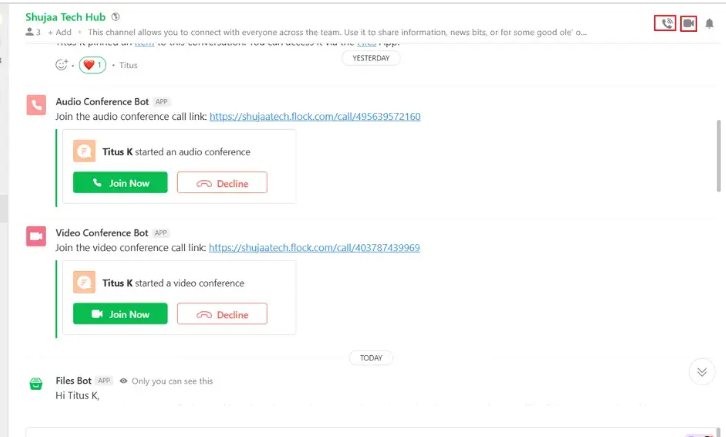
This is the obvious weakness of Flock. Video and audio calls can be arranged and made through the app, with an option for screen sharing in real-time. Also, users can join Zoom meetings right from within Flock without the need to switch apps.
Strengths:
- One-click 1:1 video calls from any device
- Screen sharing works during live calls for real-time collaboration
- Zoom integration means you are not locked into Flock’s native video tool if you prefer Zoom’s call quality
Weaknesses:
- Multiple independent reviews report videos failing to load completely during conference calls, disrupting the meeting experience
- There is no clear indicator when a call has ended, meaning users joining late may believe a meeting is still active when it has actually finished
- Performance issues and notably weaker video quality were cited as a recurring complaint compared to dedicated video tools
Best use case: Quick, informal 1:1 check-ins. For any team that runs frequent group video meetings or client-facing calls, this is the feature most likely to push you toward Zoom or a Flock alternative for video specifically.
4. To-Do
Another feature of Flock which has been highly regarded by its users is the To-Do feature which has been incorporated into Flock. One can create to-do lists in Flock, assign them to respective team members and even put deadlines on them. In addition, people can be tagged in conversations while assigning to-do lists.
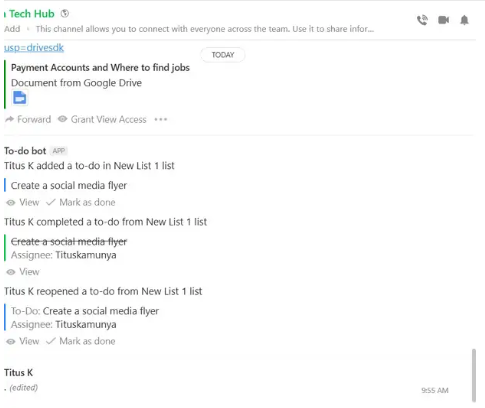
What I truly love about the To-Dos in Flock is the way they are incorporated into the chat interface without having to use any other application for it like some other social platforms do. It is very convenient not to have to switch context between applications when working on project management.
Strengths:
- Task creation directly from chat messages — no app-switching required
- Email reminders keep assigned tasks visible even when team members are not actively in Flock
- Simple, lightweight structure suits small teams that do not need a full project management platform
Limitations: This is not a substitute for dedicated project management software. Complex projects with dependencies, timelines, or multi-stage workflows will outgrow Flock’s To-Do feature quickly.
5. Notes
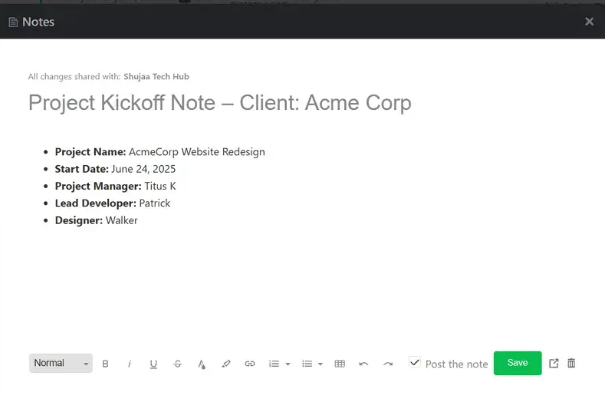
Flock’s Notes functionality creates a collaborative space for creating documents that co-exist in the context of team conversations – be it meeting notes, project specifications, or reference material.
Strengths:
- Notes are searchable alongside messages and files, keeping all team knowledge in one searchable system
- Real-time collaborative editing allows multiple people to update the same note
- Useful for capturing decisions made in a chat conversation that need a permanent, organized home
Limitations: Notes functionality is genuinely lightweight compared to dedicated documentation tools like Notion or Confluence. It works well for short reference documents but is not built for complex, deeply structured knowledge bases.
6. Flock Integrations
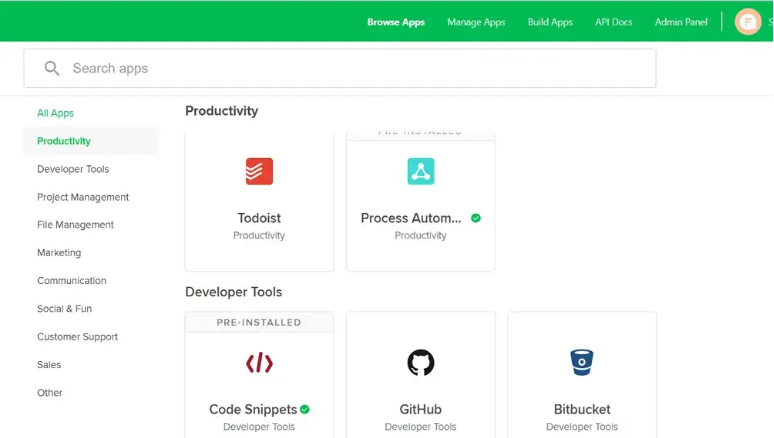
Flock integrates with 40+ third-party applications, connecting your communication hub directly to the other tools your team already uses.
Most notable integrations:
- Google Drive, Google Calendar, Google Analytics
- Trello, Asana, GitHub, Bitbucket, Jira
- Zoom (for video calls), Zapier (for automation)
- Twitter, Facebook, MailChimp
Flock’s App Store allows teams to plug apps directly into the workspace, reducing the need to switch between multiple tools to get work done. For an affordably priced app, the integration breadth is genuinely a strong point — and paired with the lower price compared to Slack, it is one of the strongest reasons to choose Flock over more established competitors.
Flock also offers a process automation feature with 10+ pre-built templates — like “Travel Request” or “IT Support Request” — that simplify recurring manual workflows without requiring custom development.
What Are the Best Flock Alternatives?
If Flock’s video call performance or interface quirks are dealbreakers for your team, these three alternatives are worth evaluating.
Slack
Slack is still regarded as the best software for teams to communicate, boasting a sleeker and more consistent user interface compared to Flock. It also boasts a better ecosystem of integrations, numbering in 2,600+ compared to Flock’s 40+. The drawback, however, is price: starting at $8.75 per user per month on Slack Pro compared to Flock’s Pro which is half the price. Also, its free plan allows only 90 days’ worth of messages.
Best for: Teams that prioritize polish, integration depth, and brand familiarity over cost savings.
Chanty
Chanty is often recommended as a better alternative precisely due to its more professional video conferencing feature and interface that looks better on different devices. The prices are comparable with those of Flock, and Chanty’s own Kanban board (Teambook) provides task management in a similar way to Flock’s To-Do but with better results.
Best for: Teams who want Flock’s affordability and built-in productivity tools without Flock’s video call reliability issues.
Microsoft Teams
For companies that use Microsoft 365 software already, Teams is the obvious choice because it is included free of charge in most packages of Microsoft 365 Business, and its video calls are much more stable than those of Flock. However, there is one drawback – the level of sophistication. Teams is more difficult to configure than Flock.
Best for: Teams already invested in Microsoft 365 who want video conferencing reliability without adding another vendor.
Is Flock Good For Team Communication and Collaboration?
Flock is a truly functional and inexpensive team communication software, though it does come with actual sacrifices to be made. When it comes to basic internal communication, file transfer and task management, Flock provides reliable performance at a lower cost than Slack and Microsoft Teams.
Choose Flock if:
- Your team has 5–100 members and a limited software budget
- Messaging, file sharing, and basic task tracking are your primary needs
- You do not rely heavily on video conferencing within the platform itself (or you are comfortable using the built-in Zoom integration instead)
- You want built-in productivity tools (To-Dos, Notes, Polls) without paying for separate apps
Look elsewhere if:
- Video conferencing quality and reliability are a daily, mission-critical requirement
- Your team needs a highly polished, consistent interface across every device
- You require enterprise-grade integrations beyond Flock’s 40+ app library
- Your team has outgrown lightweight task tracking and needs genuine project management depth
Flock is the right fit for smaller to midsize organizations who wish to combine all their communication needs along with productivity tools in one cheap platform at the expense of mediocre quality video calls and an underdeveloped user interface.
FAQs: Flock Review
How Much Does Flock Cost?
Flock offers a free plan for up to 20 users, with paid Pro plans starting at $4.50–$6 per user per month for up to 100 members. Enterprise pricing is custom for teams over 100 users.
Is Flock Better Than Chanty?
Chanty generally offers more reliable video conferencing and a more consistent interface, while Flock offers a broader integration library (40+ apps) and slightly more built-in productivity tools. Both are priced similarly, so the better choice depends on whether video call reliability or integration breadth matters more to your team.
Who Can Use Flock?
Flock is designed for businesses of all sizes across industries including marketing, engineering, sales, and HR — though it is most commonly adopted by small to medium-sized teams (5–100 people) seeking an affordable alternative to Slack or Microsoft Teams.
Disclaimer
This review is based on hands-on testing conducted in 2026, combined with verified user feedback from G2, Capterra, TrustRadius, GetApp, and SoftwareAdvice. Pricing and features were accurate at the time of publication but may have changed — always confirm current pricing directly at flock.com before making a purchasing decision. Next Byte Blog is independently operated and is not affiliated with, sponsored by, or endorsed by Flock or its parent company. Some links in this article may be affiliate links; we may earn a small commission at no additional cost to you if you make a purchase through them. This does not influence our editorial opinions or ratings.

Muneeb Azhar is the founder, publisher, and lead author of Next Byte Blog. A full-time professional freelancer specializing in SaaS, developer tools, and software reviews, he brings hands-on product experience to every piece he writes. His work covers best-of tool roundups, in-depth comparisons, and honest reviews of both free and paid software — helping readers make smarter decisions without the guesswork.