If you’ve ever spent 30 minutes trying to figure out how to configure Jira for a basic task board, you are certainly not alone. Many thousands of project managers in the US are now discreetly moving towards alternative solutions that offer speed, simplicity, and cost-effectiveness. In 2026, the market for Jira alternatives is stronger than ever before — and it’s also more competitive.
We took a close look at all the leading contenders and rated each according to ease-of-use, price, agile support, collaboration capabilities, and suitability. No matter whether you run a two-person startup or a 500-person company, there’s a project management tool out there for you.
Key Takeaways: What is the best alternative to Jira?
- monday.com is the best overall Jira alternative for teams that want visual workflows and powerful automation without a steep learning curve.
- Notion is the top pick for knowledge-heavy teams that need documentation and project tracking in one hub.
- Basecamp wins on flat-rate pricing — a huge advantage for growing teams tired of per-seat bills.
- Most Jira alternatives are easier to set up, more affordable at scale, and better suited for cross-functional teams beyond pure software development.
- Tools like ClickUp, Asana, and Wrike are strong choices depending on your team size and workflow complexity.
Quick Comparison: Top 3 Jira Alternatives
| Tool | Best For | Starting Price | Free Plan |
|---|---|---|---|
| monday.com | Visual workflows & automation | $9/user/month | ✅ Yes |
| Notion | All-in-one docs + task management | $10/user/month | ✅ Yes |
| Basecamp | Simple collaboration, flat pricing | $15/month (flat) | ❌ No |
monday.com
Best for: Visual project tracking and custom workflow automation.
It’s not a coincidence that monday.com is one of the best-known project management tools out there today. With its drag and drop board functionality, it allows you to create a visualization of all sprints or projects in a matter of moments, with no prior development knowledge necessary. The tool also includes over 40 different custom field types, multiple project view modes (Kanban, Gantt, calendar, timeline) and allows you to create an almost any kind of workflow, with absolutely no coding involved.
For those switching from Jira to monday.com, the process will be extremely easy as it offers support for bi-directional Jira synchronization. The cost starts from $9 per user/month with the Basic plan.
Notion
Best for: Teams requiring a highly configurable, all-in-one project management hub.
Notion is a perfect blend of a wiki, a database, and a project manager. The reason behind it is the very essence of its nature. The software provides a nice and neat platform that works great for those who spend most of their time in documents and want to have task management embedded into it. Free version is really helpful for solo users, while business version starts from $15/user/month.
Basecamp
Best for: Simple team collaboration and communication without the feature overload.
The philosophy behind Basecamp is simplicity at heart. Being charged only one flat fee ($15/mo for personal and $299/mo for unlimited user/project account) makes it a simple financial choice for teams with at least 20 members. It provides you with everything that you need – to-do list, message board, file-sharing, and chat.
Our Pick: monday.com is the best Jira alternative
Based on real-life tests, monday.com is the most comprehensive Jira alternative for most US-based workgroups. Not only can it track sprints for Agile project management processes, but it does so without the painful process of user adoption that you face when dealing with Jira. The app’s automation features, 200+ app integrations, including Salesforce and Slack (and even Jira), along with its mobile responsiveness, speak volumes.
Top 10 Jira Alternatives For More Seamless Project Management
Here’s our full breakdown of the best Jira alternatives in 2026, ranked and reviewed.
1. monday.com
Best for: Visual project tracking and custom workflow automation.
Pricing: Free plan available. Paid plans from $9/user/month (Basic) to $19/user/month (Pro), billed annually.
monday.com’s key strength lies in its flexibility. One can develop a Scrum board, a product roadmap, a marketing campaign plan, and a client delivery flow using the same application space. The software offers Kanban boards, Gantt charts, workload charts, and even calendars. Hence, one can work according to their preference.
The automation builder tool from monday.com is completely no-code. The software provides pre-designed “recipes” for setting up automation workflows, such as “When status becomes Done, notify the owner and move the item to the next phase.” This is simpler compared to the automation workflow tools of Jira.
Key Features:
- 40+ custom column types
- 200+ integrations including Slack, Salesforce, GitHub, and Jira
- Built-in time tracking and workload management
- Native Gantt charts with dependency mapping
- AI-powered workflow suggestions (2026 update)
Other Things I Liked About monday.com
- The onboarding experience is genuinely quick — most teams are productive within a day.
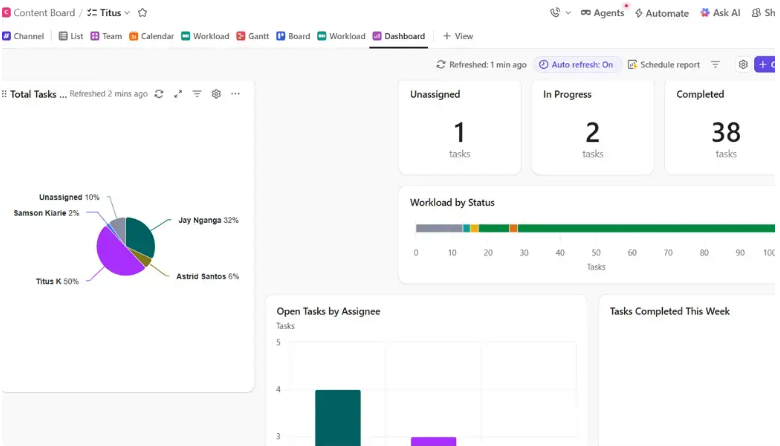
- Dashboards can pull data from multiple boards, great for portfolio-level visibility.
- The mobile app is one of the better ones in this category.
2. Notion
Best for: Teams requiring a highly configurable, all-in-one project management hub.
Pricing: Free plan available. Plus plan at $10/user/month, Business at $15/user/month.
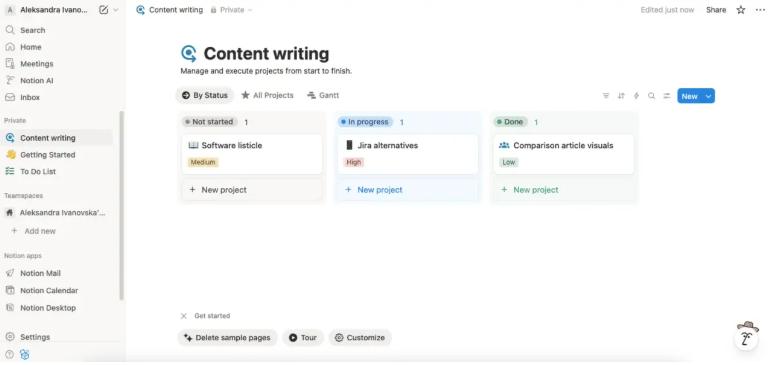
Notion is the software for teams that work in documents. While Jira follows the fixed paradigm of issues trackers, Notion gives you an opportunity to create the structure that fits you better — databases, kanban boards, roadmaps, and wikis can coexist peacefully in one environment. The product enjoys popularity among product and design teams since all their specifications, tasks, and meetings’ notes become easily manageable.
Version 2026 of Notion brings the following AI enhancements to users: automated task summary, automatic project summary creation, and AI assistant that can answer any questions about documents available in your workspace.
Key Features:
- Flexible database views (table, board, gallery, calendar, timeline)
- Native AI assistant for summarizing pages and creating tasks
- Team wikis, meeting notes, and project docs in one place
- Robust API for custom integrations
- Granular page-level permission controls
Other Things I Liked About Notion
- You can start from scratch or use hundreds of community-built templates.
- The free plan is actually useful, not a stripped-down trial.
- Works well as a client-facing project portal with limited guest access.
3. Basecamp
Best for: Simple team collaboration and communication without the feature overload.
Pricing: $15/month (personal), $299/month flat rate for unlimited users and projects.
Flat-Rate Pricing: It’s Basecamp’s Killer Feature in 2026
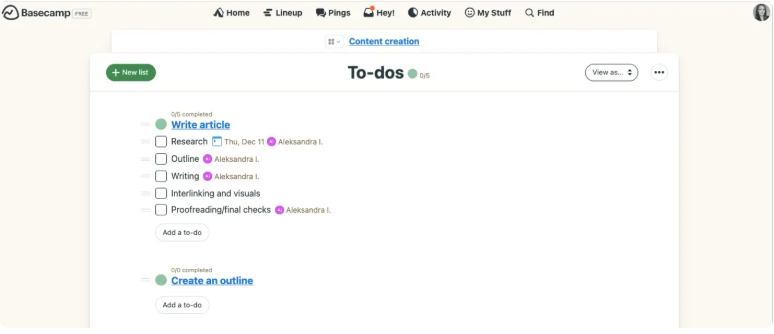
Basecamp charges a single rate for everyone, unlike all the other tools listed here that charge by seats. This means that a 50-member team can enjoy using the software for only around $6/user/month — a very reasonable price compared to what you’ll pay for Jira and monday.com.
Basecamp isn’t complicated. You can find message boards, to-do lists, file storage options, group chat capabilities, and a scheduling view there. But you won’t have a Gantt Chart, complicated automation or an overkill settings menu here.
Key Features:
- Flat-rate pricing with unlimited users
- Message boards, pings (direct messages), and Campfire group chats
- Automatic check-ins to replace status meetings
- Hill Charts for tracking project progress
- Client access included
Other Things I Liked About Basecamp
- Hill Charts are a genuinely clever way to visualize project progress beyond a basic percentage bar.
- The “always-on” communication style reduces meeting overhead for remote teams.
- Client-facing portals are built in — no extra cost.
4. Trello
Best for: Simple, visual task management using Kanban boards
Pricing: Free plan available. Standard at $5/user/month, Premium at $10/user/month.
Trello becomes the first choice among teams that have not yet used visual project management tools. Since Trello works on the card-and-column model of Kanban and its user-friendly interface allows one to start working within fifteen minutes, it is a lightweight version compared to its siblings.
Power-Ups functionality expands the possibilities of the Trello app itself because it lets you add calendars, timers, custom fields, and voting right into your boards. Trello offers some free functions which are actually usable for small teams.
Key Features:
- Drag-and-drop Kanban boards
- Cards with checklists, due dates, attachments, and comments
- 200+ Power-Up integrations
- Butler automation for recurring tasks
- Timeline and Calendar views on paid plans
Other Things I Liked About Trello
- Card mirroring lets you display the same card across multiple boards — great for cross-team visibility.
- The interface is clean enough to use as a client-facing project board.
- Free plan with unlimited cards is genuinely usable, not crippled.
5. Asana
Best for: Cross-functional teams that need to connect everyday tasks to company-wide goals
Pricing: Free plan available. Starter at $10.99/user/month, Advanced at $24.99/user/month.
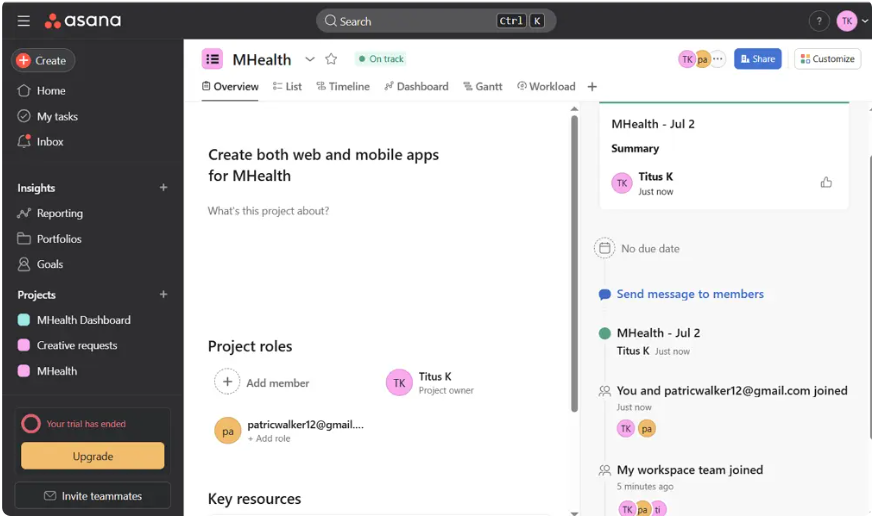
Asana is the platform designed for those who consider the alignment of goals essential. Asana’s Portfolios allow tracking the contribution of each separate project to overall company goals, which is not available in Jira that focuses solely on issues. A number of useful features such as timelines, automation of workflows, and reports make Asana suitable for marketing, operational, and product development teams.
Asana of 2026 comes with AI Studio that automates complex workflows using natural language triggers. It can be natively integrated with Microsoft Teams, Google Workspace, Slack, and Salesforce.
Key Features:
- Portfolio and goals tracking for org-wide visibility
- Timeline (Gantt-style) and Board views
- Advanced workflow automation with AI Studio
- 200+ native integrations
- Forms-based work intake for incoming requests
Other Things I Liked About Asana
- The “My Tasks” view is one of the best personal task management interfaces available.
- Dependency management is cleaner and more visual than Jira’s.
- Reporting dashboards are flexible and shareable with stakeholders.
6. Wrike
Best for: Enterprise teams that need advanced resource management and detailed project reporting
Pricing: Free plan available. Team at $10/user/month, Business at $25/user/month. Enterprise pricing on request.
Wrike is designed for enterprise-class project management where everything is properly structured. Conditional intake forms in Wrike are superior to any other tool on the market – a marketing request, a development request, or any other request may start completely separate workflow processes using the same intake form.
Hundreds of pre-built integrations with third-party applications like Adobe Creative Cloud, Salesforce, and Slack as well as Wrike Blueprints will ensure you won’t be able to choose anything else for complex project management tasks.
Key Features:
- Conditional request forms (smart intake)
- Portfolio-level resource management and workload charts
- Sequential and parallel approval chains
- Dynamic Gantt charts with dependency tracking
- 400+ integrations including Adobe Creative Cloud
Other Things I Liked About Wrike
- Wrike’s time tracking and budget reporting are mature enough for client billing workflows.
- Blueprints let you clone an entire project structure — ideal for agencies running repeatable campaigns.
- The Business plan’s analytics dashboards are genuinely executive-ready.
7. ClickUp
Best for: Teams that want to consolidate multiple work apps into one customizable platform
Pricing: Free plan available. Unlimited at $7/user/month, Business at $12/user/month.
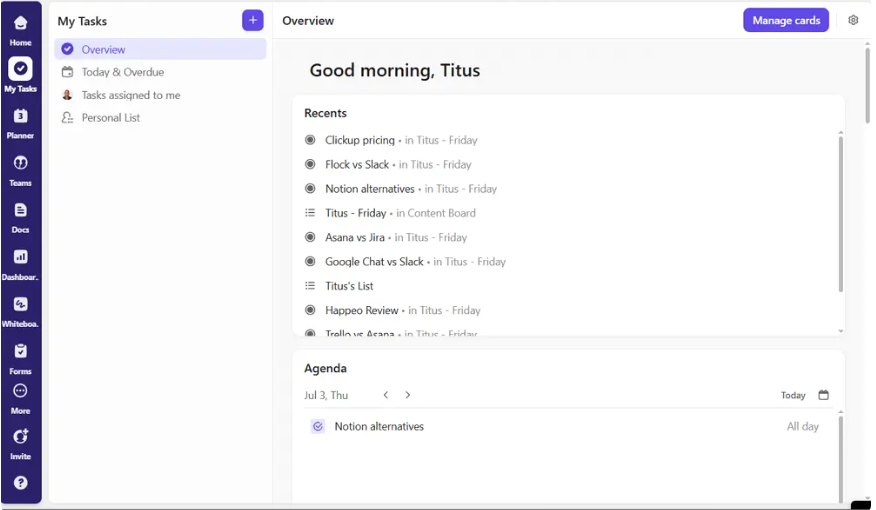
The premise of ClickUp is straightforward: eliminate all other apps you are currently using. This is because ClickUp integrates task management, documentation, whiteboarding, time tracking, goal setting, chatting, and sprint management into one solution. The result is substantial savings on subscription fees by those who pay for Jira, Confluence, Slack, and an additional time tracker.
There is indeed a steep learning curve when using ClickUp, mainly because of the number of functionalities this solution offers, which surpasses most others on the list. Allocate two to four weeks for the onboarding process. Nonetheless, once you settle into ClickUp, there’s no end to customizability.
Key Features:
- 15+ project views (List, Board, Gantt, Mind Map, Workload, and more)
- Native Docs and wikis with collaborative editing
- Built-in time tracking and goal management
- Sprint and backlog management for agile teams
- Importers for Jira, Asana, Trello, and monday.com
Other Things I Liked About ClickUp
- The free plan is the most generous in this category — unlimited tasks, unlimited members.
- ClickUp AI can summarize threads, generate subtasks, and write project briefs.
- The “Everything View” aggregates all tasks across every project in one place.
8. Smartsheet
Best for: Teams that prefer spreadsheet-style project management with enterprise-grade automation
Pricing: Pro at $9/user/month, Business at $19/user/month. Enterprise plans on request.
Think of Smartsheet as Jira for people who like spreadsheets. For the team that loves Excel and doesn’t want “another tool,” Smartsheet gives a spreadsheet with all the features for managing projects such as Gantt views, automated processes, resource allocation, and live dashboards.
It’s especially suited for operations, financial, and construction teams where data tracking is more important than flexibility. No code automation lets you automate alerts, row movements, and field updates based on logic conditions.
Key Features:
- Spreadsheet-style interface with formula support
- Gantt charts, card view, and calendar view
- Advanced automation with conditional logic
- Dashboards with live widget-based reporting
- Enterprise-grade security and compliance controls
Other Things I Liked About Smartsheet
- The form-to-sheet workflow is excellent for collecting structured data from external stakeholders.
- Smartsheet’s permissions and sharing model works well in large organizations with varied access needs.
- Built-in version history and cell-level commenting improve audit trails.
9. ProofHub
Best for: Teams that want flat-rate pricing with unlimited users
Pricing: Essential at $45/month (flat, unlimited users, 40 projects), Ultimate Control at $89/month (flat, unlimited everything).
The hidden gem is ProofHub, which offers much more than what you pay for. Similar to Basecamp, ProofHub operates on a subscription basis without considering the number of users. The package offers task management, time tracking, team messaging, proofing, gantt charts, and file management in one intuitive interface.
In particular, ProofHub offers a handy proofing utility that will be perfect for any creative team since reviews can be done right in ProofHub and not require an additional software such as InVision or Frame.io.
Key Features:
- Flat-rate pricing with unlimited users
- Built-in proofing and annotation tools
- Gantt charts and Kanban boards
- Time tracking and timesheets
- Role-based access controls
Other Things I Liked About ProofHub
- The discussion and announcement features replace a lot of email chains.
- The proofing workflow is genuinely one of the best available for creative and marketing teams.
- No per-seat pricing makes budget forecasting straightforward and predictable.
10. Taskade
Best for: AI-powered task management with real-time collaboration
Pricing: Free plan available. Pro at $8/month, Business at $16/month.
Taskade is clearly the most advanced tool on the list from the standpoint of its reliance on AI technology. This 2026 software comes with the AI agent system capable of generating projects based on a single sentence, assigning tasks automatically, and doing the research right in the software. Taskade provides quite a modern solution for tech-savvy companies seeking quick results without unnecessary bureaucratic hassle.
The features include real-time collaboration, video conferencing, and mind mapping, which makes it rather a comprehensive solution considering its price range.
Key Features:
- AI agents for automated project creation and task assignment
- Real-time collaborative editing on tasks and docs
- Mind map view for visual brainstorming
- Built-in video conferencing and team chat
- Cross-device sync with offline mode
Other Things I Liked About Taskade
- The AI project generator can create a full project structure — tasks, subtasks, and assignments — from a brief description in seconds.
- The mind map view is great for turning brainstorm sessions into actionable task lists.
- The free plan includes AI features, which is rare in this space.
How to Choose the Best Jira Alternative For Your Team
Before you commit to any tool, answer these four questions:
- Team size: Small teams (under 15) often thrive with Trello, Basecamp, or Notion. Mid-size teams (15–100) should look at monday.com, Asana, or ClickUp. Enterprise teams benefit from Wrike or Smartsheet.
- Workflow type: Agile and sprint-based teams need ClickUp or monday.com. Documentation-heavy teams lean toward Notion. Creative teams often prefer ProofHub.
- Budget model: If headcount is growing fast, flat-rate tools like Basecamp or ProofHub save thousands annually compared to per-seat pricing.
- Migration complexity: Tools like ClickUp and monday.com offer native Jira importers that preserve most metadata, reducing migration friction.
In Conclusion: What’s the Best Jira Alternative?
Jira is definitely a good product, but it is designed for software engineering teams, not enterprises. In case your team finds it too complicated, expensive or inefficient, then changing it would be a wise decision.
We would recommend starting with monday.com for its great visualization and automated processes, and because anyone can access it. If your team relies heavily on documentation, then we strongly suggest trying Notion. Finally, for more budget-friendly options, check out Basecamp or ProofHub for flat fees regardless of how many users you have.
The right Jira replacement is waiting to be found. Choose what works better for your team.
FAQs: Best Jira Alternatives
What is the best alternative to Jira?
monday.com is widely considered the best overall Jira alternative in 2026, offering visual workflows, no-code automation, and strong integrations at a competitive price.
Which is better, Zoho or Jira?
Zoho Projects is better for small-to-mid-size teams on a budget, offering an easier setup and lower cost; Jira is stronger for large engineering teams needing deep agile customization and DevOps integrations.
Does Google have a Jira alternative?
Google doesn’t offer a dedicated project management tool, but Google Tables and tight integrations in Google Workspace (Tasks, Chat Spaces) serve as lightweight alternatives for basic project tracking.
Can Microsoft Planner replace Jira?
Microsoft Planner works well for simple task management within the Microsoft 365 ecosystem, but it lacks Jira’s sprint management, backlog tracking, and developer tool integrations needed by agile software teams.

Muneeb Azhar is the founder, publisher, and lead author of Next Byte Blog. A full-time professional freelancer specializing in SaaS, developer tools, and software reviews, he brings hands-on product experience to every piece he writes. His work covers best-of tool roundups, in-depth comparisons, and honest reviews of both free and paid software — helping readers make smarter decisions without the guesswork.