Being a freelancer in 2026 entails being everything at once. You manage projects, deliver on tasks, serve as an account manager, and even handle finances yourself. Without some sort of system in place to manage your clients, their requirements, deadlines, and deliverables, chances are you’ll miss out on deadlines and lose clients in the process.
Most project management software systems were created for teams. This means that they assume the existence of departments, resource management, and a hierarchy of permissions that a single freelancer does not require. Instead, a great freelance PM tool integrates all your existing tools, such as a Trello board, Notion notes, spreadsheet trackers, calendar, into one coherent workspace that makes sense within your solo workflow.
This guide highlights the 7 best project management tools for freelancers in 2026, based on personal testing of different solo workflows and includes honest recommendations with verified pricing and accurate analysis.
Key Takeaways: Best Project Management Software for Freelancers
| Tool | Best For | Free Plan | Starting Paid Price |
|---|---|---|---|
| ClickUp | All-in-one: tasks, docs, time tracking, chat | ✅ Unlimited tasks | $7/user/month |
| Asana | Multi-client structured project management | ✅ Up to 10 users | $10.99/user/month |
| monday.com | Visual client work tracking | ✅ 2 users | $12/seat/month |
| Trello | Simple solo kanban workflows | ✅ 10 boards | $5/user/month |
| Notion | Docs + project management combined | ✅ Unlimited pages | $10/user/month |
| Wrike | Complex multi-stakeholder collaboration | ✅ Unlimited users | $10/user/month |
| Jira | Freelance developers, agile sprints | ✅ Up to 10 users | $7.91/user/month |
How I Picked the Best Project Management Software for Freelancers
Most project management software targets teams, built around resource allocation, workload balancing across departments, and permission hierarchies that a solo freelancer never touches. What freelancers need covers a different set of requirements:
- Multi-client task tracking without a complex organizational hierarchy
- Deadline visibility across multiple simultaneous active projects
- Documentation alongside tasks — project briefs, client notes, and deliverable specs in the same workspace
- Time tracking for accurate invoicing on hourly work
- A free or affordable solo plan — per-seat pricing that starts multiplying at five users is irrelevant to a one-person operation
- Low setup time — a tool that requires weeks of configuration before it becomes useful is the wrong tool for a freelancer
Every tool in this list was evaluated against these six criteria through actual use, not software demos.
Our Top 3 Picks
- ClickUp — Best overall: the most features on the best free plan, with time tracking and Docs included at zero cost
- Asana — Best for structured client work: timeline, dependencies, and automations that keep multi-client workloads organized
- monday.com — Best for visual tracking: color-coded status boards that communicate every project’s health at a single glance
ClickUp

Best for: Organizing Tasks and Documentation Across Multiple Clients
ClickUp’s free plan surpasses the performance of every other product listed here when it comes to individual freelancers. Unlimited tasks, unlimited users, inbuilt Docs, built-in time tracker, 15+ project views — all these come for free. If a freelancer is using three different products for managing tasks, taking notes, and logging time, then he/she can use ClickUp for everything for free.
Asana

Best for: Structured Project Management with Clear Timelines
Asana’s rule-based automation and timelines are specifically designed for freelancers managing numerous client projects at once. Whenever a deliverable enters the “In Review” stage, Asana can automatically send a notification to the client, schedule an automatic follow-up within two days, and change the project status without any manual intervention by you after configuring the process once.
monday.com

Best for: Keeping Project Documentation in One Place
The column-based system of data management in monday.com means that freelancers can view all aspects of the client’s projects in one place on the board, such as the project’s status, its priority level, deadlines, budgets, and contacts. The views presented on monday.com are the easiest to comprehend for freelancer-client communications.
At a Glance: Top 7 Project Management Software For Freelancers
| Feature | ClickUp | Asana | monday.com | Trello | Notion | Wrike | Jira |
|---|---|---|---|---|---|---|---|
| Free plan user limit | Unlimited | 10 users | 2 users | Unlimited | 1 user (personal) | Unlimited | 10 users |
| Native time tracking | ✅ Free | ✅ Advanced | ✅ Pro+ | ❌ | ❌ | ✅ Business+ | ✅ All plans |
| Gantt/timeline view | ✅ Free | ✅ Starter+ | ✅ Standard+ | ⚠️ Power-Up | ❌ | ✅ Team+ | ✅ Standard+ |
| Built-in Docs/Notes | ✅ All plans | ❌ | ✅ Workdocs | ❌ | ✅ Core feature | ✅ All plans | ❌ |
| Client sharing | ✅ Guest links | ✅ Guest users | ✅ Guest access | ✅ Board share | ✅ Guest access | ✅ External | ✅ Viewer role |
| Mobile app quality | ✅ Strong | ✅ Strong | ✅ Strong | ✅ Best rated | ⚠️ Good | ⚠️ Decent | ⚠️ Complex |
| Best free plan | ✅ #1 | ✅ #2 | ⚠️ 2 users | ✅ #3 | ✅ Unlimited pages | ✅ Good | ✅ Good |
Top 7 Best Project Management Software for Freelancers: Detailed Mini Reviews
ClickUp
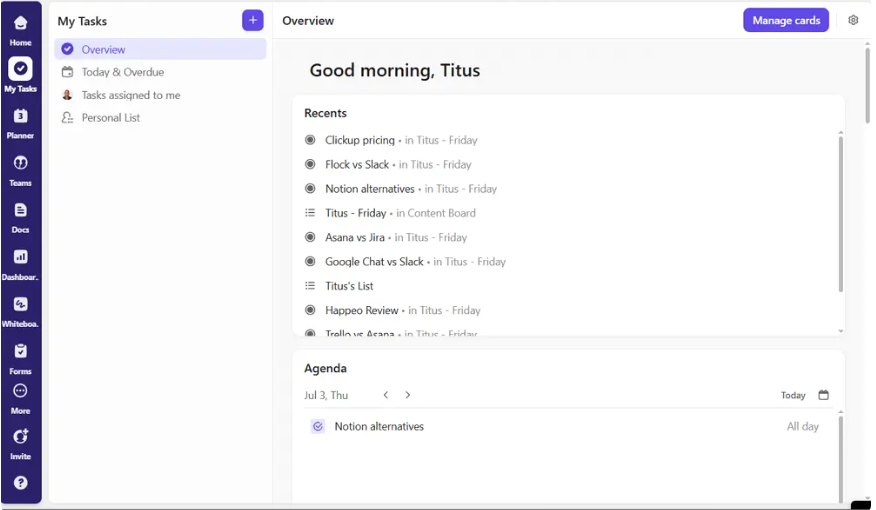
Best for: Freelancers Who Want One Tool for Everything (Tasks, Notes, Chat, Time Tracking, etc.)
Why Choose ClickUp
ClickUp provides customizable views, allowing you to tailor your workspace to fit your specific preferences. You can switch between list, board, and calendar views, making it easy to visualize your work.
For freelancers, the critical differentiator is what the free plan includes. Every other tool in this list either limits users, restricts views, or withholds time tracking from the free tier. ClickUp’s Free Forever plan gives you:
- Unlimited tasks across unlimited projects
- Native time tracking without a third-party integration
- ClickUp Docs for project briefs, client notes, and SOPs
- 15+ views including List, Board, Gantt, Calendar, and Mind Map
- Whiteboards for visual brainstorming
- 100MB storage and unlimited members
For a freelancer running 3–8 active client projects simultaneously, ClickUp’s Spaces architecture organizes each client as a separate Space — keeping client work cleanly separated without requiring a separate workspace or paid account per client.
Other Things I Liked About ClickUp
- Custom fields: Track client name, project type, invoice status, and hourly rate directly on task cards — no separate spreadsheet required
- Recurring task templates: Set up onboarding sequences, weekly check-ins, and delivery checklists once and reuse them for every new client automatically
- ClickUp Brain AI: On the paid plan, summarizes project status, drafts emails, and answers questions about your workspace content
- Client portal via guest links: Share specific project views with clients without giving them a full ClickUp account
- Offline mode: Continues working without internet — critical for freelancers working from coffee shops or during travel
ClickUp Pricing
| Plan | Price | Key Addition |
|---|---|---|
| Free Forever | $0 | Unlimited tasks, 15+ views, Docs, time tracking |
| Unlimited | $7/user/month | Unlimited storage, Gantt, integrations |
| Business | $12/user/month | Advanced automations, custom fields, goals |
Asana
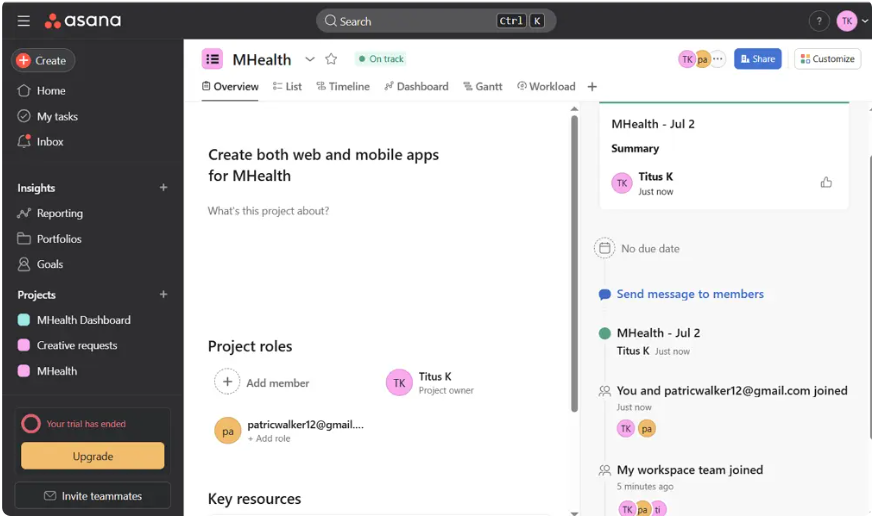
Best for: Freelancers Handling Multiple Clients or Larger Projects
Why Choose Asana
The Asana application performs admirably when used by mid-size and large-scale teams working on complicated projects where they require thorough project management services; however, its organized manner of functioning suits freelancers too, especially those working on managing high volume client work.
When there are four ongoing clients requiring deliverables at once and they are delivered based on the status of the drafts prepared by you, then the timeline feature of Asana helps you identify any scheduling conflict in advance. The dependence of tasks avoids any chances of scheduling any deliverable without its respective draft approval.
There is an automation function present in Asana through which the process of delivering any task goes smoothly without any manual interference.
Other Things I Liked About Asana
- Unlimited automations on Starter plan: Rule-based automations with no monthly action cap — more generous than Trello or monday.com at equivalent pricing
- Project templates: Pre-built client onboarding, content calendar, and campaign management templates reduce setup time for new engagements
- Form-based intake: Embed an Asana intake form on your website or in your client welcome email — new project requests populate directly as tracked tasks
- Portfolios on Advanced plan: Track the status of all active client projects from a single executive dashboard
Asana Pricing
| Plan | Price | Key Addition |
|---|---|---|
| Personal | $0 (up to 10 users) | Unlimited tasks, list/board views |
| Starter | $10.99/user/month | Timeline, automations, AI Studio |
| Advanced | $24.99/user/month | Goals, portfolios, time tracking |
monday.com
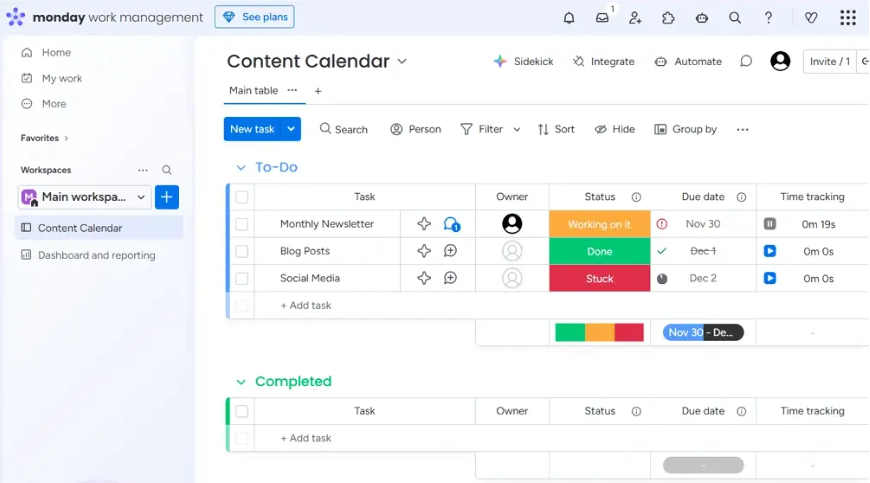
Best for: Freelancers Who Prefer Visual Project Tracking and Customizable Workflows
Why Choose monday.com
Features in monday.com’s AI Work Platform allow freelancers to create summaries, classify data, identify risks, and avoid redundant coordination efforts. As for client-facing freelancers, who regularly share their status updates, the feature of summarizing from monday.com saves the time invested in communicating.
The column-based data structure allows the creation of a client project board where all the variables – such as the deadline, delivery, payment status, priority, and contact details of the client – are included within one single row. No need for a CRM system or payment tracker separately.
Freelancers working with clients interested in project progress will appreciate the ability of their clients to have guest access to their project board.
Other Features I Liked About monday.com
- Workdocs: Create project briefs, meeting notes, and delivery summaries inside monday.com — connected directly to the relevant project board
- Dashboard widgets: Build a personal overview showing all client projects, upcoming deadlines, and open tasks in a single screen
- Time tracking on Pro plan: Log hours directly on task rows for accurate invoice preparation
- Board templates: Client project tracker, content calendar, and freelance CRM templates reduce initial setup time
monday.com Pricing
| Plan | Price | Key Addition |
|---|---|---|
| Free | $0 (2 users max) | 3 boards, basic views |
| Basic | $12/seat/month | Unlimited boards, 5GB storage |
| Standard | $14/seat/month | Timeline, calendar, automations |
| Pro | $19/seat/month | Time tracking, 25,000 automations/month |
Trello
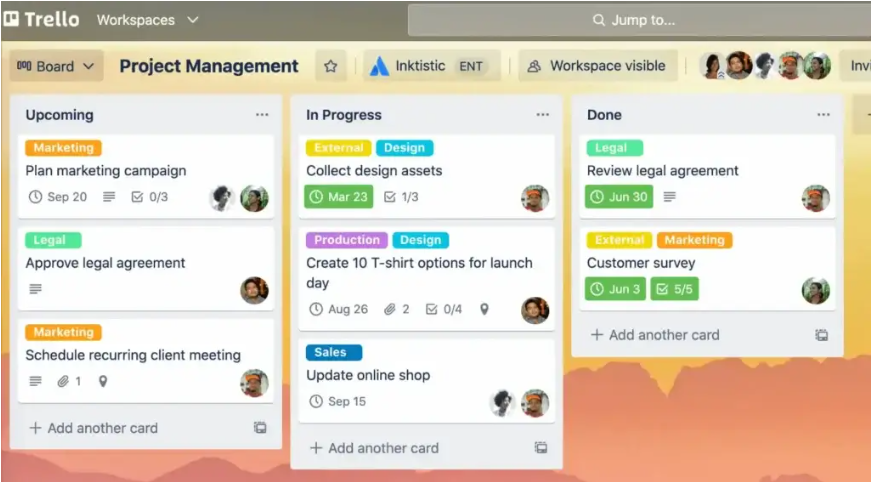
Best for: Solo Freelancers Who Want a Simple Visual Workflow
Why Choose Trello
Trello shines for small teams, freelancers, and anyone managing straightforward workflows. Its card-based kanban interface requires no onboarding, produces a working project board in under 60 minutes, and communicates project status visually without any configuration.
For freelancers whose workflow is genuinely linear — tasks moving from “In Progress” to “In Review” to “Delivered” — Trello’s simplicity is its greatest strength. No unnecessary complexity, no features you will never use, no setup tax.
The free plan’s unlimited cards mean a freelancer tracking 10 active client projects will never hit a task limit. The 10-board cap is the only real constraint — one board per client is the natural structure, and the free tier supports up to 10 simultaneous client boards.
Other Things I Liked About Trello
- Butler automation: Rule-based workflow automation in plain English — move a card to “Delivered” and Butler automatically archives it after 7 days and sends a completion notification
- Power-Ups: Add calendar view, timeline, Google Drive integration, and Harvest time tracking without leaving Trello
- Email-to-board: Forward client emails directly to a Trello board as cards — capture new requests without manual entry
- Mirror cards: A single task card appearing in both a client-specific board and a master delivery calendar board simultaneously
Trello Pricing
| Plan | Price | Key Addition |
|---|---|---|
| Free | $0 | Unlimited cards, 10 boards, Butler |
| Standard | $5/user/month | Unlimited boards, custom fields |
| Premium | $10/user/month | Timeline, dashboard, workspace views |
Notion
Best for: Freelancers Who Want Project Management + Documentation in One Tool (Writers, Designers, Consultants)
Why Choose Notion
The Notion app includes features like notes, databases, wikis, and basic project management in a highly adaptable workspace. It’s an especially useful product for any freelance writer who needs to create content documentation, as Notion offers writing surfaces and data management features that are not offered together by many similar applications on the market.
For instance, one could keep their deliverable tracker, editorial calendar, drafts database, and client style guide in the same Notion page, with linked databases for linking their deliverables to clients and displaying dates in a calendar format.
Notion’s greatest advantage is its ability to replace your current Notion + Trello + Google Docs + Airtable system with a single flexible workspace.
Other Things I Like About Notion
- Unlimited pages and blocks on free plan: No content restrictions — your entire freelance operation runs on the free tier
- Cross-database relations: Link client databases to project databases to invoice databases — replicate basic CRM behavior without a separate tool
- Notion AI: Drafts project summaries, generates meeting agendas, and writes first drafts of client update emails
- Web clipper: Save research, client examples, and inspiration directly to Notion from any browser
Notion Pricing
| Plan | Price | Key Addition |
|---|---|---|
| Free | $0 | Unlimited pages, basic sharing |
| Plus | $10/user/month | Unlimited file uploads, 30-day history |
| Business | $18/user/month | Private spaces, advanced page analytics |
Wrike
Best for: Freelancers Handling Complex Projects or Collaborating with Multiple Stakeholders
Why Choose Wrike
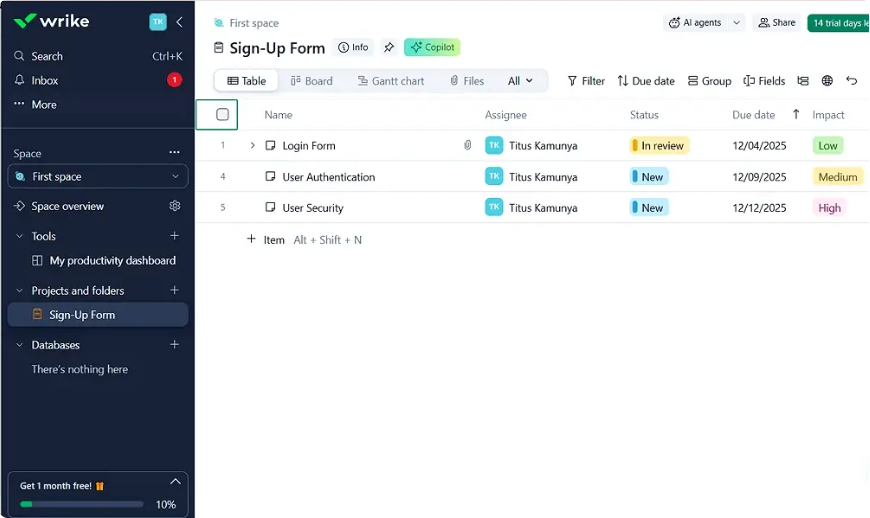
Wrike is a project management and collaboration software designed for teams and solopreneurs — but it earns its place in a freelancer’s toolkit specifically when client projects involve multiple stakeholders who need visibility and sign-off control.
For freelancers delivering work that requires formal approval from multiple client-side contacts — creative directors, legal reviewers, and account leads all approving the same deliverable — Wrike’s approval workflow handles that routing automatically. No email chains, no “I didn’t know it needed my sign-off” delays.
Cross-tagging lets a freelancer’s task appear in both their personal task view and the client-specific project simultaneously — no duplication, no synchronization failures.
Other Things I Liked About Wrike
- Proofing and approval: Annotate images, videos, and documents directly for client review cycles — reduces revision round-trip time significantly
- Request forms: Embed intake forms that route new client requests directly into tracked Wrike tasks with pre-assigned due dates
- Time tracking on Business tier: Log billable hours directly against project tasks for accurate invoicing
- Wrike Wit AI: Generates project summaries, draft task descriptions from meeting notes, and risk flags for approaching deadlines
Wrike Pricing
| Plan | Price | Key Addition |
|---|---|---|
| Free | $0 (unlimited users) | Basic tasks, board view |
| Team | $10/user/month | Gantt, automations, dashboards |
| Business | $24.99/user/month | Time tracking, approvals, custom workflows |
Jira
Best for: Freelance Developers or Engineering Teams Managing Software Projects Using Agile Methodologies
Why Choose Jira
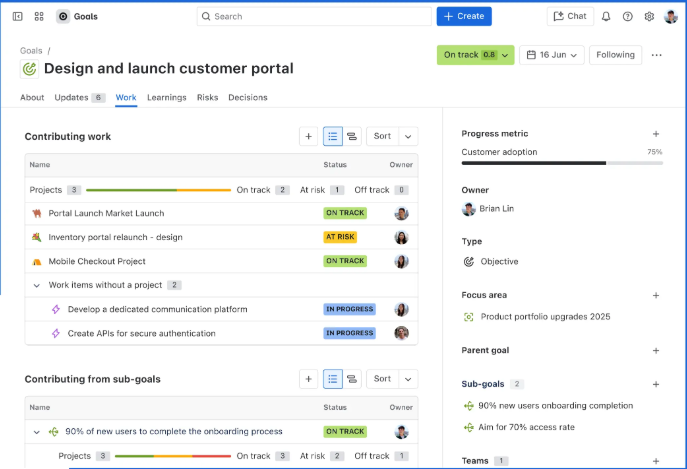
Designed for software development, Jira is ready to launch for teams using the Agile methodology. For freelance developers running sprint-based client engagements, Jira’s backlog management, story point estimation, velocity charts, and GitHub/GitLab integration are purpose-built for the technical workflow — no adaptation required.
A freelance developer delivering a 6-week feature sprint uses Jira’s sprint board to show clients exactly where each feature stands, with the GitHub integration automatically updating ticket status when a pull request is merged.
Other Things I Liked About Jira
- GitHub integration: Pull requests, commits, and branch activity automatically linked to Jira issues — no manual status updates required
- Custom issue types: Track bugs, tasks, stories, and epics with type-specific workflows in the same project
- Sprint velocity charts: Demonstrate delivery predictability to clients with quantified historical sprint performance
- Atlassian Intelligence AI: Sprint risk prediction, work summaries, and issue classification for active projects
- Free plan for up to 10 users: Sufficient for most freelance developer engagements with small client teams
Jira Pricing
| Plan | Price | Key Addition |
|---|---|---|
| Free | $0 (up to 10 users) | Scrum/kanban boards, backlog |
| Standard | $7.91/user/month | Audit logs, user permissions, 250GB storage |
| Premium | $14.54/user/month | Advanced Roadmaps, 99.9% SLA |
What Are Project Management Apps for Freelancers?
Project management apps for freelancers are tools that help independent professionals organize, track, and deliver client work without the complexity of enterprise project management software. Unlike team-focused PM platforms, the best freelancer PM tools are designed for solo or small-team use — with simple setup, affordable solo pricing, and features that match one-person operation realities.
A project management tool works for freelancers when it replaces other apps rather than adding to them.
Key Features of the Best Project Management Tools for Freelancers
The non-negotiables for a freelancer PM tool:
- Task management with deadlines: Track deliverables across multiple client projects with clear status and due dates
- Multiple project visibility: See all active client work from a single dashboard without switching between separate project spaces
- Client sharing options: Share project views or specific deliverable trackers with clients without full platform accounts
- Documentation alongside tasks: Project briefs, client notes, and feedback threaded directly to relevant tasks
- Time tracking or integration: Log hours against tasks for accurate hourly invoicing
- Mobile app: Capture tasks, review status, and update deliverables without being at a desk
- Free or affordable solo plan: Per-user pricing that does not penalize small operation size
Wrapping Up: Selecting the Best Project Management Tool for a Freelancer
The best project management tool for your freelance business is the one that replaces the most scattered tools — not the one with the longest feature list.
Start with the workflow gap, not the feature list:
- Scattered across too many tools → ClickUp (consolidates tasks, docs, time tracking, and notes in one free workspace)
- Multiple clients, complex deadlines → Asana (structured timelines and automations manage multi-client delivery)
- Visual-first, client status updates → monday.com (color-coded boards communicate status without status meetings)
- Simple solo projects, fast start → Trello (kanban in 60 minutes, free forever for 10 boards)
- Writing, design, or consulting work → Notion (docs and databases replace four separate apps)
- Multi-stakeholder approval workflows → Wrike (approval routing and proofing for complex client reviews)
- Freelance developer, agile sprints → Jira (sprint planning and GitHub integration purpose-built for dev work)
Start with a free plan. Run your actual client workflow through it for one week. The tool that reduces your administrative overhead — not adds to it — is the right one for your freelance business in 2026.
FAQs
Which Is the Best Project Management Tool for Freelancers?
ClickUp is the best overall project management tool for freelancers in 2026 — its free plan includes unlimited tasks, native time tracking, built-in Docs, and 15+ project views, giving solo professionals everything they need at zero cost.
Which Is the Best Free Project Management Tool for Freelancers?
Notion is the best free project management tool for freelancers who need documentation alongside task tracking. ClickUp is the best free option for feature depth — most freelancers will never need a paid plan with what the free tier provides.
Disclaimer: Content on Next Byte Blog is for informational purposes only. Pricing and features mentioned are based on data available at the time of writing and may have changed. We are not affiliated with any tools or platforms mentioned unless stated. Some links may be affiliate links. Always verify information directly with the official source before making decisions.

Muneeb Azhar is the founder, publisher, and lead author of Next Byte Blog. A full-time professional freelancer specializing in SaaS, developer tools, and software reviews, he brings hands-on product experience to every piece he writes. His work covers best-of tool roundups, in-depth comparisons, and honest reviews of both free and paid software — helping readers make smarter decisions without the guesswork.