Trying to manage your marketing team without the proper software is similar to carrying out a marketing campaign without any brief. Deadlines get messed up, creative assets are lost in emails, and there is no way of keeping track of who approves what. Proper project management software will make all those problems a thing of the past.
However, here is the catch: most project management software was not designed with marketing teams in mind. These applications were first made for software developers, operations staff, or even general use by businesses before adding a “marketing template” onto them.
This guide is going to introduce you to the 13 best project management tools that are perfect for marketing campaigns and tasks.
Key Takeaways: The Best Marketing Project Management Software for Marketing Teams
- ClickUp is the ultimate solution for scaling marketing teams with flexibility requirements at enterprise-level rates.
- Monday.com shines when it comes to visual teams with an emphasis on processes for handling multi-channel campaigns.
- Wrike is the one to turn to if you’re an enterprise marketing team handling complicated multi-stakeholder campaigns.
- Asana works best for structured cross-functional teams who require clear hierarchy of tasks.
- Notion is the perfect tool for content-heavy teams who thrive on documentation.
- Flat-rate solutions like Basecamp and ProofHub may save growing businesses thousands of dollars per year.
How I Picked the Best Project Management Software for Marketing Teams
I evaluated each tool based on how well it supports real marketing workflows — not just generic task management. Here’s what I looked at:
- Campaign planning and timeline management (Gantt charts, dependencies, milestones)
- Content calendar and editorial workflow support
- Creative review and approval features
- Ease of collaboration across internal teams, freelancers, and clients
- Integrations with marketing tools (Google Analytics, HubSpot, Slack, etc.)
- Pricing transparency and value for team size
- AI features that actually save time (not just marketing fluff)
Our Top 3 Project Management Software for Marketing Teams
ClickUp

Best for fast-scaling marketing teams needing all-in-one workflows
ClickUp brings tasks, docs, goals, time tracking, and automation under one roof. Marketing teams love it because you can run a content calendar, manage campaign sprints, and track OKRs without switching between five different apps. The free tier is genuinely generous, and the Business plan at $12/user/month makes it one of the best-value platforms on this list.
monday.com

Best for visual, process-driven marketing and campaign teams
The power of monday.com lies in how it allows for easy visualization. If you want an application where everyone in the team can instantly view the pipeline of the whole campaign and get to know who is accountable for what, who is lagging behind, and when the work has to be done, monday.com can easily offer it to you.
Wrike

Best for enterprise marketing teams managing complex campaigns
However, Wrike can be used in an environment that requires more than just a kanban-style project. If one is managing several campaigns at once, then having several dependencies between departments and a process for approvals becomes necessary.
At a Glance: Best Project Management Software for Marketing Teams
| Tool | Best For | Starting Price | Free Plan |
|---|---|---|---|
| ClickUp | All-in-one workflows | $7/user/mo | ✅ Yes |
| monday.com | Visual campaign management | $9/user/mo | ✅ Limited |
| Wrike | Enterprise-grade campaigns | $10/user/mo | ✅ Yes |
| Zoho Projects | Budget-conscious teams | $4/user/mo | ✅ Yes |
| Asana | Cross-functional teams | $10.99/user/mo | ✅ Yes |
| Basecamp | Simple team collaboration | $15/user/mo | ❌ No |
| Trello | Agile, lightweight tasks | $5/user/mo | ✅ Yes |
| Notion | Content and knowledge teams | $8/user/mo | ✅ Yes |
| Motion | AI-powered scheduling | $19/user/mo | ❌ No |
| ProofHub | Creative collaboration | $45/mo flat | ❌ No |
| Airtable | Data-driven workflows | $20/user/mo | ✅ Yes |
| ProProfs Project | Simple PM | $39.97/mo flat | ✅ Yes |
| Smartsheet | Spreadsheet-style planning | $9/user/mo | ❌ No |
Top 13 Best Project Management Software for Marketing Teams
ClickUp
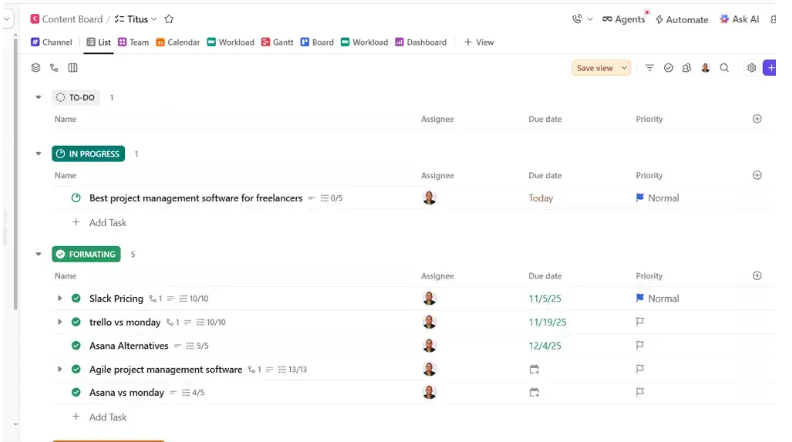
Best for fast-scaling marketing teams needing all-in-one workflows
One of the few solutions that deserve to be called all-in-one is ClickUp. Marketing managers can handle everything from campaign launch schedules, content briefs, client deliverables, and capacity planning without switching to another tool.
The distinguishing factor about ClickUp when it comes to marketing is that it is highly flexible. One can create a content calendar by simply dragging and dropping items in it. Automatic task assignment when campaigns progress through the pipeline, and brief writing within tasks using the ClickUp’s Docs module is also possible. The ClickUp AI integration ($5/user/month add-on) automatically summarizes notes taken in meetings, generates descriptions for tasks, and auto-populates project templates.
While the free version may be enough for a small team on a tight budget, the Business version, which costs $12/user/month, has an extensive list of features included. Unlimited automation, time tracking, and workload management are among them.
Pros
- Extremely customizable — works for nearly any marketing workflow
- Generous free plan with solid core features
- Native docs, goals, time tracking, and dashboards in one platform
- Strong automation builder for repetitive marketing tasks
Cons
- Steep learning curve for new users; can feel overwhelming at first
- Mobile app experience lags behind the desktop version
- AI features cost extra on top of the base subscription
monday.com
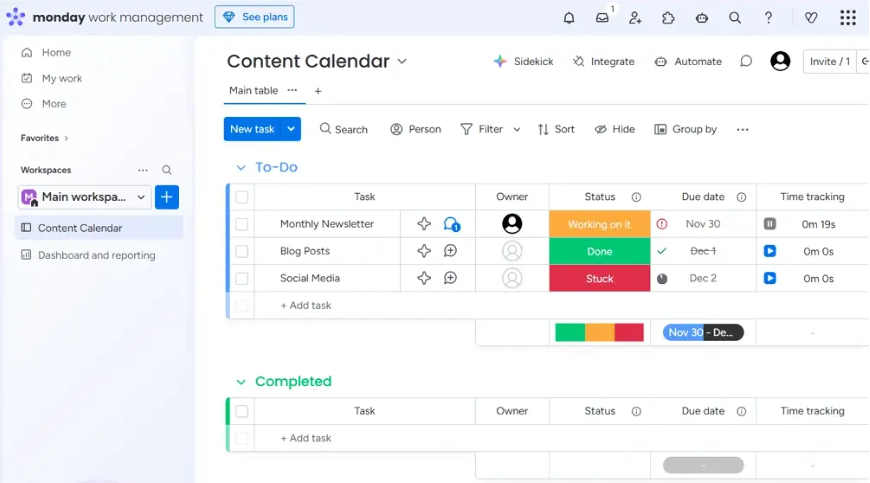
Best for visual, process-driven marketing and campaign teams
The monday.com platform has become a favorite amongst marketers since its board view allows them to easily understand what stage every campaign, asset, or deliverable is in, all in real time.
It is best for marketing campaigns across multiple channels. It enables you to create an effective launch strategy complete with dependent tasks, track creative development all the way from briefs to approval, and create automation rules that will alert the relevant person in the team when a task is completed.
There are more than 200 integrations available with the software that includes applications like HubSpot, Mailchimp, Google Analytics, and Salesforce. This feature saves marketers the hassle of creating complex connections for their marketing technology stack.
The Pro version costing $19 per user per month is ideal for marketers who need to manage client work or campaigns which involve confidentiality.
Pros
- Best-in-class visual dashboards for campaign tracking
- Powerful no-code automation builder
- Deep integrations with popular marketing tools
- Excellent for onboarding non-technical team members
Cons
- Pricing escalates quickly for larger teams
- Storage limits on lower-tier plans
- Gantt and timeline views locked behind paid plans
Wrike
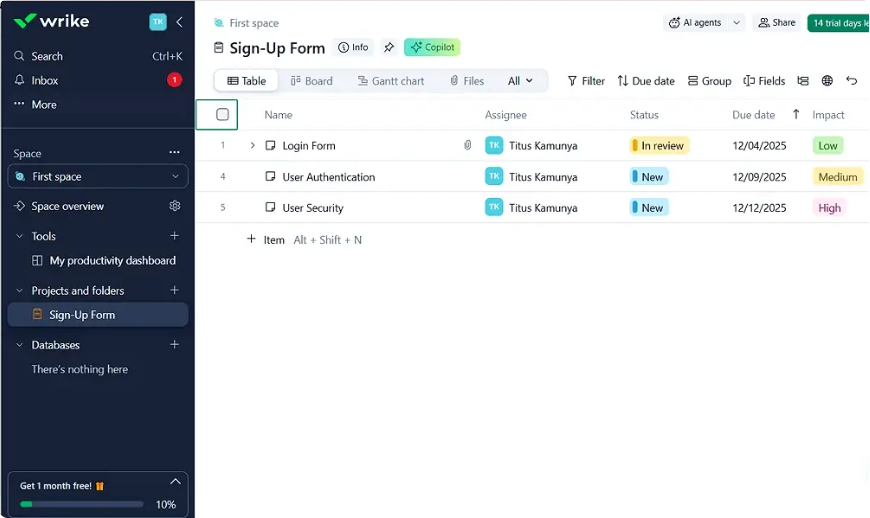
Best for enterprise marketing teams managing complex campaigns
It is the platform to choose for an enterprise marketing team that needs a complex project management solution. Unlike Trello and Basecamp, it allows to manage hierarchical task structures, departmental interdependencies, and multistep approval flows in a highly structured manner.
In particular, it offers proofing and markup tools that allow the reviewer to edit images, videos, and PDFs within the platform without downloading them. Its AI capabilities (Wrike Lightspeed) include the generation of project briefs, detecting potential issues with individual tasks, and predicting future bottlenecks.
Priced at $25/user/month for its Business package, Wrike is expensive. But its value proposition for a marketing enterprise team running more than 20 campaigns simultaneously is clear.
Pros
- Best-in-class for complex campaign management and dependencies
- Built-in proofing and creative review tools
- Advanced reporting and real-time resource management
- AI-powered risk detection and project summarization
Cons
- Expensive for small to mid-size teams
- Interface can feel dense for users coming from simpler tools
- Full feature set requires the higher-tier plans
Zoho Projects

Best for budget-conscious marketing teams already using Zoho’s ecosystem
If your marketing department is currently using Zoho CRM, Zoho Campaigns, or Zoho Analytics, then Zoho Projects is the hidden gem you need to consider. In terms of native integration capabilities, it ranks among the best in the pack; there’s zero middleware when it comes to moving campaign data from one tool to another.
Zoho Projects costs an extremely low $4 per user per month while offering Gantt charts, task dependencies, time tracking, and reporting capabilities. It doesn’t come loaded with advanced AI features, but if all you need is project management, then Zoho Projects offers great value at the very least.
Pros
- Extremely affordable starting price
- Deep native integration with the Zoho ecosystem
- Solid Gantt charts and task dependency management
Cons
- Best value only if you’re already using Zoho tools
- UI feels dated compared to modern alternatives
- Limited third-party app integrations outside Zoho
Asana
Best for Cross-functional marketing teams managing structured campaigns
It is the industry benchmark for cross-functional collaboration and project management, and any marketing team that can work cohesively within product, sales, and design departments will love it instantly. The project templates, which include content production, product launches, and events, are amongst the best ones that exist.
There is also the Timeline view where campaign managers can get an easy-to-follow Gantt style overview of everything that is happening, while the workload view helps with easy planning of capacity. The AI layer, called Asana Intelligence, automatically manages your tasks based on priority, and also balances workloads in a meaningful way.
The Starter plan costs $10.99/user/month, which isn’t too bad considering what you get out of it; although, you will need the Advanced version ($24.99/user/month) to access some advanced analytics features.
Pros
- Intuitive UI with minimal onboarding friction
- Strong template library built for marketing workflows
- Excellent cross-functional collaboration and task ownership clarity
- AI-powered workload balancing and smart prioritization
Cons
- No native time tracking on lower-tier plans
- Advanced features like portfolios require the most expensive plan
- Can feel rigid for teams with highly custom workflows
Basecamp
Best for small marketing teams prioritizing simple collaboration
There’s no need to have an all-inclusive software in order to find something that works well – Basecamp proves that perfectly. In one platform, there will be message boards, task management features, file hosting service, group messaging, and calendar all at once. It won’t take long to configure Basecamp.
The killer feature that makes Basecamp worth considering is its flat-rate pricing. It costs $299/month for unlimited users for the Pro Unlimited version. This makes Basecamp the cheapest solution for groups of 20+ people on this list.
Pros
- Dead simple to set up and use — zero learning curve
- Flat-rate pricing is excellent for growing teams (20+ users)
- All core collaboration features included at every tier
Cons
- No native Gantt charts or timeline views
- Limited reporting and analytics
- Not suited for complex, multi-dependency campaigns
Trello
Best for agile marketing teams managing lightweight task workflows
Trello’s kanban boards are among the most user-friendly in the project management space. For marketing departments managing social media calendars, blog post ideas, or other similar processes, Trello’s system of boards and cards can hardly be beat in terms of speed, visualization, and explanation to the team.
With Butler (Trello’s automation add-on), you can automate tasks such as moving cards, sending notifications, and assigning tasks based on trigger conditions – all without writing any script. Trello offers some useful capabilities at no cost, though more complex marketing departments may find their needs exceeded by its constraints.
Pros
- Easiest onboarding experience of any tool on this list
- Visual kanban boards perfect for content production pipelines
- Solid free plan for small teams
- Built-in automation via Butler
Cons
- No native Gantt or timeline view without Power-Ups
- Limited reporting for data-driven marketing teams
- Not ideal for complex, multi-phase campaigns
Notion
Best for content-focused marketing teams organizing ideas and knowledge
Notion belongs to its unique class. It is not just another project management software but a versatile work environment where content teams can write, plan, structure, and work together in one interface. Content briefs, brand guides, campaign playbooks, editorial calendars, and competitive analysis can be managed within one system that ties them together.
Views on databases (tables, boards, calendars, galleries) allow content teams to streamline the workflow of article creation from ideation to publishing. Notion AI (a $8/user/month add-on) is helpful when drafting texts, synthesizing research data, and creating outlines.
But there is a downside – the project management features of Notion are less robust than those of ClickUp and Asana. If you need to focus solely on tasks and deadlines, you should consider using separate PM software. But for content-oriented marketing organizations, Notion is a must-have platform.
Pros
- Best-in-class for documentation, wikis, and knowledge management
- Highly flexible — build your system exactly how your team works
- Excellent for content briefs, SOPs, and campaign playbooks
- Notion AI is genuinely useful for content creation workflows
Cons
- Weaker at traditional project management (Gantt, dependencies, resource planning)
- Notion AI is the most expensive AI add-on on this list
- Requires significant setup time to realize full value
Honorable Mentions
Motion
Best for AI-Powered Scheduling and Deadline Management
Motion uses AI to automatically schedule tasks around your team’s calendar, reprioritizing work in real time when new items are added or deadlines shift. For fast-paced marketing teams where priorities change daily, it’s a smart, low-maintenance way to keep everyone on track. Starting at $19/user/month.
ProofHub
Best for Centralized Creative Collaboration
ProofHub combines project management, proofing, and team chat in a flat-rate model ($45/month for unlimited users). The built-in proofing tool lets stakeholders annotate creative assets directly, cutting the review-and-approval cycle significantly. Ideal for in-house creative teams and design-heavy marketing departments.
Airtable
Best for Data-Driven Marketing Workflows
Airtable is the right tool when your marketing workflows look more like databases than task lists. Campaign performance tracking, content repositories, influencer databases, and UTM link management all work beautifully in Airtable’s relational database structure. Starts at $20/user/month for team features.
ProProfs Project
Best for simple project management
ProProfs Project combines Gantt charts, kanban boards, time tracking, and campaign reporting in a clean, beginner-friendly interface. It’s consistently rated as one of the easiest tools to get a team up and running on, with flat-rate pricing that suits lean marketing departments.
Smartsheet
Best for spreadsheet-style campaign planning with enterprise-grade automation
Smartsheet is the bridge between Excel and enterprise project management. Marketing teams that are deeply comfortable in spreadsheet logic — rows, columns, formulas — will adapt to Smartsheet almost immediately, but gain powerful automation, approval workflows, and real-time reporting on top. Starts at $9/user/month.
Wrapping Up: What’s the Best Project Management Tool for Your Marketing Team?
There’s no universal answer — the best tool depends on your team’s size, workflow complexity, and existing tech stack.
- Choose ClickUp if you want maximum features at the best price point.
- Choose monday.com if visual workflows and ease of use are your top priorities.
- Choose Wrike if you’re running enterprise-level campaigns with complex approvals.
- Choose Notion if your team is content-first and needs a knowledge base as much as a task tracker.
- Choose Basecamp if you’re a small team that values simplicity and wants flat-rate pricing.
Whatever you pick, the best project management tool is the one your team will actually use consistently. Start with a free trial, involve your team early, and prioritize adoption over features.
FAQ
What is the best free project management software for marketing teams?
ClickUp offers the strongest free plan — it includes unlimited tasks, multiple project views, and basic automation at no cost.
What features should marketing project management software have?
Look for content calendars, campaign timelines, creative approval workflows, integrations with marketing tools, and solid reporting dashboards.
Is ClickUp better than Asana for marketing?
ClickUp offers more features at a lower price; Asana wins on simplicity and onboarding speed. ClickUp is better for complex workflows; Asana is better for teams that want a clean, structured experience out of the box.
Can small marketing teams afford project management software?
Yes. Tools like Trello and ClickUp have solid free plans, while Basecamp and ProofHub offer flat-rate pricing that becomes very affordable for teams of 10 or more.
What’s the difference between marketing project management software and general PM tools?
Marketing-specific tools include features like content calendars, creative proofing, campaign tracking, and native integrations with tools like HubSpot and Mailchimp — features general PM tools often lack.
Does Notion work as a project management tool for marketing?
Notion works best as a knowledge workspace and content hub. It can handle basic task tracking but lacks advanced features like Gantt charts and resource planning. Pair it with a dedicated PM tool for complex campaign management.
What project management software integrates best with HubSpot?
monday.com, ClickUp, and Asana all offer native HubSpot integrations or robust API connections, making them the top choices for marketing teams using HubSpot as their CRM
Disclaimer: Content on Next Byte Blog is for informational purposes only. Pricing and features mentioned are based on data available at the time of writing and may have changed. We are not affiliated with any tools or platforms mentioned unless stated. Some links may be affiliate links. Always verify information directly with the official source before making decisions.

Muneeb Azhar is the founder, publisher, and lead author of Next Byte Blog. A full-time professional freelancer specializing in SaaS, developer tools, and software reviews, he brings hands-on product experience to every piece he writes. His work covers best-of tool roundups, in-depth comparisons, and honest reviews of both free and paid software — helping readers make smarter decisions without the guesswork.