Tired of working around Basecamp’s missing features? Discover Basecamp alternatives built for remote teams who need more than message boards and basic to-do lists.
Basecamp is intentionally simple — message boards, to-do lists, file storage, schedules, and automatic check-ins. For teams that value radical simplicity and async communication, that philosophy works. But that same intentional simplicity becomes a liability when your team needs kanban boards for visual workflow tracking, Gantt charts for deadline dependencies, time tracking for client billing, or automation to handle repetitive handoffs without a human in the loop.
Basecamp’s biggest flaw is that it even lacks a kanban board — something considered a staple for keeping track of projects. The calendar view works as a high-level overview but does not surface task duration, dependency chains, or workload data. And without native Gantt charts, teams managing multi-phase projects frequently resort to spreadsheets running alongside Basecamp rather than through it.
This guide covers the 7 best Basecamp alternatives in 2026 — tested against real remote team workflows, with verified pricing and honest breakdowns of where each tool outperforms Basecamp.
Key Takeaways: Best Basecamp Alternatives
| Tool | Best For | Free Plan | Starting Paid Price |
|---|---|---|---|
| ClickUp | All-in-one remote project management | ✅ Unlimited users | $7/user/month |
| Asana | Structured cross-functional projects | ✅ Up to 10 users | $10.99/user/month |
| monday.com | Visual, customizable workflow management | ✅ 2 users | $12/seat/month |
| Plaky | Budget-conscious remote teams | ✅ Unlimited users | $3.99/user/month |
| Wrike | Large multi-department projects | ✅ Unlimited users | $10/user/month |
| Jira | Software development agile workflows | ✅ Up to 10 users | $8.15/user/month |
| Trello | Small teams, simple visual boards | ✅ Unlimited cards | $5/user/month |
How I Picked the Best Basecamp Alternatives
Every tool in this list was evaluated against the specific gaps Basecamp leaves open for growing remote teams:
- Kanban board availability — Does the tool offer visual card-based project tracking natively?
- Gantt chart access — Is timeline view available without requiring an enterprise plan?
- Time tracking — Can teams log hours directly in the platform without a third-party integration?
- Workflow automation — Does the tool reduce manual task handoffs at an accessible price tier?
- Pricing vs. Basecamp — Does the tool offer better value than Basecamp Pro Unlimited ($299/month flat) for teams of different sizes?
Our Top 3 Basecamp Alternatives
Based on testing across all five criteria:
- ClickUp — Best overall: deepest feature set, strongest free plan, most customizable for evolving remote workflows
- Asana — Best for cross-functional teams: structured visibility, timeline, and portfolio tracking that Basecamp cannot match
- monday.com — Best for visual teams: database-style board management with the lowest training overhead of any tool tested
ClickUp

Best for: Remote Teams Needing Customizable, All-in-One Project Management
ClickUp is an all-in-one work platform with modular design. You can turn features on or off per workspace, making it adaptable for simple or highly structured teams. It’s strong in automation, hierarchical structures, goals, dependencies, and customization. ClickUp gives you more depth than Basecamp without necessarily losing simplicity. As your team grows or your work becomes more complex, you can layer in advanced features like goals, automations, or workload balancing.
Asana
Best for: Cross-Functional Teams Managing Structured Projects and Campaigns
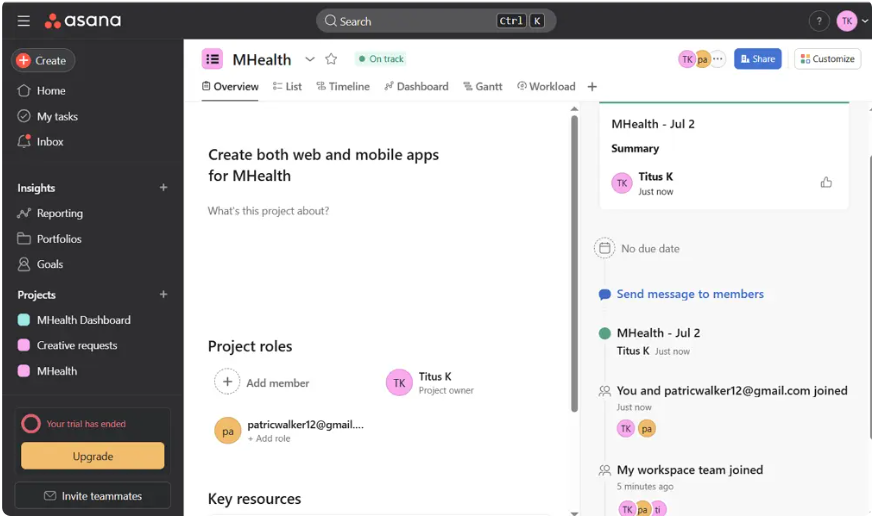
Choose Asana if your work needs structured visibility across teams and departments, with layered hierarchies and portfolio tracking for complex organizational setups. Where Basecamp organizes work around projects with message boards and to-do lists, Asana organizes work around tasks with dependencies, timelines, and goals that roll up to executive-level portfolios — the reporting visibility that Basecamp fundamentally cannot provide.
monday.com
Best for: Remote Teams That Want Visual, Customizable Workflow Management
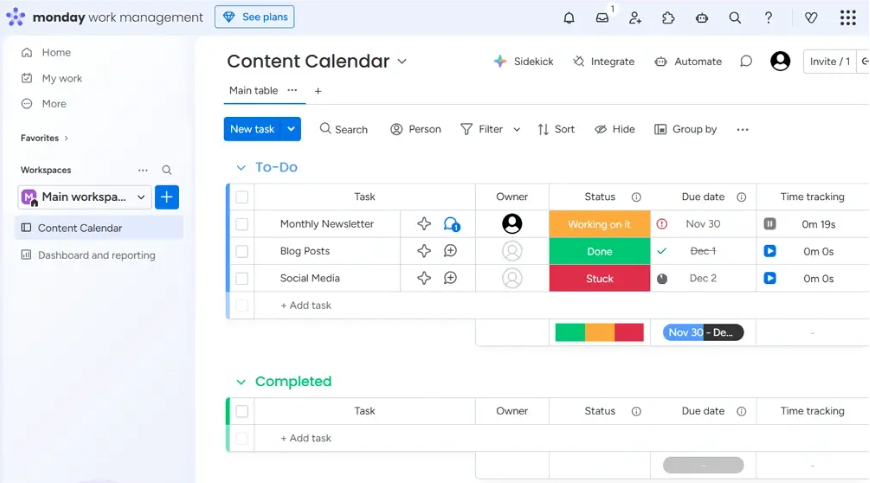
Choose monday.com if you prefer a database-style approach to managing projects, where filtering, grouping, and viewing data feels more natural and easier than working in a spreadsheet. For remote teams that live in visual dashboards and need instant status clarity across multiple active projects, monday.com’s color-coded board system communicates project health at a glance — without requiring anyone to open a message board to understand what is happening.
At a Glance: Top 7 Basecamp Alternatives
| Feature | ClickUp | Asana | monday.com | Plaky | Wrike | Jira | Trello |
|---|---|---|---|---|---|---|---|
| Free plan | ✅ Unlimited | ✅ 10 users | ✅ 2 users | ✅ Unlimited | ✅ Unlimited | ✅ 10 users | ✅ 10 boards |
| Kanban board | ✅ Free | ✅ Starter+ | ✅ All plans | ✅ All plans | ✅ Free | ✅ All plans | ✅ All plans |
| Gantt chart | ✅ Free | ✅ Starter+ | ✅ Standard+ | ✅ Pro+ | ✅ Team+ | ✅ Premium+ | ⚠️ Power-Up |
| Time tracking | ✅ Unlimited+ | ✅ Advanced | ✅ Pro+ | ✅ Pro+ | ✅ Business+ | ✅ All plans | ❌ |
| Workflow automation | ✅ Business+ | ✅ Starter+ | ✅ Standard+ | ⚠️ Limited | ✅ Team+ | ✅ Premium+ | ✅ Butler |
| AI features | ✅ Brain add-on | ✅ AI Studio | ✅ Sidekick | ❌ | ✅ Wrike Wit | ✅ Atlassian AI | ❌ |
| Best free plan | ✅ Yes | ⚠️ Good | ⚠️ Limited | ✅ Yes | ✅ Yes | ✅ Yes | ✅ Yes |
Top 7 Basecamp Alternatives
ClickUp
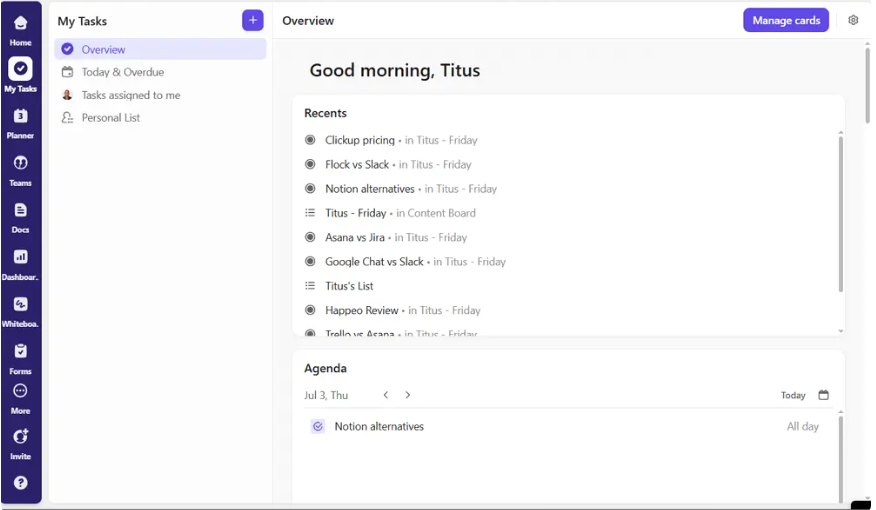
Best for: Remote Teams Needing Customizable, All-in-One Project Management
Why Choose ClickUp Over Basecamp
Basecamp is a communication tool with some task management abilities attached. ClickUp is a project management platform with communication built in. That distinction matters when your remote team’s primary bottleneck is workflow visibility — not message organization.
Choose ClickUp if your workflows evolve frequently, and deep customization with custom fields, statuses, and automations that let you tailor every process is your priority.
The most direct comparison point: Basecamp Pro Unlimited costs $299/month flat and gives you message boards, to-do lists, and basic file storage. ClickUp Business at $12/user/month for a 10-person team costs $120/month — 60% less — while adding 15+ project views, built-in Docs and Whiteboards, native time tracking, unlimited automations, and ClickUp Brain AI. For growing remote teams, that is not a marginal advantage. It is the entire value proposition.
Other Features I Liked About ClickUp
- Modular feature toggling: Turn specific features on or off per Space — keep it simple for junior team members, enable advanced views for project leads
- ClickUp Docs: Built-in document creation linked directly to tasks and projects — replaces the need for Basecamp’s message boards and an external wiki simultaneously
- Offline mode: Tasks and Docs remain fully accessible and editable without internet connectivity — a genuine differentiator for field teams and frequent travelers
- Goal tracking: Set team and company objectives with measurable targets, and track progress automatically as linked tasks complete
- 1,000+ integrations: Slack, GitHub, Zoom, Google Drive, HubSpot, Salesforce, Zapier, and hundreds more — broader than Basecamp’s integration ecosystem
ClickUp Pricing
| Plan | Price | Key Addition |
|---|---|---|
| Free Forever | $0 | Unlimited users, unlimited tasks, 15+ views |
| Unlimited | $7/user/month | Unlimited storage, integrations, Gantt |
| Business | $12/user/month | Advanced automations, time tracking, goals |
| Enterprise | Custom | White labeling, SSO, dedicated support |
Asana
Best for: Cross-Functional Teams Managing Structured Projects and Campaigns
Why Choose Asana Over Basecamp
Asana lets you add a timeline view, which gives you information on not just when tasks are due, but also how long tasks are expected to take. That duration-aware timeline is the most concrete feature gap between Asana and Basecamp — and it directly affects whether leadership can forecast delivery dates and resource needs with any accuracy.
Asana’s rules-based automation handles the workflow handoffs that Basecamp requires manual follow-through on: when a task moves to “Review,” automatically assign it to the designated reviewer, set a two-day due date, and send a Slack notification — all without human intervention. For cross-functional teams managing campaigns, product launches, and hiring pipelines simultaneously, this automation layer is where Asana earns its premium over Basecamp.
Other Features I Liked About Asana
- Task dependencies: Mark tasks as blockers for subsequent work — Asana surfaces at-risk dates automatically when a dependency slips
- Portfolios: Track the status of multiple active projects from a single executive-level dashboard — unavailable in Basecamp at any price
- Rules Builder: Configure trigger-action automations with unlimited monthly runs on the Starter plan — no artificial action cap
- Asana AI Studio: AI-powered workflow suggestions, status summary generation, and risk flagging for active projects
- Forms and intake flows: Structured request intake converts inbound work into tracked tasks automatically — Basecamp has no equivalent
Asana Pricing
| Plan | Price | Key Addition |
|---|---|---|
| Personal | $0 (up to 10 users) | Unlimited tasks, basic views |
| Starter | $10.99/user/month | Timeline, workflow automations, AI Studio |
| Advanced | $24.99/user/month | Goals, portfolios, time tracking, proofing |
| Enterprise | Custom | HIPAA, SAML SSO, advanced data controls |
monday.com
Best for: Remote Teams That Want a Visual, Customizable Workflow Management
Why Choose monday.com Over Basecamp
monday.com’s AI Work Platform is a strong option for teams that want AI-powered capabilities connected directly to project and workflow execution. It includes AI Blocks, AI Automations, monday agents, monday sidekick, and monday vibe, helping teams summarize updates, categorize information, surface risks, build workflows, and reduce repetitive coordination.
Where Basecamp communicates project status through message boards that require reading to understand, monday.com’s color-coded status columns communicate project health at a glance. A column of green means things are on track. A column of red means they are not. No message thread required.
For remote teams managing marketing campaigns, client onboarding pipelines, and operational workflows — where the work shape changes frequently — monday.com’s flexible board architecture adapts without requiring a system rebuild. Basecamp’s project structure does not flex this way.
Other Features I Like About monday.com
- AI Work Platform: monday Sidekick drafts updates, suggests automations, and summarizes board status — the most accessible AI layer of any tool tested for non-technical operators
- Workdocs: Native document creation with live board data embedded — build project specs that automatically reflect current task status
- Client portals: Share filtered board views with external clients without exposing your full workspace
- 25,000 automation actions/month on Pro: The most generous automation allowance at mid-tier pricing in this category
- Dashboard widgets: Build executive status views combining data from multiple boards — data Basecamp simply cannot surface
monday.com Pricing
| Plan | Price | Key Addition |
|---|---|---|
| Free | $0 (2 users max) | 3 boards, basic views |
| Basic | $12/seat/month | Unlimited boards, 5GB storage |
| Standard | $14/seat/month | Timeline, calendar, 250 automations/month |
| Pro | $19/seat/month | Time tracking, 25,000 automations/month |
| Enterprise | Custom | HIPAA, advanced permissions, SSO |
Plaky
Best for: Budget-Conscious Remote Teams Needing Simple Project Tracking
Why Choose Plaky Over Basecamp
Plaky is a kanban-first project management tool with one of the most generous free plans in the category — unlimited users, unlimited projects, and unlimited tasks at zero cost. For early-stage remote teams whose primary objection to Basecamp is not feature depth but cost at scale, Plaky is the most financially accessible alternative.
The core feature set covers the basics Basecamp lacks: visual kanban boards, table view, calendar, and basic task tracking — all available on the free plan without a user cap.
Other Features I Liked About Plaky
- Unlimited users on free plan — the most accessible free tier for growing distributed teams
- Time tracking on Pro plan — a feature Basecamp does not offer natively at any price
- Multiple project views — Board, Table, and Calendar available without an upgrade
- Guest access — invite external stakeholders without requiring full Plaky accounts
- Simple, clean interface — lower setup and onboarding time than ClickUp or monday.com for non-technical teams
Plaky Pricing
| Plan | Price | Key Addition |
|---|---|---|
| Free | $0 | Unlimited users, unlimited projects, kanban |
| Pro | $3.99/user/month | Time tracking, automations, custom fields |
| Business | $6.99/user/month | Advanced permissions, priority support |
Wrike
Best for: Large Teams Managing Complex, Multi-Department Projects
Why Choose Wrike Over Basecamp
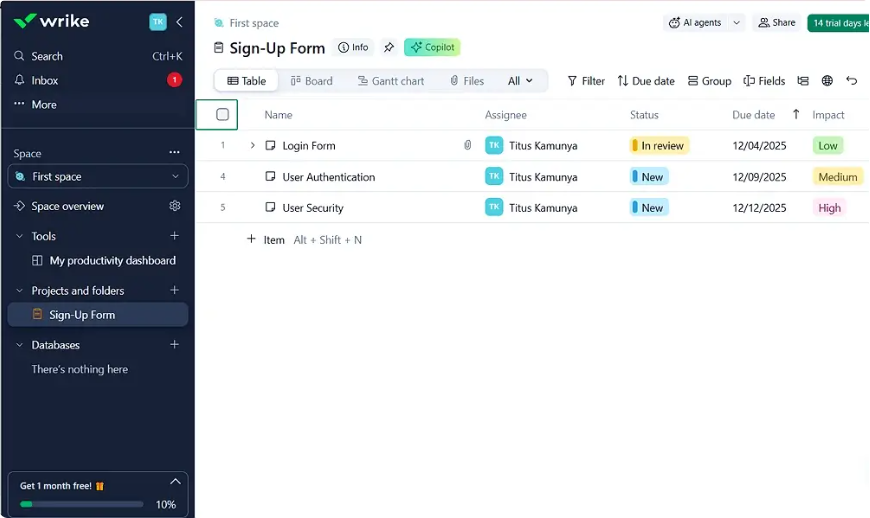
Wrike is a project management tool that will help you keep track of projects and tasks, while Basecamp is a communication tool with some task management abilities attached. For organizations where projects span multiple departments, involve dozens of stakeholders, and require granular resource planning, Wrike provides structural depth that Basecamp was never designed to deliver.
Wrike’s cross-tagging allows a single task to appear in multiple project views simultaneously — enabling the kind of cross-departmental visibility where a design task can live in both the design team’s space and the product launch project without duplication. Basecamp’s project structure does not support this pattern.
Other Features I Liked About Wrike
- Visual proofing: Annotate images, videos, and documents directly in Wrike for approval cycles — critical for marketing and creative agencies
- Custom workflows with status transitions: Define specific rules for how tasks progress through stages — not just “To Do / In Progress / Done”
- Resource management on Business tier: Workload charts and capacity planning for managing team availability across multiple active projects
- Wrike Wit AI: Risk prediction, task generation from meeting notes, and project summary features
- Advanced permissions: Client portal access, external collaborator controls, and department-level data isolation
Wrike Pricing
| Plan | Price | Key Addition |
|---|---|---|
| Free | $0 (unlimited users) | Basic task management, board view |
| Team | $10/user/month | Gantt, subtasks, automations, dashboards |
| Business | $24.99/user/month | Custom workflows, time tracking, approvals |
| Enterprise | Custom | HIPAA, SAML SSO, advanced security |
Jira
Best for: Software Development Teams Using Developer-Focused Workflows
Why Choose Jira Over Basecamp
Choose Jira if you manage technical or software projects with complex dependencies and agile workflows that demand detailed issue tracking and sprint planning. Basecamp has no sprint planning, no backlog management, and no native integration with GitHub or GitLab for pull request tracking. For any engineering team running agile ceremonies, Basecamp is the wrong tool from the starting assumption.
Jira’s sprint boards, velocity charts, epic tracking, and story point estimation are features Basecamp users in software roles actively work around — typically building parallel Jira instances while trying to keep Basecamp for client communication. Consolidating into Jira eliminates that overhead entirely.
Other Features I Liked About Jira
- 3,000+ Marketplace apps: The largest integration ecosystem of any tool in this list — including native Confluence (docs), Jira Service Management (IT ticketing), and Bitbucket (code repository)
- Advanced sprint reporting: Velocity charts, burndown charts, and sprint retrospective metrics built into the platform
- Custom issue types: Bugs, stories, epics, tasks, and custom types all tracked in a unified backlog
- Atlassian Intelligence: AI for work summaries, task breakdown suggestions, and sprint risk identification
- Native GitHub and GitLab integration: Pull requests, commits, and branch activity linked directly to Jira issues without configuration
Jira Pricing
| Plan | Price | Key Addition |
|---|---|---|
| Free | $0 (up to 10 users) | Unlimited projects, basic boards |
| Standard | $8.15/user/month | Audit logs, role management, 250GB storage |
| Premium | $16/user/month | Advanced roadmaps, AI, multi-project automation |
| Enterprise | Custom | Unlimited sites, HIPAA, FedRAMP |
Trello
Best for: Small Teams Managing Simple Projects Visually
Why Choose Trello Over Basecamp
Choose Trello if your work follows clear, visual stages, and you want an intuitive Kanban-style view of progress without unnecessary layers. Trello adds the single feature Basecamp most conspicuously lacks — a kanban board — without adding any complexity. For small teams and freelancers who find both Basecamp and ClickUp overkill, Trello’s card-and-list architecture is the fastest path from account creation to working project tracker.
Trello supports integrations with Slack, Google Drive, Jira, Dropbox, and many more via power-ups or Zapier. Those Power-Ups add calendar views, timeline planning, and advanced automation capabilities without requiring a full platform migration.
Other Features I Liked About Trello
- Butler automation: Rule-based workflow automation in plain English — trigger actions when cards move, due dates approach, or labels change
- Timeline Power-Up: Gantt-style timeline view added to any board on Standard plan and above
- Templates gallery: Pre-built boards for marketing campaigns, product roadmaps, hiring pipelines, and team wikis
- Mirror cards: Single card visible in multiple boards simultaneously — helpful for cross-team dependencies
- Guest access: External collaborators join specific boards without full workspace credentials
Trello Pricing
| Plan | Price | Key Addition |
|---|---|---|
| Free | $0 | Unlimited cards, 10 boards, Butler automation |
| Standard | $5/user/month | Unlimited boards, custom fields, timeline |
| Premium | $10/user/month | Dashboard, calendar, workspace views |
| Enterprise | $17.50/user/month | Org-wide permissions, SSO, audit logs |
Wrapping Up: Finding the Right Project Management Software for Your Team
Basecamp deserves credit for proving that radical simplicity is a legitimate product philosophy. For teams where async communication is the primary bottleneck, Basecamp still works. But the tools in this guide handle what Basecamp cannot — and most do it for less money at comparable team sizes.
The right Basecamp alternative depends on your team’s specific missing piece:
- Need all-in-one remote workflow management → ClickUp
- Need structured task dependencies and portfolio visibility → Asana
- Need visual, database-style boards with fast adoption → monday.com
- Need free unlimited users on a tight budget → Plaky
- Managing complex multi-department enterprise projects → Wrike
- Running agile software development workflows → Jira
- Need simple kanban boards with minimal setup → Trello
Start with a free trial of your top choice, import one active project, and run your real workflow through it for one week. The tool that stops feeling like a platform and starts feeling like a workflow is the right one for your team.
FAQs: Best Basecamp Alternatives
What Is the Best Free Alternative to Basecamp?
ClickUp and Plaky offer the most generous free plans — both support unlimited users at zero cost. ClickUp adds 15+ project views, built-in Docs, and unlimited tasks. Plaky adds kanban, calendar, and table views with no user cap.
Why Do Teams Look for Basecamp Alternatives?
Most teams leave Basecamp because it lacks native kanban boards, Gantt charts, time tracking, and workflow automation — features that become necessary as teams scale beyond simple task lists and message boards.
Which Basecamp Alternative Is Best for Small Teams?
Trello is the best Basecamp alternative for small teams — its free plan covers unlimited cards and 10 boards, the kanban interface requires no training, and setup takes under 60 minutes for most simple workflows.
Are There Cheaper Alternatives to Basecamp with More Features?
Yes. ClickUp Unlimited at $7/user/month and Trello Standard at $5/user/month both cost significantly less than Basecamp Pro Unlimited ($299/month flat) for teams under 40 people, while adding features Basecamp does not offer at any price tier.
Disclaimer: Content on Next Byte Blog is for informational purposes only. Pricing and features mentioned are based on data available at the time of writing and may have changed. We are not affiliated with any tools or platforms mentioned unless stated. Some links may be affiliate links. Always verify information directly with the official source before making decisions.

Muneeb Azhar is the founder, publisher, and lead author of Next Byte Blog. A full-time professional freelancer specializing in SaaS, developer tools, and software reviews, he brings hands-on product experience to every piece he writes. His work covers best-of tool roundups, in-depth comparisons, and honest reviews of both free and paid software — helping readers make smarter decisions without the guesswork.


One thought on “Basecamp Alternatives: 7 Tools That Handle What Basecamp Can’t”