Trello may be one of the most recognizable project management tools available in the market – and there is a reason for it. Visual kanban boards provided by Trello are easy enough to use even for novices who will learn how to use them within several minutes. However, Trello boards can handle more complex processes than those that are performed for fun and education. Before choosing a particular plan, you should make sure you fully understand what you will be getting, what are the limitations you will have to deal with, and whether paying extra really makes sense for your team.
This guide breaks down every Trello plan available in 2026, with verified pricing, exact feature inclusions, honest limitations, and the real cost calculations for teams of different sizes.
Key Takeaways: Trello Pricing Overview
| Plan | Price (Annual) | Price (Monthly) | Best For |
|---|---|---|---|
| Free | $0 | $0 | Individuals and small teams |
| Standard | $5/user/month | $6/user/month | Small to medium teams needing unlimited boards |
| Premium | $10/user/month | $12.50/user/month | Teams needing advanced views and unlimited automation |
| Enterprise | From $17.50/user/month | Annual only | Large organizations with security and governance needs |
Important billing note: Annual billing saves approximately 17–20% across Standard and Premium. Enterprise is available on annual billing only — no monthly option exists at this tier. The median Trello customer pays approximately $500/year based on verified purchase data.
What Is Trello Mainly Used For?
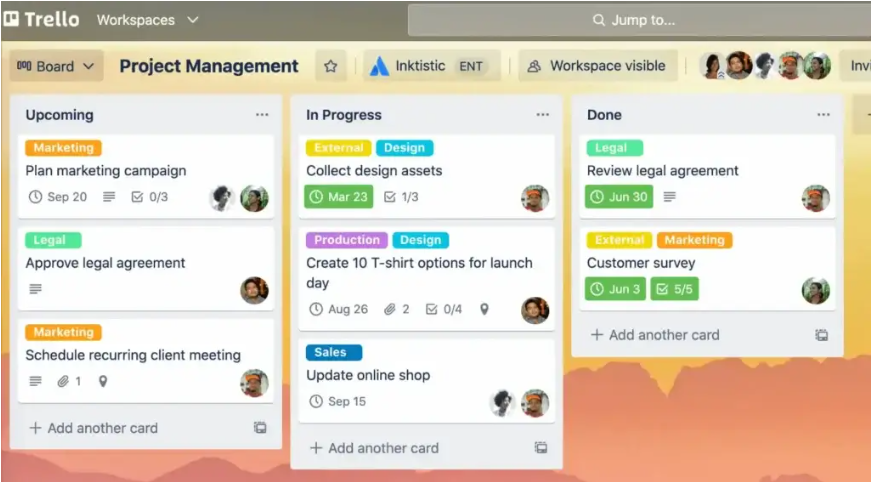
Trello is a visual project management platform built on the kanban methodology. Work is organized into boards (projects), lists (stages like “To Do,” “In Progress,” and “Done”), and cards (individual tasks that move through those stages).
Its primary use cases across US teams in 2026:
- Marketing teams: Campaign tracking, editorial calendars, content approval workflows
- Product teams: Feature backlogs, sprint boards, roadmap planning
- Operations teams: Onboarding checklists, process documentation, vendor tracking
- Freelancers and solopreneurs: Client project management, personal task management
- Remote teams: Async workflow visibility across time zones
Benefits of Using Trello
- Low learning curve: Most users are productive within 30–60 minutes of account creation — no training program required
- Visual clarity: Card-based boards communicate project status at a glance without requiring status meetings
- Free plan generosity: Unlimited cards, unlimited users, and 10 boards at zero cost — one of the most capable free tiers in the PM category
- Butler automation: Built-in rule-based automation without requiring a separate automation tool
- Power-Ups ecosystem: Hundreds of third-party integrations (Slack, Google Drive, Jira, Salesforce) extend Trello’s capabilities within the existing interface
- Atlassian ecosystem fit: Native integration with Jira, Confluence, and Bitbucket for organizations already in the Atlassian stack
Trello Pricing Structure Explained
The hierarchical organization of Trello has a simple setup compared to other project management software, but there are crucial limitations hidden in the space between Free and Enterprise plans. Butler limit restrictions, attachment size constraints, and the inability to use views below the Enterprise level all point to upgrade opportunities.
Real team cost examples (Standard plan, annual billing):
| Team Size | Annual Cost (Standard) | Annual Cost (Premium) |
|---|---|---|
| 3 users | $180/year | $360/year |
| 5 users | $300/year | $600/year |
| 10 users | $600/year | $1,200/year |
| 25 users | $1,500/year | $3,000/year |
| 50 users | $3,000/year | $6,000/year |
Can I Use Trello for Free Forever?
Yes. Trello’s free plan is permanent — no trial period, no credit card, no time limit. The free plan is designed for individuals and small teams who need straightforward kanban project tracking without complex features.
What’s Included in Trello’s Free Plan?
- Unlimited cards on every board
- Unlimited members — no user cap
- 10 boards per workspace (hard limit — the primary free plan restriction)
- Unlimited Power-Ups (one Power-Up per board — changed from the old 1-per-board model)
- 250 Butler automation command runs per month
- 10MB file attachment limit per card
- Basic security: two-factor authentication and unlimited activity logs
- Mobile apps for iOS and Android
Who Gets Value from the Trello Free Plan?
- Solo founders and freelancers managing fewer than 10 active projects
- Small teams (2–5 people) with simple, linear workflows
- Personal productivity users tracking tasks, goals, or reading lists
- Teams evaluating Trello before committing to a paid plan
- Side projects and hobby workflows that do not require reporting or timeline views
The 10-board cap is the most commonly cited free plan limitation. A team running 10 separate client accounts or project streams will hit this ceiling and need either the Standard plan or an alternative tool.
Trello Standard Plan: Features, Limitations, and Use Cases
The Standard plan costs $5/user/month billed annually or $6/user/month on monthly billing. It is the most popular paid tier and the sweet spot for small to medium teams that have outgrown the free plan’s board limit.
What’s Included in the Trello Standard Plan?
- Unlimited boards — removes the 10-board hard cap completely
- Unlimited Power-Ups — all available integrations active per board
- Custom fields — add text, number, date, dropdown, and checkbox fields to cards
- Advanced checklists — assign due dates and members to individual checklist items
- 1,000 Butler automation command runs per month (4x the free plan limit)
- 250MB file attachment limit (vs. 10MB on free)
- Guest access controls — restrict guest permissions by board
- Saved searches and board templates
Who Gets Value from the Trello Standard Plan?
- Small to medium teams actively managing more than 10 projects simultaneously
- Agencies running multiple client boards that need custom fields for status tracking
- Teams using Power-Ups for third-party integrations with tools like Slack, Google Drive, or GitHub
- Operations teams that need advanced checklists with individual assignees and due dates
Standard is not the right upgrade if your primary need is timeline views, Gantt charts, or dashboard reporting — those features are locked behind Premium.
Trello Premium Plan: Features, Limitations, and Use Cases
The Premium plan costs $10/user/month billed annually or $12.50/user/month on monthly billing. It doubles the per-seat cost of Standard but unlocks the workspace-level views that transform Trello from a task board into a project planning tool.
What’s Included in the Trello Premium Plan?
Everything in Standard, plus:
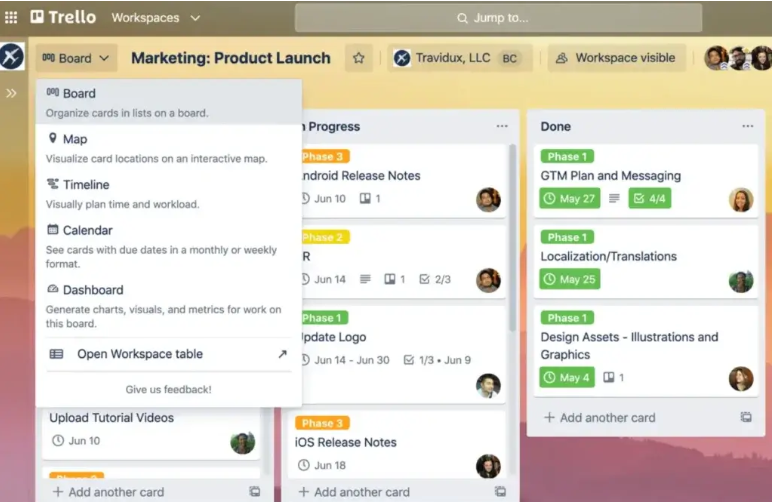
- Timeline view — Gantt-style visualization of card dates and durations
- Calendar view — cards displayed on a monthly/weekly calendar
- Table view — spreadsheet-style view of all cards across multiple boards
- Dashboard view — charts and metrics tracking card counts, due dates, and activity
- Map view — geographic plotting for location-based workflows
- Workspace-level views — see Timeline, Table, Calendar, and Dashboard across all boards simultaneously (the key Premium differentiator)
- Unlimited Butler automation — no monthly command run cap
- Observer mode — read-only workspace access for stakeholders without seats
- Advanced admin controls — workspace-level permissions, attachment restrictions, and content export
- Atlassian Intelligence — AI features for card summaries, action items, and content drafting
- Priority support
Who Gets Value from the Trello Premium Plan?
- Cross-functional teams that need timeline planning for multi-phase projects
- Marketing and creative teams running campaigns that require calendar coordination
- Team leads and managers who need dashboard metrics without manual reporting
- Organizations with compliance or governance requirements that need attachment controls
- Automation-heavy teams that will exceed the 1,000/month Standard command limit
The workspace views are the single most important Premium feature. Being able to see your entire organization’s workload in a Timeline or Table view — across all boards simultaneously — is what justifies the 2x price step from Standard.
Trello Enterprise Plan: Features, Limitations, and Use Cases
Enterprise pricing starts at $17.50/user/month for 50+ users, billed annually only. The per-user rate decreases as team size increases (volume discounts available). There is no monthly billing option at Enterprise tier.
What’s Included in the Trello Enterprise Plan?
Everything in Premium, plus:
- Organization-wide permissions — standardize board creation, Power-Up usage, and workspace settings across the entire organization
- Attachment permissions — control which file sources (Google Drive, Dropbox, Box) members can attach
- Power-Up administration — approve and restrict which Power-Ups can be enabled across the organization
- Free SSO and user provisioning via Atlassian Access (a $4/user/month add-on for lower tiers)
- Organization-visible boards — make boards discoverable without sharing direct links
- Multi-board guests — external collaborators can access multiple boards without triggering billable seat conversion
- Enterprise support — dedicated customer success, 24/7 priority support, and onboarding assistance
- Unlimited workspaces — remove the single-workspace limitation
Who Gets Value from the Trello Enterprise Plan?
- Large organizations (50+ users) that need centralized administration of Trello across multiple departments
- Companies with compliance requirements where SSO and user provisioning are non-negotiable
- IT administrators managing Trello adoption at scale who need Power-Up control and content governance
- Organizations where the $4/user/month Atlassian Access SSO add-on cost on Premium would exceed the Enterprise per-seat difference
Hidden cost alert: On Standard and Premium plans, SSO requires the separate Atlassian Access add-on at $4/user/month. For organizations with security requirements, Enterprise quickly becomes cost-competitive once you factor in that add-on fee.
What Is the Best Trello Alternative?
Trello is very good at visual kanban project management. However, it does have its weaknesses – no built-in time tracking on any plans, no advanced reporting on the Standard plan, no Gantt chart except the Premium plan, and only one workspace available, which causes governance challenges. If there’s a need for more features without Trello’s expensive costs, three other tools surpass it.
ClickUp

Combines Task Management with Built-in Docs, Goals, Time Tracking, Automation, and Multiple Views in One Platform.
ClickUp’s free plan directly outperforms Trello’s free plan: unlimited users, 15+ project views (including Gantt, Calendar, and Timeline), built-in Docs, native time tracking, and ClickUp Brain AI — none of which appear in Trello’s free tier.
For small teams who find Trello’s free 10-board cap limiting and do not want to pay for kanban’s missing features, ClickUp at $7/user/month (Unlimited plan) provides more capability at a lower starting price than Trello Premium.
Best for: Teams that need all-in-one workflow management — docs, tasks, goals, and automations — without tool sprawl.
monday.com
Spreadsheet-Style Boards with Customizable Columns to Track Statuses, Owners, Timelines, Numbers, Dependencies, and Progress in One Place.
monday.com’s column-based data model gives teams a database-style view of project work that Trello’s card system cannot replicate. Status columns, formula columns, dependency tracking, and visual dashboards are all native features — not Power-Up additions.
For operations teams, marketing agencies, and any team where structured data matters as much as visual workflow, monday.com’s flexibility outperforms Trello across most use cases. Its Standard plan at $14/seat/month includes timeline, calendar, and 250 automations/month.
Best for: Data-driven teams that want customizable column structures for tracking complex project attributes beyond basic task status.
Asana
Advanced Project Planning Features Like Dependencies, Milestones, and Workload Visibility to Keep Teams Aligned on Deadlines.
Asana’s task dependencies, timeline view, and portfolio tracking address the three most significant gaps in Trello: dependency management (tasks that cannot start until others complete), milestone tracking, and executive-level portfolio visibility. All three are available on Asana’s Starter plan at $10.99/user/month.
For cross-functional teams managing campaigns, product launches, and hiring pipelines — where dependencies and deadline visibility matter — Asana’s structured approach consistently outperforms Trello’s flexible-but-flat kanban model.
Best for: Cross-functional teams that need task dependencies, deadline tracking, and portfolio visibility across multiple active projects simultaneously.
Conclusion: Is Trello Worth Paying For?
Trello is worth paying for — within its category. For teams whose primary need is visual kanban project management with simple task tracking, Trello Standard at $5/user/month is one of the best value paid plans in the project management space in 2026.
Here is the honest breakdown by tier:
- Free plan: Yes — one of the best free PM tools available. Start here and upgrade only when the 10-board cap becomes a real limitation.
- Standard plan ($5/user/month): Yes — removes the board cap, adds custom fields, and enables full Power-Ups. Worth it for any team actively running more than 10 projects.
- Premium plan ($10/user/month): Yes — if and only if your team needs Timeline, Calendar, or Dashboard views, or will exceed the 1,000 automation cap. Not worth it for Kanban-only workflows.
- Enterprise plan ($17.50+/user/month): Worth evaluating for 50+ user organizations where SSO, Power-Up governance, and multi-board guest access justify the step up from Premium.
If Trello’s missing features — time tracking, advanced reporting, task dependencies — are blockers for your team’s workflow, evaluate ClickUp or Asana before upgrading to Trello Premium.
Trello Pricing: FAQs
How Much Does Trello Cost?
Trello’s paid plans range from $5/user/month (Standard, annual) to $17.50+/user/month (Enterprise). The free plan is permanently free with no credit card required.
What Are the Limitations of the Trello Free Version?
The free plan limits workspaces to 10 boards, caps file attachments at 10MB per card, restricts Butler automation to 250 command runs per month, and excludes Timeline, Calendar, Dashboard, and Table views.
Is There a Free Trello Alternative?
Yes. ClickUp offers a free plan with unlimited users, 15+ views, and built-in Docs — surpassing Trello’s free tier on most feature dimensions. Asana’s free plan supports up to 10 users with unlimited tasks and basic project views.
How Many People Can Be on a Free Trello Board?
Trello’s free plan supports unlimited members per board — there is no user cap. The restriction on the free plan is the number of boards (10 per workspace), not the number of people using them.
Can I Use Trello for Personal Use?
Yes. Trello is widely used for personal productivity — habit tracking, reading lists, travel planning, personal goal setting, and solo project management. The free plan is fully sufficient for personal use with no feature restrictions that affect individual workflows.
Disclaimer: Content on Next Byte Blog is for informational purposes only. Pricing and features mentioned are based on data available at the time of writing and may have changed. We are not affiliated with any tools or platforms mentioned unless stated. Some links may be affiliate links. Always verify information directly with the official source before making decisions.

Muneeb Azhar is the founder, publisher, and lead author of Next Byte Blog. A full-time professional freelancer specializing in SaaS, developer tools, and software reviews, he brings hands-on product experience to every piece he writes. His work covers best-of tool roundups, in-depth comparisons, and honest reviews of both free and paid software — helping readers make smarter decisions without the guesswork.
3 thoughts on “Trello Pricing Explained in 2026: Free Plan, Paid Plans, and Add-ons”