Canva is the go-to design tool for millions of American creators, marketers, and small business owners — and for good reason. But “popular” doesn’t always mean “perfect for you.” Maybe you’ve hit its limits with brand consistency. Maybe your social posts look like everyone else’s because you’re all pulling from the same template library. Or maybe you simply want stronger AI features that Canva’s Magic Design can’t match.
Whatever the reason, there are excellent Canva alternatives in 2026 that do specific things better — sometimes much better. Some are completely free. Some are AI-native. Some are laser-focused on use cases Canva treats as an afterthought.
We tested 15 of them and compared what actually matters: features, ease of use, AI capabilities, pricing, and who each tool is genuinely best for.
What to Look for in a Canva Alternative
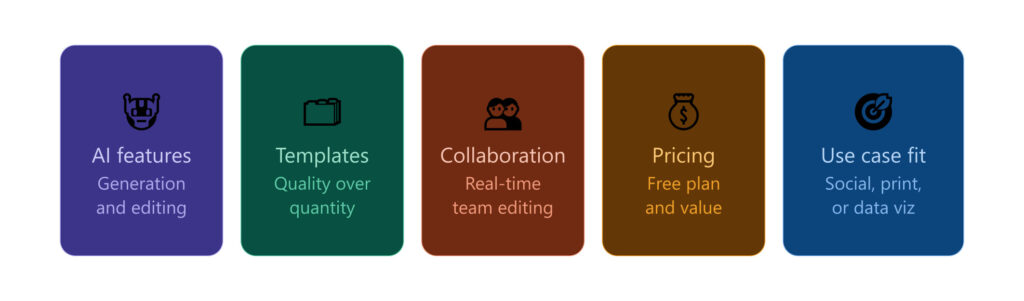
Before diving into the list, here’s what separates a real Canva alternative from a watered-down imitation:
- AI capabilities — Some tools bolt on basic AI as an afterthought. Others are built from the ground up around AI that generates original designs from text descriptions.
- Template quality vs. original generation — Do you want thousands of pre-made templates to customize, or AI that creates truly unique designs from scratch? These are fundamentally different approaches.
- Specific strengths — The best alternative depends on what you actually create: social posts, data reports, print materials, or UI mockups.
- Collaboration features — For teams, real-time editing, approval workflows, and brand management tools matter enormously.
- Pricing and value — Free plans vary wildly. Paid plans range from $7/month to $60+/month, so matching cost to use case is critical.
The 15 Best Canva Alternatives in 2026
1. Krumzi — Best for AI-Powered Social Media Design
Best for: Content creators and marketers who want unique designs generated by AI, not tweaked from templates.
Krumzi takes a fundamentally different approach from Canva. Instead of offering a library of templates to modify, it uses AI to generate complete, original social media posts from a text description. If you’re tired of your Instagram graphics looking identical to everyone else’s — because you’re all pulling from the same Canva template pool — Krumzi is worth a serious look.
Key features:
- AI-generated designs from text prompts
- Social media format optimization
- Brand consistency tools
- Original outputs, not recycled templates
Pricing: Free plan available. Paid plans vary — check their website for current US pricing.
2. Adobe Express — Best for Adobe Ecosystem Users
Best for: Creators already using Adobe products who want seamless Creative Cloud integration.
Adobe Express is arguably the strongest all-around Canva alternative for US users in 2026. It’s backed by Adobe’s Firefly AI engine, which generates commercially safe AI images — something that matters for businesses worried about copyright. The free plan includes over 100,000 templates, 10 Firefly AI credits per month, and 5GB of cloud storage.
What sets Express apart is its deep integration with Photoshop, Illustrator, and Adobe Fonts. Make edits in Photoshop and they sync automatically. Access thousands of professional Adobe Fonts directly in the editor. For anyone already in the Adobe ecosystem, this alone justifies the switch.
Key features:
- Adobe Firefly AI (commercially safe image generation)
- Premiere Rush video editor (paid plans)
- Adobe Fonts and Creative Cloud sync
- Brand templates and logo uploads
Pricing: Free plan available. Paid plans start at $9.99/month.
3. Visme — Best for Data Visualization and Presentations
Best for: Marketers, educators, and business professionals who create data-heavy reports and presentations.
If you create infographics, slide decks, or reports regularly, Visme is in a class of its own. Its interactive chart builder, animated infographics, and data widget library go far beyond what Canva offers. You can connect live data sources, build interactive content that audiences can actually engage with, and collaborate in real time with your team.
Visme is not the fastest tool for a quick Instagram post — but for serious visual communication and data storytelling, nothing on this list beats it.
Key features:
- Interactive charts and animated infographics
- Live data connections
- Real-time team collaboration
- 10+ AI tools for design and content
Pricing: Free plan available. Paid plans start at approximately $12.25/month.
4. Figma — Best for Collaborative Design Teams
Best for: UI/UX designers, web developers, and professional design teams.
Figma is the industry standard for professional design work. It’s not optimized for quick social media graphics — it’s a precision vector design tool that rivals Adobe Illustrator for web and app design. In 2026, Figma added AI-powered design suggestions that meaningfully accelerate complex workflows.
The free tier is genuinely generous: unlimited personal projects with no artificial caps. For teams needing pixel-perfect materials, real-time multi-editor collaboration, and a massive plugin ecosystem, Figma outperforms Canva in every dimension that matters to professionals.
Key features:
- Professional vector design tools
- Real-time multi-editor collaboration
- Massive plugin and community library
- AI-powered design suggestions (2026)
Pricing: Free plan available. Paid plans start at $12/editor/month.
5. VistaCreate (Crello) — Best Free Canva Alternative
Best for: Users who want a Canva-like experience with a more generous free plan.
VistaCreate (formerly Crello) was built to compete directly with Canva, which means the interface and workflow feel immediately familiar. The drag-and-drop editor, template categories, and dashboard layout are nearly identical — making the switch almost effortless.
What makes VistaCreate stand out on the free plan: you get 10GB of cloud storage (double Canva’s 5GB) and can upload your full brand kit at no cost. That last point alone is significant — Canva locks brand kit access behind its Pro paywall.
Key features:
- Brand kit on the free plan
- 10GB free storage
- Canva-like drag-and-drop interface
- 50,000+ templates
Pricing: Free plan available. Paid plan approximately $13/month.
6. Simplified — Best All-in-One Marketing Platform
Best for: Solopreneurs and small marketing teams who want design, copywriting, and social scheduling in one place.
Simplified combines a graphic design editor with an AI copywriting tool and a social media scheduler. If you’re currently paying for Canva, a writing assistant, and a scheduling tool separately, Simplified can consolidate all three. It’s especially well-suited for US content creators running lean operations on a budget.
Key features:
- AI-powered design and copywriting
- Social media scheduler built in
- Brand kit and template library
- Video editing capabilities
Pricing: Free plan available. Paid plans start around $9/month.
7. Snappa — Best for Speed and Simplicity
Best for: Bloggers, social media managers, and marketers who need graphics fast, without a learning curve.
Snappa lives up to its name — it’s fast. The stripped-down interface removes everything non-essential so you can go from opening the app to downloading a finished graphic in under two minutes. It covers virtually every social platform format, has a solid library of free photos and graphics, and includes background removal on paid plans.
If Canva feels like it has too many options, Snappa is the antidote.
Key features:
- Clean, minimal interface
- Extensive social media template library
- Background remover (paid)
- Up to 3 users on paid plans
Pricing: Free plan available. Paid plans start at $10/month.
8. Piktochart — Best for Infographics
Best for: Journalists, educators, and marketers who need professional-grade infographics.
Piktochart has been the go-to infographic tool long before Canva added infographic templates. Its infographic editor is purpose-built — with chart types, data input tools, and layout systems specifically designed for visual storytelling with information. The learning curve is minimal, and the outputs look genuinely professional.
Key features:
- Dedicated infographic editor
- Chart builder and data import
- Report and presentation templates
- Team collaboration tools
Pricing: Free plan available. Paid plans start at approximately $14/month.
9. Predis.ai — Best for AI Social Media Content
Best for: Social media managers who want AI to handle content creation end-to-end.
Predis.ai goes beyond design. You feed it your brand details and a topic, and it generates complete social media posts — visual, caption, and hashtags — optimized for each platform. It also includes a competitor analysis feature that shows what’s performing well in your niche, making it one of the more strategically useful tools on this list.
Key features:
- AI post generation from a prompt
- Caption and hashtag suggestions
- Competitor content analysis
- Multi-platform scheduling
Pricing: Free plan available. Paid plans start around $27/month.
10. Fotor — Best for Photo Editing Plus Design
Best for: Content creators who need serious photo editing alongside template-based design.
Fotor sits at the intersection of photo editor and design tool. It includes AI background removal, portrait retouching, HDR effects, and a one-tap “photo enhancer” — tools you won’t find in Canva’s editor. If a significant portion of your design work starts with photos that need editing before they go into a layout, Fotor handles both steps in one place.
Key features:
- AI photo enhancement and retouching
- Background remover
- Template-based design editor
- HDR and artistic filters
Pricing: Free plan available. Paid plans start around $3.33/month.
11. Kittl — Best for Typography and Print Design
Best for: Designers, print-on-demand sellers, and creators focused on high-quality typography.
Kittl is the typography-obsessed designer’s dream. Its text styling tools, vintage and retro design elements, and print-focused templates are miles ahead of what Canva offers. If you create T-shirt designs, logos, poster art, or merchandise graphics, Kittl’s specialized toolkit gives you results that look like they came from a professional design studio.
It also has an AI image generation feature that lets you pick between different AI models — something Canva doesn’t offer.
Key features:
- Advanced typography and text effects
- Vintage, retro, and artistic templates
- AI image generation (multi-model)
- Print-ready exports
Pricing: Free plan available. Paid plans start at $10/month.
12. Pixelied — Best Budget Alternative
Best for: Freelancers and small teams who need solid design capabilities at the lowest possible cost.
Pixelied offers a surprisingly capable design editor at a fraction of the cost of Canva Pro. It includes mockup generators, a background remover, social media templates, and a brand kit — features that Canva locks behind its premium tier. For budget-conscious US creators who hit Canva’s free plan limits, Pixelied is a compelling upgrade without a premium price tag.
Key features:
- Brand kit and logo uploads
- Background remover
- Mockup generator
- Social media template library
Pricing: Free plan available. Paid plans start around $7.99/month.
13. Stencil — Best for Quick Social Media Graphics
Best for: Bloggers, Pinterest creators, and marketers who post graphics at high volume.
Stencil is purpose-built for social media speed. It integrates directly with platforms like Buffer and WordPress, making it ideal for creators running scheduled content pipelines. The template library skews toward blog graphics, Pinterest pins, and promotional images — not presentation slides or infographics. If your creative workflow is high-volume social posting, Stencil’s focused toolkit removes friction.
Key features:
- Direct Buffer and WordPress integration
- 1,100+ social media templates
- Extensive free photo library
- Browser extension for quick saves
Pricing: Free plan available (limited). Paid plans start around $9/month.
14. Recraft — Best for AI Image Generation
Best for: Designers and brand teams who need original, consistent AI-generated illustrations and icons.
Recraft is one of the more impressive AI image generation tools specifically for design work. Unlike generic text-to-image tools, Recraft lets you maintain style consistency across multiple generated images — critical for brands that need a cohesive visual language. You can generate vector illustrations, icons, and brand imagery in a defined style, then tweak and export them.
Key features:
- Style-consistent AI image generation
- Vector and raster output options
- Brand style locking
- High-quality illustration generation
Pricing: Free plan available. Paid plans from approximately $20/month.
15. Creative Fabrica — Best for Design Assets and Resources
Best for: Crafters, print-on-demand sellers, and designers who need a massive library of fonts, graphics, and SVG assets.
Creative Fabrica is more of a design asset marketplace with a built-in editor than a traditional Canva competitor — but for certain creators, it fills a gap Canva can’t. Its library of premium fonts, SVG cut files, and design elements is enormous, and the Studio editor lets you put those assets to work directly in-browser without downloading and re-uploading to another tool.
Key features:
- Millions of fonts, graphics, and SVG files
- Built-in Studio design editor
- Print-on-demand friendly assets
- Craft and cutting machine templates
Pricing: Subscription from $4.99/month. Studio tools included.
Quick Comparison: Canva Alternatives at a Glance
| Tool | Best For | Free Plan | Paid From |
|---|---|---|---|
| Krumzi | AI-generated social designs | Yes | Varies |
| Adobe Express | Adobe ecosystem users | Yes | $9.99/mo |
| Visme | Data viz & presentations | Yes | ~$12.25/mo |
| Figma | Professional design teams | Yes | $12/editor/mo |
| VistaCreate | Free Canva switch | Yes | ~$13/mo |
| Simplified | All-in-one marketing | Yes | ~$9/mo |
| Snappa | Fast social graphics | Yes | $10/mo |
| Piktochart | Infographics | Yes | ~$14/mo |
| Predis.ai | AI social content | Yes | ~$27/mo |
| Fotor | Photo editing + design | Yes | ~$3.33/mo |
| Kittl | Typography & print | Yes | $10/mo |
| Pixelied | Budget-friendly design | Yes | ~$7.99/mo |
| Stencil | High-volume social posting | Yes | ~$9/mo |
| Recraft | AI image generation | Yes | ~$20/mo |
| Creative Fabrica | Design assets library | Yes | $4.99/mo |
Pricing as of 2026 — verify on each tool’s official website before purchasing.
How to Choose the Right Alternative
With 15 options, it’s easy to feel paralyzed. Here’s a simple decision framework:
- Choose Krumzi if you want AI to generate original designs — not templates — for social media.
- Choose Adobe Express if you’re already using any Adobe product and want a seamless creative workflow.
- Choose Visme if data visualization, interactive charts, or detailed presentations are your primary use case.
- Choose Figma if you work on a design team or need professional vector design tools.
- Choose VistaCreate if you want the most Canva-like experience for free, with a better free storage allowance.
- Choose Snappa or Stencil if speed and simplicity for social media graphics is what you need most.
- Choose Kittl if typography, vintage aesthetics, or print-on-demand is your focus.
- Choose Piktochart if infographics and data reports are your main output.
- Choose Recraft if you need consistent, brand-aligned AI-generated images and illustrations.
Frequently Asked Questions
What is the best free alternative to Canva?
VistaCreate is the top free Canva alternative — it has a nearly identical interface, a brand kit on the free plan, and 10GB of storage at no cost.
Is there a Canva alternative with better AI features?
Yes. Krumzi generates original designs from text descriptions rather than tweaking templates. Adobe Express offers Firefly AI for commercially safe image generation, and Predis.ai automates complete social posts including captions and hashtags.
Can I import my Canva designs into another tool?
Most Canva alternatives don’t support direct Canva file imports. Export your designs from Canva as PNG, JPG, or PDF and use them as a reference when rebuilding in your new tool.
Which Canva alternative is best for social media marketing?
For pure design speed, Snappa and Stencil are excellent. For AI-powered content creation with built-in scheduling, Simplified and Predis.ai are the strongest all-in-one options for US social media marketers.
Are Canva alternatives worth paying for if Canva’s free plan is good enough?
If Canva’s free plan covers your needs, there’s no urgent reason to switch. But if you want AI-generated original designs, stronger team collaboration, better data visualization, or specific features like advanced typography, paid alternatives can offer significantly more value for your workflow.
Wrapping Up
Canva remains an excellent default — but it’s no longer the only tool worth considering in 2026. Whether you’re a solo content creator in the US looking for something faster and cheaper, a marketing team that needs serious collaboration features, or a designer who wants AI to do the heavy lifting, there’s a Canva alternative on this list built for exactly what you need.
Start with the free plan of whichever tool best matches your primary use case. Most of these platforms offer genuinely functional free tiers — you’ll know within an hour whether the tool fits your workflow.
Disclaimer: Content on Next Byte Blog is for informational purposes only. Pricing and features mentioned are based on data available at the time of writing and may have changed. We are not affiliated with any tools or platforms mentioned unless stated. Some links may be affiliate links. Always verify information directly with the official source before making decisions.

Muneeb Azhar is the founder, publisher, and lead author of Next Byte Blog. A full-time professional freelancer specializing in SaaS, developer tools, and software reviews, he brings hands-on product experience to every piece he writes. His work covers best-of tool roundups, in-depth comparisons, and honest reviews of both free and paid software — helping readers make smarter decisions without the guesswork.