monday.com is undoubtedly an excellent visual project management tool. Thanks to its visual features like color-coding of the status boards, the flexibility of columns, and no-code automations, it is the best visual tool for project management in the market. However, it has a pricing policy that irritates many growing US teams at almost all tiers.
For example, the free tier ends at 2 users, which makes it practically impossible to use for actual projects. The basic tier starts at $12 per user and month. With the Pro tier at $19 per user-monthly cost, the price of a 10-member team comes down to $2,280/year without even one integration or AI feature enabled. Unlike other similar services, monday.com offers its AI features only at the Enterprise tier.
Thus, if monday.com’s pricing model does not match your needs or is simply ahead of your team in value creation, these alternatives will be helpful for you.
Key Takeaways: Best monday.com Alternatives
| Tool | Best For | Free Plan | Starting Paid Price |
|---|---|---|---|
| ClickUp | Customizable all-in-one PM | ✅ Unlimited users | $7/user/month |
| Plaky | Free budget-friendly PM | ✅ Unlimited users | $3.99/user/month |
| Trello | Simple kanban tracking | ✅ 10 boards | $5/user/month |
| Asana | Structured project management | ✅ 10 users | $10.99/user/month |
| Smartsheet | Spreadsheet-style PM | ❌ 30-day trial | $12/user/month |
| Motion | AI-driven task scheduling | ❌ 7-day trial | $19/user/month |
| Airtable | Data-heavy custom workflows | ✅ Limited | $20/seat/month |
| Wrike | Enterprise project management | ✅ Unlimited users | $10/user/month |
| Notion | Docs + lightweight PM | ✅ Unlimited pages | $10/user/month |
| Teamwork | Client work and agencies | ✅ 5 users | $13.99/user/month |
Quick Comparison: The Top 3 monday.com Alternatives
ClickUp

Best for: Customizable Project Management in One Space
ClickUp is the most suitable tool for all purposes, which is similar to monday, yet much more customizable and affordable. ClickUp offers all the above-mentioned features on its Business plan at only $7 per user/month, whereas monday.com users need to pay $19 per seat for the Pro plan and beyond.
Plaky

Best for: Budget-Friendly, Simple-Visual Task Management and Project Tracking
For those searching for a way around these limitations imposed by monday.com free plans, Plaky is your answer right off the bat. They have clearly mentioned that their free plan allows for unlimited number of users. You can have as many boards as you want, all for free without any credit card details needed.
Trello
Best for: Simple, Kanban Visual Tracking
Trello is the best simple kanban alternative to monday.com. Teams who have their main requirements in terms of visual card-style project management, which involves moving tasks from one stage to another, will receive it much faster and more affordably on Trello than on monday.com. The Trello plan starts with unlimited cards and 10 boards, and its standard price ($5/user/month) is much less than monday.com’s Basic.
ClickUp Is the Top monday.com Alternative
After comparing all 10 applications against actual workflow processes in practice, ClickUp has emerged as an undisputed victor. Among the top alternatives to monday as an integrated solution that offers greater customizability, ClickUp stands out. The price of ClickUp Business for a 10-person team at $12/user/month comes to $1,440 per year. Meanwhile, the cost of a 10-person monday.com Pro plan amounts to $2,280 annually. With $840 extra per year, one can access a host of other features, including built-in time-tracking functionality.
Top 10 monday.com Alternatives
ClickUp
Best for: Customizable Project Management in One Space
ClickUp combines all aspects of monday.com, such as tasks, documentation, time tracking, goals, whiteboard, and automation, into one workspace, scalable from a free individual to enterprise-level use.
The fundamental rationale why teams prefer to move from monday.com to ClickUp is price per feature. To enjoy full access to time tracking and automation capabilities at monday.com, you need its Pro Plan priced at $19 per user per month. However, ClickUp’s Business Plan costs only $12/user/month and gives unlimited automations, time tracking, dashboarding, and goal tracking.
What makes ClickUp the top alternative:
- 15+ views: List, Board, Gantt, Calendar, Workload, Mind Map, Whiteboard, Sprint, and more — accessible without upgrading past the Unlimited plan
- Built-in Docs: Create project briefs, SOPs, and team wikis linked directly to tasks — monday.com requires Workdocs (a separate feature) and lacks the depth of ClickUp’s Docs
- Unlimited automations on Business: monday.com caps automations at 25,000 actions/month on Pro. ClickUp Business removes the cap entirely
- ClickUp Brain AI: Available as a $9/user/month add-on — AI task summaries, automated status updates, and workspace-wide search. monday.com’s AI credits are limited by plan tier and cannot be purchased separately on lower plans
- Free plan for unlimited users: monday.com’s free plan supports 2 users. ClickUp’s Free Forever plan supports unlimited users with unlimited tasks
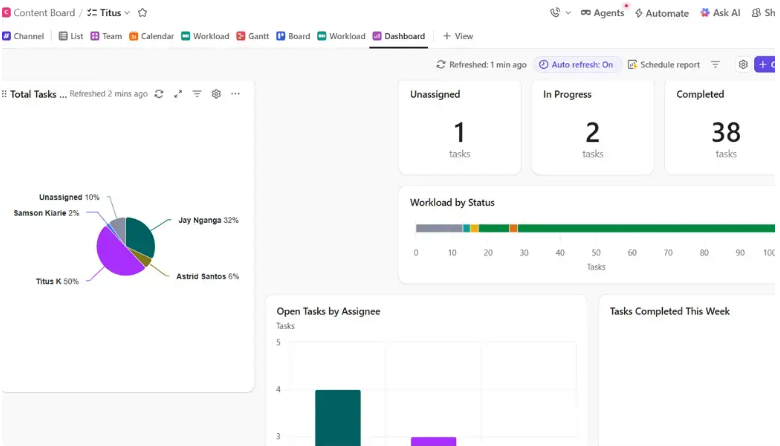
Pricing: Free Forever ($0, unlimited users), Unlimited ($7/user/month), Business ($12/user/month), Enterprise (custom).
Limitations: ClickUp’s depth creates a steeper learning curve than monday.com. New teams typically need 2–4 weeks of dedicated setup before reaching full productivity. monday.com is faster to productive use for non-technical teams.
Plaky

Best for: Budget-Friendly, Simple-Visual Task Management and Project Tracking
Plaky is the best choice if you’re looking for an all-inclusive free plan for unlimited users. Monday’s free plan only allows two users on three boards, but Plaky’s free plan offers unlimited users and unlimited boards with kanban, table, and calendar views.
If you’re a startup, small business, or remote team that needs to track projects visually and doesn’t want to pay per seat, Plaky solves every problem that Monday creates for you in its free plan.
Key features:
- Unlimited users and unlimited projects on the free plan — no billing surprises as the team grows
- Board, Table, and Calendar views without an upgrade
- Drag-and-drop card management with color-coded status labels
- Guest access for external stakeholders without additional seat cost
- Time tracking and automations on Pro plan ($3.99/user/month)
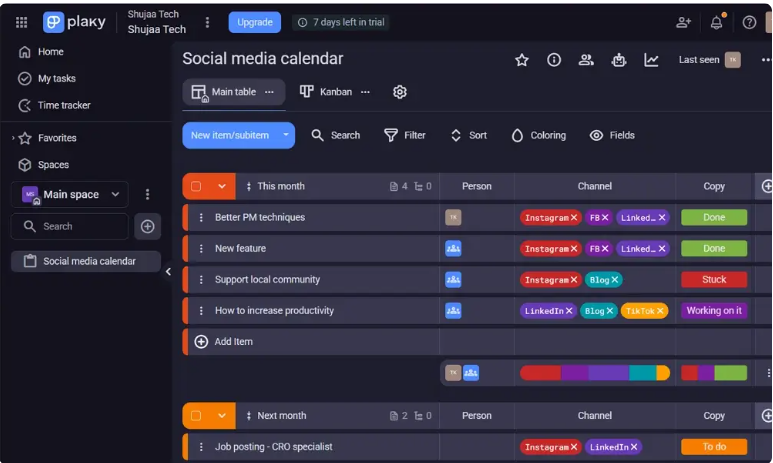
Pricing: Free (unlimited users, unlimited projects), Pro $3.99/user/month, Business $6.99/user/month.
Limitations: Smaller integration ecosystem than monday.com. Fewer built-in analytics and dashboard features. Best suited for teams with straightforward visual tracking needs rather than complex multi-department workflows.
Trello
Best for: Simple, Kanban Visual Tracking
For simpler kanban projects, Trello wins hands down. The interface of Trello simplifies project management by distilling the core essence of it into visuals — cards flowing through various states — and provides it faster and more cheaply than its competitors, including monday.com.
In cases where teams think monday.com’s column system is too complicated for their actual work processes, Trello’s simplicity becomes an advantage. It offers unlimited cards, unlimited users, and 10 boards per workspace for free, with Butler automation included.
Key features:
- Unlimited cards and unlimited members on all plans
- Butler automation for workflow rules without code — triggers when cards move, due dates approach, or labels change
- Power-Ups for adding Calendar, Timeline, GitHub, and Google Drive integrations
- Board templates covering marketing, product, HR, and agile workflows
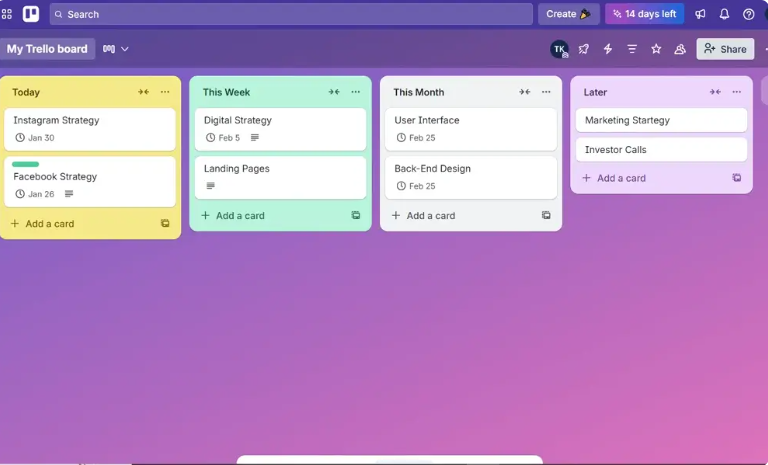
Pricing: Free (10 boards), Standard $5/user/month, Premium $10/user/month, Enterprise $17.50/user/month.
Limitations: No native sprint planning, no story points, no velocity tracking. Timeline view requires Standard plan ($5/user/month). Not suitable for complex multi-team projects with dependency tracking requirements.
Asana
Best for: Structured Project Management
For organizations looking for structure and clarity in their tasks, Asana is definitely the way forward compared to monday.com. Asana is ideal for midsize and large companies with complicated projects and requires detailed task management, and its structured nature tends to create more accountability than monday.com’s flexible nature but less opinionated nature.
The rule-based automation on the Starter plan that allows unlimited automation is better compared to the monday.com Standard plan, which has 250 automations per month. Task dependency and timeline are both features found in the Starter plan ($10.99/user/month) compared to monday.com Standard ($14/seat/month).
Key features:
- Task dependencies prevent scheduling conflicts before they cause missed deadlines
- Timeline view with duration-aware Gantt planning — not just due dates, but how long tasks take
- Goals and Portfolios for executive visibility across multiple active projects
- Unlimited automations on Starter — no monthly action cap unlike monday.com Standard
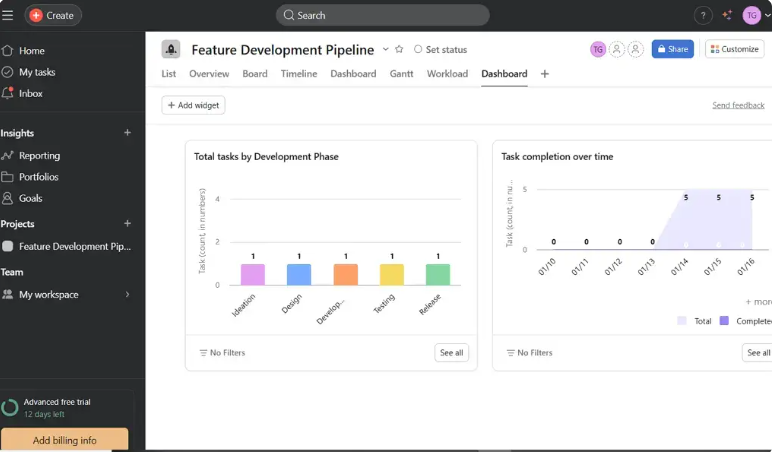
Pricing: Free (up to 10 users), Starter $10.99/user/month, Advanced $24.99/user/month.
Limitations: Free plan is limited compared to ClickUp or Plaky. No built-in time tracking on Starter. Less visually immediate than monday.com for non-technical stakeholders reviewing project status.
Smartsheet
Best for: Spreadsheet-Style Project Management and Budget Tracking
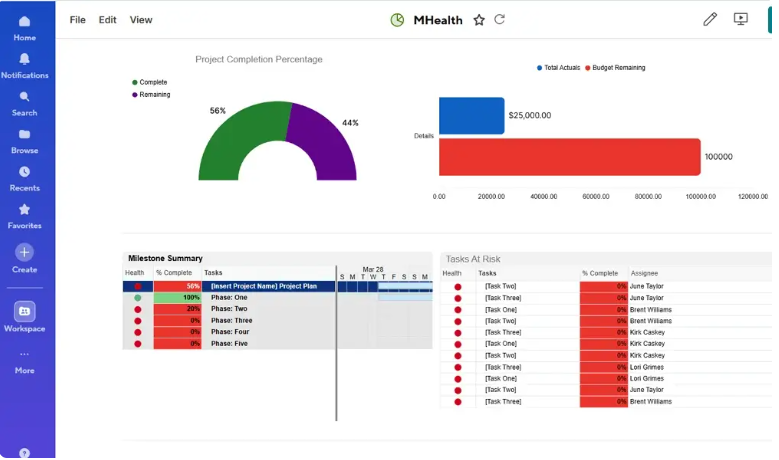
In the case of spreadsheet-based project management, there is no better monday.com replacement than Smartsheet. This application integrates features typical for project management, such as Gantt charts, resource management, portfolio dashboards, and automation, along with a spreadsheet-like interface. Finance departments and PMOs find it easy to use and understand.
Where budgeting, financial reporting, data structuring, and actual task management come into play at the same time, Spreadsheets become a natural option, and the learning curve associated with purely visual project management software is avoided.
Key features:
- Grid, Gantt, Card, and Calendar views from the same spreadsheet data model
- Portfolio dashboards with cross-sheet reporting and conditional formatting
- Resource management with workload visualization across multiple projects
- Pre-built templates for project planning, budget tracking, and intake management
Pricing: No permanent free plan (30-day trial). Pro $12/user/month, Business $24/user/month.
Limitations: No free plan. Steeper learning curve for teams without spreadsheet experience. Less visually engaging than monday.com for non-financial workflows.
Motion
Best for: AI-Driven Project and Task Management
Motion is the most AI-friendly project management solution to replace monday.com; it automatically schedules all of your meetings, tasks, and projects by using an AI which changes in real time based on any change in your priorities and deadlines.
Unlike monday.com where you manually enter your deadlines and statuses, Motion does this on its own based on your current schedule, priority, and urgency of the deadlines. For people who are constantly changing their priorities, Motion will save you hundreds of decisions that you make each day.
Key features:
- AI scheduler that automatically builds and rebuilds your day based on task priorities and deadlines
- Meeting scheduling assistant that protects focus blocks automatically
- Project templates with AI-estimated timelines from a brief description
- Calendar integration with Google Calendar and Outlook for unified scheduling
Pricing: 7-day free trial. Individual $19/user/month, Team $12/user/month (annual).
Limitations: Less suitable for team collaboration and client-facing project visibility than monday.com. AI scheduling works best for individual task management rather than multi-person project coordination.
Airtable
Best for: Custom Workflows for Data-Heavy Projects
If you have lots of data to work with and want to use “tables as apps,” then Airtable makes for the perfect monday.com alternative since its relationship database allows you to connect records and use lookup fields and rollups that cannot be achieved using monday.com’s column method of organizing data. For marketing operations, content, and agencies working on projects and involving structured data, Airtable definitely wins out over monday.com.
Key features:
- Relational database with linked records and lookup fields across multiple tables
- Gallery, Grid, Kanban, Calendar, Gantt, and Timeline views on a single dataset
- Interface Designer for building custom views for different team roles
- Airtable AI for field generation, record summarization, and data enrichment
Pricing: Free (limited records and views), Team $20/seat/month, Business $45/seat/month.
Limitations: Steeper learning curve than monday.com for teams unfamiliar with relational database concepts. Free plan’s record limit creates upgrade pressure quickly. More expensive than monday.com at comparable tiers.
Wrike

Best for: Enterprise Project Management
Wrike offers the governance and project management capabilities that monday.com is missing in its lower price range. The cross-tagging, permission system, visual approval system, and multiple-project resource planning of Wrike offer it a definitive advantage over monday.com as a monday.com alternative in the non-enterprise space.
Key features:
- Cross-tagging lets tasks appear in multiple project contexts without duplication
- Resource management with workload visualization across active projects and teams
- Proofing and approval workflows for creative and marketing teams
- Wrike Wit AI for sprint risk prediction and automated status summaries
Pricing: Free (unlimited users, basic tasks), Team $10/user/month, Business $24.99/user/month.
Limitations: Higher implementation cost than monday.com. Steeper learning curve for non-enterprise teams. Best value emerges at 50+ users.
Notion
Best for: Documentation-Driven Workflows and Sprint Planning
If you want a platform for storing documents and working on light projects in one place, then Notion is the ultimate monday.com competitor where your project management and documentation are intertwined. While in monday.com, tasks and documentation tools are separated, in Notion, both tools coexist in one app: from specifications of your project to meeting notes and databases for tasks.
For startup businesses, product teams, consulting firms, and agencies where delivering the written product is just as important as managing tasks, there is no need to use monday.com and a separate wiki.
Key features:
- Unlimited pages and databases connected to each other through linked database relations
- Kanban, table, calendar, and gallery views on the same database
- Notion AI for document summarization, writing assistance, and task generation
- Cross-database rollups for aggregating data across multiple project databases
Pricing: Free (unlimited personal pages), Plus $10/user/month, Business $18/user/month.
Limitations: Project management capabilities are secondary to documentation — no native time tracking, no advanced reporting. Requires more manual configuration than monday.com for structured project workflows.
Teamwork
Best for: Budget-Conscious Teams and Client Work
When it comes to client-based work, then Teamwork becomes the best alternative to monday.com. Teamwork integrates both project management and billing, including timesheets, budgets, and invoicing in one place, making it unnecessary to use separate software for invoicing along with the project management software.
In case of agencies based in the United States that have more than one ongoing project with deliverables and invoice management, Teamwork offers capabilities that are unavailable in monday.com on its standard plans.
Key features:
- Built-in time tracking with billable hours reporting per client and project
- Client portals for external stakeholder visibility without full workspace access
- Budget tracking with actual vs. estimated cost comparison
- Profitability reporting across active client projects
Pricing: Free (up to 5 users), Starter $13.99/user/month, Deliver $25.99/user/month.
Limitations: Less visually intuitive than monday.com for internal team workflows. Slower adoption for non-agency teams unfamiliar with project billing concepts.
What Is Project Management Software?
Project management software is a tool used for planning, tracking, executing, and reporting work. The contemporary project management platform software, such as monday.com and its alternative software, extends its capabilities far past mere to-do lists and provides a collaborative workspace where tasks can be assigned, deadlines monitored, resources managed, and processes automated.
Key Features of Product Management Tools
The capabilities that separate serious PM platforms from basic task managers:
- Multiple project views: Board, list, Gantt, calendar, and dashboard views of the same work
- Task dependencies: Tasks that cannot start until prerequisite work completes
- Workflow automation: Trigger-action rules that handle repetitive handoffs without human intervention
- Time tracking: Log hours against tasks for resource management and billing
- Reporting and dashboards: Aggregate data across projects for leadership visibility
- Collaboration tools: Comments, mentions, file attachments, and approval workflows
- Integration ecosystem: Connections to Slack, Google Workspace, Microsoft 365, GitHub, and CRM tools
- Guest and client access: External stakeholder views without full account requirements
Wrapping Up: Choosing the Right monday.com Alternative for Your Team
The best monday.com alternative depends entirely on which specific gap in monday.com is costing your team the most:
- monday.com costs too much → ClickUp (same visual PM depth, 37% lower per-seat cost at equivalent tiers)
- Free plan limited to 2 users → Plaky (unlimited users on the free plan, permanently)
- Need simple kanban fast → Trello (fastest setup, cheapest paid plan at $5/user/month)
- Need structured task dependencies → Asana (timelines, dependencies, unlimited automations at Starter)
- Spreadsheet-native workflow → Smartsheet (grid-based PM for finance and operations teams)
- AI-powered scheduling → Motion (automatically builds your day based on priorities and deadlines)
- Data-heavy relational workflows → Airtable (linked records and database views monday.com cannot replicate)
- Enterprise governance and scale → Wrike (permissions, proofing, and resource management for 50+ users)
- Docs + project management combined → Notion (replaces monday.com + wiki tool with one workspace)
- Client billing + project tracking → Teamwork (built-in invoicing and profitability reporting for agencies)
Disclaimer: Content on Next Byte Blog is for informational purposes only. Pricing and features mentioned are based on data available at the time of writing and may have changed. We are not affiliated with any tools or platforms mentioned unless stated. Some links may be affiliate links. Always verify information directly with the official source before making decisions.

Muneeb Azhar is the founder, publisher, and lead author of Next Byte Blog. A full-time professional freelancer specializing in SaaS, developer tools, and software reviews, he brings hands-on product experience to every piece he writes. His work covers best-of tool roundups, in-depth comparisons, and honest reviews of both free and paid software — helping readers make smarter decisions without the guesswork.