
Asana rocks at organizing and prioritizing tasks with its clean interface. It’s perfect for basic task tracking, but here’s the thing: when teams grow or workflows get more complex, its rigid structure starts showing flaws. So, it doesn’t work well for larger teams needing flexibility.
In 2026, US teams ditch Asana due to pricey per-seat costs between $10.99 and $24.99 per user monthly, getting higher for big groups. Plus, basic plans miss native documents and whiteboards. Automation is rare unless Advanced is paid. Time tracking and resource management also need extra tools on most plans.
This guide covers the 7 best Asana alternatives tested in 2026 — with full pricing, honest verdicts, and the specific scenario where each one outperforms Asana.
Key Takeaways: What Is the Best Alternative to Asana?
| Tool | Best For | Free Plan | Starting Paid Price |
|---|---|---|---|
| ClickUp | All-in-one project and workflow management | ✅ Unlimited users | $7/user/month |
| monday.com | Visual, customizable project tracking | ✅ 2 users | $12/seat/month (Basic) |
| Wrike | Real-time collaboration, complex workflows | ✅ Unlimited users | $10/user/month |
| Zoho Projects | Zoho ecosystem integration | ✅ Up to 3 users | $5/user/month |
| Microsoft Planner | Microsoft 365 integrated teams | ✅ Included with M365 | $6/user/month (Planner Plan 1) |
| Trello | Simple visual kanban management | ✅ Unlimited cards | $5/user/month |
| Todoist | Personal and team task management | ✅ 5 projects free | $4/month (Pro) |
How I Picked the Best Asana Alternative
Every tool in this guide was evaluated against five criteria that reflect how real teams actually use project management software:
- Feature value vs. Asana at the same price tier — Does this tool offer meaningfully more at equivalent cost?
- Onboarding speed — How long before a new team member is productive without training?
- Automation capability — Can the tool handle workflow automation without hitting monthly action limits?
- Integration ecosystem — Does it connect natively with Slack, Google Workspace, Microsoft 365, and HubSpot?
- Mobile experience — Is the mobile app a genuine daily driver or an afterthought?
Our Top 3 Asana Alternatives
Based on testing across all five criteria:
- ClickUp — Best overall value: more features, lower cost, better free plan
- monday.com — Best for fast team adoption and visual-first workflows
- Wrike — Best for complex, enterprise-grade project structures and resource planning
ClickUp

Best for: All-in-one Project and Workflow Management
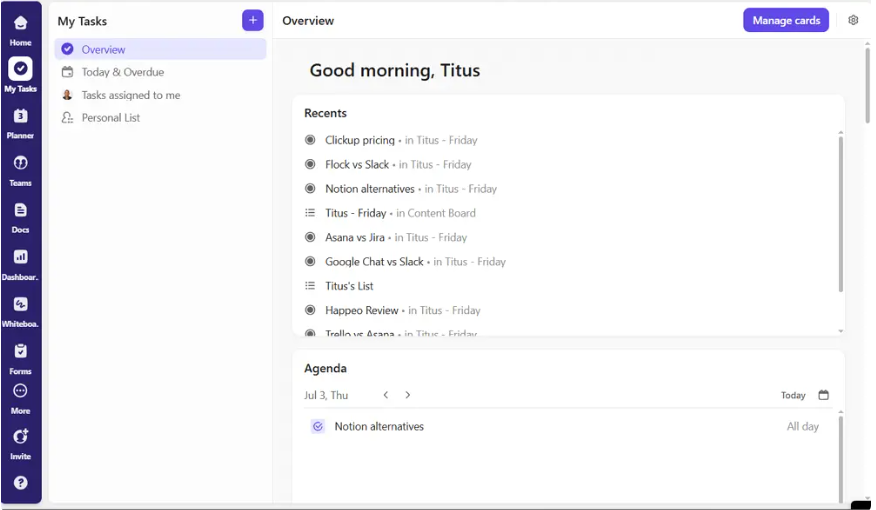
ClickUp is the go-to alternative to Asana for teams looking for a simpler, better project management tool without high per-seat prices. At $7/user/month, the Unlimited ClickUp tier saves you 52% compared to Asana’s Advanced tier ($24.99/user/month). Plus, ClickUp includes features Asana locks behind higher tiers, like built-in Docs and Whiteboards, time tracking, and unlimited automations on Business.
monday.com

Best for: Visual-Customizable Project Tracking
Monday.com gets a 9.1 out of 10 for ease of use, compared to Asana’s 8.6. It’s also more visually oriented, which makes it easier for new people to jump in. Unlike Asana, Monday.com’s flexible board setup fits any workflow. You don’t have to fit your processes into a set structure, making it super adaptable for different teams.
Wrike

Best for: Real-Time Collaboration and Customizable Workflows
Wrike handles complex projects better than Asana. It steps up when tasks span many departments and involve lots of people needing strict planning. The software really shines with its detailed permission settings, allowing external users project access without full credentials. So it’s perfect for client work Asana can’t handle.
At a Glance: 7 Asana Alternatives
| Feature | ClickUp | monday.com | Wrike | Zoho Projects | Microsoft Planner | Trello | Todoist |
|---|---|---|---|---|---|---|---|
| Free plan | ✅ Unlimited users | ✅ 2 users | ✅ Unlimited | ✅ 3 users | ✅ M365 | ✅ 10 boards | ✅ 5 projects |
| Gantt chart | ✅ Free | ✅ Standard+ | ✅ Team+ | ✅ All plans | ⚠️ Planner 1 | ⚠️ Power-Up | ❌ |
| Native time tracking | ✅ Unlimited+ | ✅ Pro+ | ✅ Business+ | ✅ Premium+ | ❌ | ❌ | ❌ |
| Built-in Docs | ✅ All plans | ✅ All plans | ✅ All plans | ✅ All plans | ✅ Loop | ❌ | ❌ |
| Automation | ✅ Unlimited (Biz) | ✅ 25K/month (Pro) | ✅ Business tier | ✅ Premium+ | ⚠️ Limited | ✅ Butler | ❌ |
| AI features | ✅ Brain add-on | ✅ Sidekick | ✅ Wrike Wit | ✅ Zia | ✅ Copilot | ❌ | ⚠️ Limited |
| Starting paid price | $7/user/month | $12/seat/month | $10/user/month | $5/user/month | $6/user/month | $5/user/month | $4/month |
Top 7 Asana Alternatives for More Seamless Project Management
ClickUp
Best for: All-in-one Project and Workflow Management
Why Choose ClickUp Over Asana
ClickUp outshines Asana because it does more but costs less per user, with features like task, doc, goal, time tracking, dashboard, and whiteboard handling in one place. This consolidation saves budget-conscious teams money since ClickUp goes for $12 a month per user, compared to Asana’s $24.99, cutting costs by half.
Plus, ClickUp stops the spread of needing multiple tools. Resource management starts at ClickUp’s Unlimited tier, priced at $7 a user per month annually, while Asana only offers this in their costly Enterprise plan. For teams maxed out with Asana’s limits, ClickUp stands out because of this key distinction.
Other Features I Liked About ClickUp
- 15+ views: List, Board, Gantt, Calendar, Workload, Mind Map, Whiteboard, Timeline, and Sprint — all accessible on the free plan without upgrades
- ClickUp Brain: Workspace-wide AI that summarizes tasks, writes content, and answers questions about your entire workspace — available as a $9/user/month add-on
- Unlimited automation on Business tier: No monthly action cap that forces an enterprise upgrade mid-quarter
- Offline mode: Tasks and docs remain accessible and editable without a network connection — Asana has no offline equivalent
- 1,000+ integrations including Slack, Google Workspace, GitHub, HubSpot, Salesforce, and Zapier
ClickUp Pricing
| Plan | Price | Key Addition |
|---|---|---|
| Free Forever | $0 | Unlimited users, 100MB storage, 15+ views |
| Unlimited | $7/user/month | Unlimited storage, integrations, Gantt |
| Business | $12/user/month | Advanced automations, custom fields, goals |
| Enterprise | Custom | White labeling, SSO, dedicated support |
monday.com
Best for: Visual-Customizable Project Tracking
Why Choose monday.com Over Asana
Even though they’re similar in cost and ease of use, monday.com slightly beats Asana when it comes to price and overall features. It’s got better capabilities for running simple automations right within the system too.
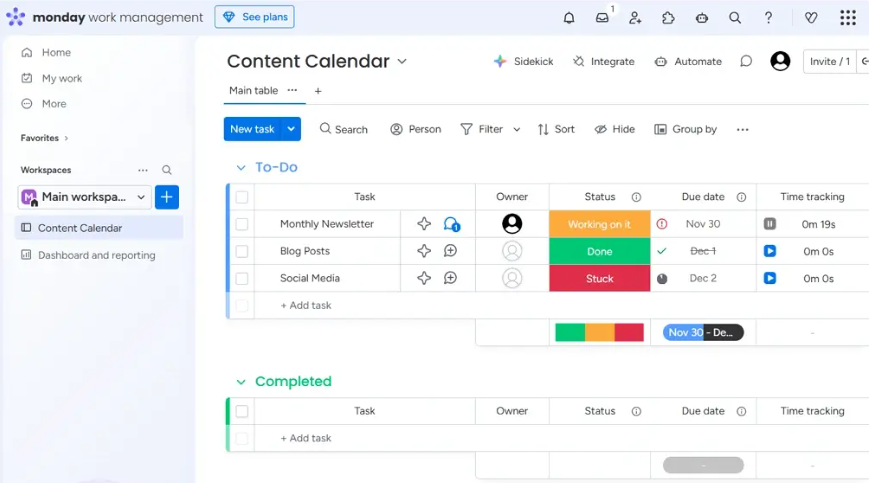
monday.com is way more visual and customizable than Asana. While Asana is more rigid and set in its ways, monday.com adapts to different workflows easily. If you work in creative teams or marketing and your tasks aren’t always standard, monday.com fits those unusual needs way better.
Its visual board is a big plus because it makes it super easy for non-tech savvy people to get involved. With status columns, color coding, and drag-and-drop features, everyone can see where projects stand just by glancing at the board. They don’t need to know Asana’s task structure to stay in the loop.
Other Features I Like About monday.com
- Canvas and Workdocs: Native document creation with live board embeds — build project specs alongside the boards they describe
- Column-first data model: Add columns for priority, budget, links, dependencies, and any custom field without restructuring existing boards
- Automations with 25,000 actions/month (Pro): The most generous automation allowance of any mid-tier plan among Asana alternatives
- monday AI (Sidekick): AI for task summaries, content generation, and automation suggestions — available on paid plans
- Client-facing portals: Share curated board views with external clients or contractors without exposing your full workspace
monday.com Pricing
| Plan | Price | Key Addition |
|---|---|---|
| Free | $0 (2 users max) | 3 boards, basic views |
| Basic | $12/seat/month | Unlimited boards, 5GB storage |
| Standard | $14/seat/month | Timeline, calendar, 250 automations/month |
| Pro | $19/seat/month | Time tracking, 25,000 automations/month |
| Enterprise | Custom | HIPAA, SSO, advanced permissions |
Wrike
Best for: Real-Time Collaboration and Customizable Workflows
Why Choose Wrike Over Asana
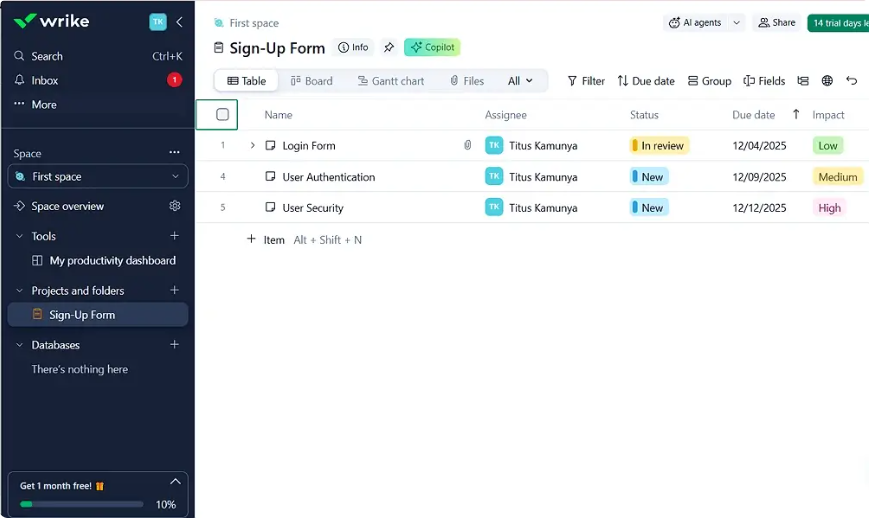
Wrike’s in-depth permission settings give external users project-level functionality, making it better than Asana for client portals or situations where multiple subcontractors are on a project. For professional services firms, marketing agencies, and enterprise operations teams, this combination of granular permissions and resource planning at accessible pricing tiers is Wrike’s defining advantage.
Wrike also offers Gantt functionality at its mid-tier (Team plan, $10/user/month) — more accessible than Asana, which requires its Advanced tier ($24.99/user/month) for equivalent timeline capabilities. Real-time co-editing on documents, live editing indicators, and version history make Wrike’s collaboration features genuinely stronger than Asana’s for teams working simultaneously on the same deliverables.
Other Features I Liked About Wrike
- Cross-tagging: A single task can live in multiple projects simultaneously — no duplication, no synchronization failures
- Request forms: Structured intake forms route incoming work directly into tracked projects with pre-assigned owners and due dates
- Wrike Wit AI: AI-powered task generation, risk prediction, and project summary features built into the platform
- Custom workflows with status labels: Build your own workflow stages with specific transition rules — not just “To Do / In Progress / Done”
- Resource management on Business tier: Workload charts, effort tracking, and capacity planning for teams managing multiple active projects simultaneously
Wrike Pricing
| Plan | Price | Key Addition |
|---|---|---|
| Free | $0 (unlimited users) | Basic task management, board view |
| Team | $10/user/month | Gantt, subtasks, automations |
| Business | $24.99/user/month | Custom workflows, time tracking, approvals |
| Enterprise | Custom | HIPAA, advanced security, SSO |
Zoho Projects
Best for: Those Already in the Zoho Ecosystem
Why Choose Zoho Projects Over Asana
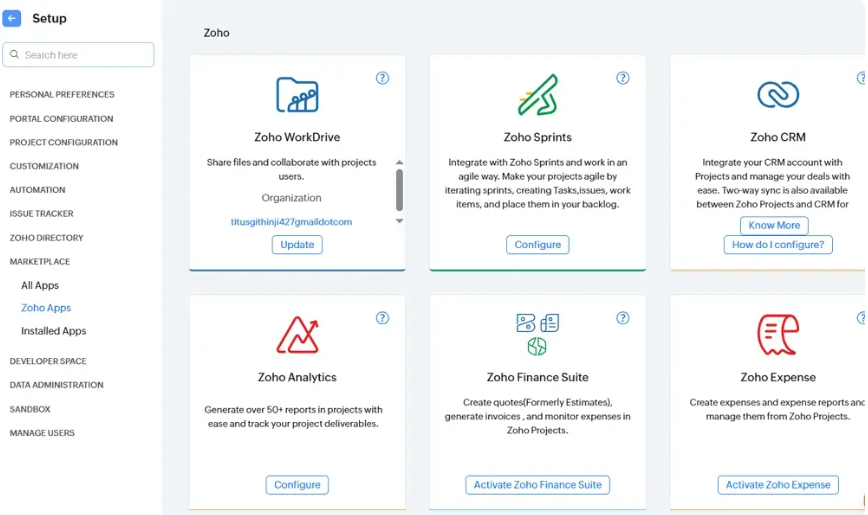
Zoho Projects is the right choice when your team already runs on Zoho CRM, Zoho Analytics, Zoho Cliq, or any other Zoho product. The native integration across the Zoho ecosystem eliminates the need for Zapier connections between your CRM, project management, and communication tools.
At $5/user/month (Premium), Zoho Projects delivers Gantt charts, budget tracking, time sheets, and resource utilization reports at roughly half the cost of Asana Starter. For small businesses managing client projects with attached invoicing, the Zoho Finance integration handles billing directly from project milestones.
Other Features I Liked About Zoho Projects
- Drag-and-drop interface consistently rated among the most intuitive in project management reviews
- Blueprint automation: Visual flowchart-based workflow automation builder — more approachable than code-based alternatives
- Issue tracking module: Built-in bug tracker connects project tasks directly to reported issues — useful for software development teams
- Zoho Analytics integration: Pull project time data into custom reports without manual export or third-party connectors
- AI-powered task assignment suggestions based on team availability and workload
Zoho Projects Pricing
| Plan | Price | Key Addition |
|---|---|---|
| Free | $0 (3 users, 2 projects) | Basic tasks and milestones |
| Premium | $5/user/month | Gantt, time tracking, 50 projects |
| Enterprise | $10/user/month | Custom roles, advanced reporting, unlimited projects |
Microsoft Planner
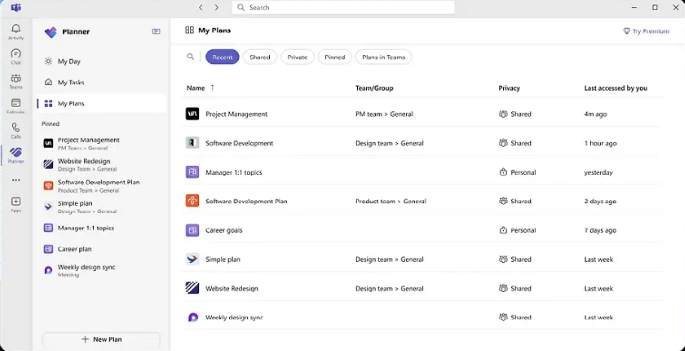
Best for: Users Already in the Microsoft Ecosystem
Why Choose Microsoft Planner Over Asana
Microsoft Planner is the default choice when your organization already pays for Microsoft 365. It is included at no additional cost across most Microsoft 365 plans — making it the cheapest Asana alternative for organizations standardized on Microsoft infrastructure.
The 2026 version of Planner integrates Microsoft Loop (co-authoring documents), Copilot AI (task summaries and plan generation), and Teams (project boards surfaced directly inside Teams channels) in a unified interface. For organizations running Teams as their communication backbone, having project boards embedded inside the same platform removes the context-switching overhead entirely.
Other Features I Liked About Microsoft Planner
- Microsoft Loop integration: Co-author project documents alongside task boards in the same workspace
- Copilot AI: Generate project plans from a brief description, summarize plan status for stakeholders, and identify at-risk tasks
- Teams embedding: Planner boards displayed as tabs inside Microsoft Teams channels — zero additional login or context switch
- Viva Insights integration: Surface time allocation and focus data alongside project workload for wellbeing-conscious organizations
- Microsoft Graph API: Deep programmatic integration with the full Microsoft 365 data layer for organizations building custom tooling
Microsoft Planner Pricing
| Plan | Price | Availability |
|---|---|---|
| Planner (Basic) | Included with most M365 plans | Microsoft 365 Business Basic+ |
| Planner Plan 1 | $6/user/month | Standalone subscription |
| Planner and Project Plan 3 | $30/user/month | Advanced project management |
| Planner and Project Plan 5 | $55/user/month | Portfolio management + AI |
Trello
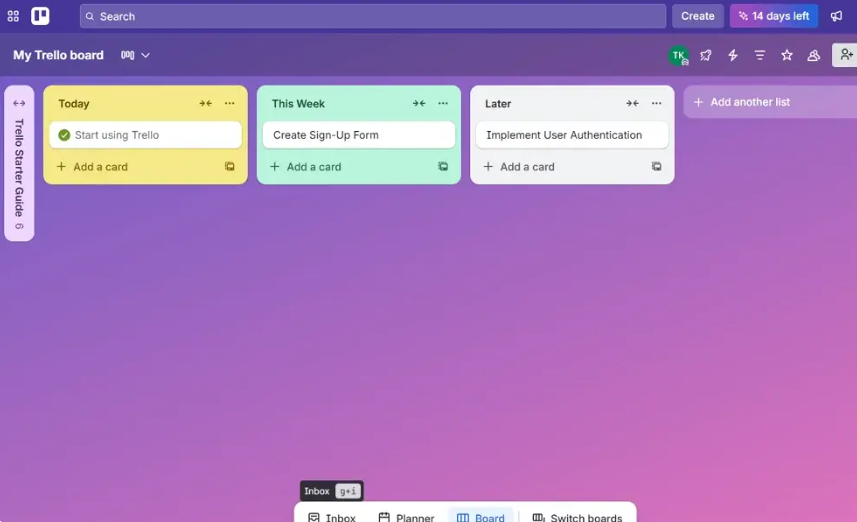
Best for: Simple, Visual Kanban-Style Task Management with User-Friendly Interface
Why Choose Trello Over Asana
Trello provides easy-to-use kanban boards with a super helpful free version. It’s perfect for teams with a straightforward workflow since tasks just move from left to right on their boards. You don’t even need setup; it’s up and running fast.
Plus, the free plan on Trello comes with unlimited cards and 10 boards per workspace, along with the Butler automation system. This makes it great for small teams and freelancers who can use it forever without upgrading. Asana’s free plan, however, only works well for teams under 10 people and doesn’t include things like timelines and automations. So for smaller groups, Trello really stands out.
Other Features I Liked About Trello
- Power-Ups: Community-built extensions add Calendar, Timeline, Voting, Custom Fields, and third-party integrations without leaving Trello
- Butler automation: Rule-based workflow automation in plain English — “When a card is moved to Done, mark all checklist items complete and send me an email”
- Mirror cards: A single card appearing in multiple boards simultaneously — useful for cross-team visibility without duplication
- Guest access: Invite external collaborators to specific boards without a full Trello account
- Fast setup: Most teams are fully operational within one hour of account creation
Trello Pricing
| Plan | Price | Key Addition |
|---|---|---|
| Free | $0 | Unlimited cards, 10 boards |
| Standard | $5/user/month | Unlimited boards, custom fields, unlimited guests |
| Premium | $10/user/month | Timeline, calendar, dashboard, workspace views |
| Enterprise | $17.50/user/month | Org-wide permissions, SSO, audit logs |
Todoist
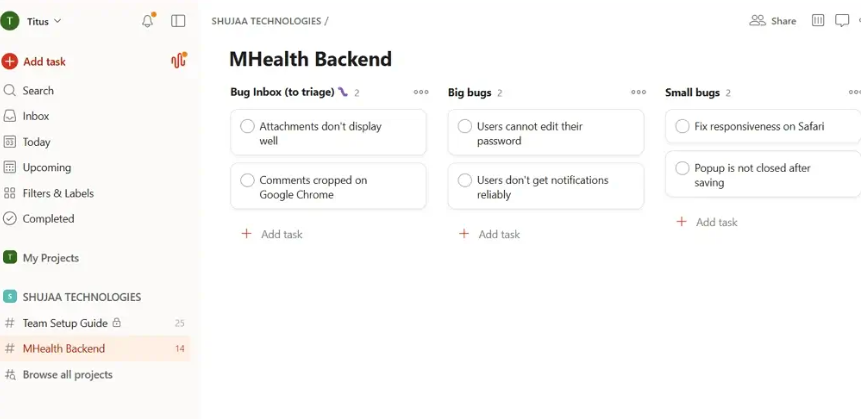
Best for: Simple Personal and Team Task Management
Why Choose Todoist Over Asana
Todoist does one thing better than any all-in-one platform — task management. For individuals and small teams whose primary need is a reliable, fast, cross-platform task manager, Todoist’s natural language input, clean mobile apps, and $4/month Pro pricing make it the most affordable capable alternative on this list.
Where Asana is built for team project coordination, Todoist is built for personal execution. “Submit report every Friday at 4pm” creates a recurring task instantly. Priority levels, labels, and filters organize complex personal backlogs without requiring a project management framework.
Other Features I Liked About Todoist
- Cross-platform consistency: Identical experience on iOS, Android, Mac, Windows, and web — the most consistent mobile experience tested
- Karma system: Productivity streak tracking that gamifies consistent task completion — surprisingly effective for building daily habits
- Sections and nested sub-tasks: Organize complex projects with clear hierarchy without the overhead of a full PM platform
- Integrations with Gmail, Outlook, Slack, and Google Calendar for capturing tasks from wherever they arise
- Todoist AI: Deadline suggestions, smart scheduling, and task breakdown recommendations
Todoist Pricing
| Plan | Price | Key Addition |
|---|---|---|
| Free | $0 | 5 active projects, unlimited tasks |
| Pro | $4/month (billed annually) | 300 projects, reminders, AI assistant |
| Business | $6/user/month | Team workspaces, admin dashboard |
In Conclusion: What’s the Best Asana Alternative?
For visual flexibility, monday.com. For an everything-suite, ClickUp. For flat pricing, Basecamp. For simple boards, Trello.
The right Asana alternative depends on which specific gap in Asana is costing your team the most:
- Cost at scale → ClickUp (52% cheaper than Asana Advanced at equivalent team size)
- Fast adoption and visual workflows → monday.com
- Enterprise resource management → Wrike
- Zoho ecosystem integration → Zoho Projects
- Microsoft 365 teams → Microsoft Planner (often free with existing M365 subscription)
- Simple kanban without overhead → Trello
- Personal productivity alongside team tasks → Todoist
Start with the free plan of your top candidate and run your actual workflow through it for one week before migrating. The right tool stops feeling like setup and starts feeling like work within the first 48 hours.
FAQs: Best Asana Alternatives
What Is the Best Alternative to Asana?
ClickUp is the best overall Asana alternative for most US teams — it offers more features, a stronger free plan, and 52% lower cost at equivalent tiers. monday.com is the best alternative for teams prioritizing fast adoption and visual project tracking.
What Is the Disadvantage of Asana?
Asana’s biggest disadvantages are its per-seat pricing that escalates quickly (Advanced at $24.99/user/month gates many core features), the lack of built-in time tracking and resource management at standard tiers, and no native Docs or Whiteboards without integrating additional tools.
Is Trello Better Than Asana?
Trello is better than Asana for simple kanban-style workflows with fast onboarding and a more generous free plan. Asana is better for structured task dependencies, goal tracking, and multi-team projects that need reporting and portfolio visibility.
Disclaimer: Content on Next Byte Blog is for informational purposes only. Pricing and features mentioned are based on data available at the time of writing and may have changed. We are not affiliated with any tools or platforms mentioned unless stated. Some links may be affiliate links. Always verify information directly with the official source before making decisions.

Muneeb Azhar is the founder, publisher, and lead author of Next Byte Blog. A full-time professional freelancer specializing in SaaS, developer tools, and software reviews, he brings hands-on product experience to every piece he writes. His work covers best-of tool roundups, in-depth comparisons, and honest reviews of both free and paid software — helping readers make smarter decisions without the guesswork.




vdrzid