Choosing between Asana, monday.com, and ClickUp in 2026 is harder than it looks. All three handle task management, timelines, and team collaboration. All three have shipped serious AI features. All three have improved their mobile apps, integrations, and reporting tools significantly over the past 18 months.
The real differences are not in what they can do — they are in how they do it, who they are designed for, and what the total cost looks like once you add AI, users, and the features you actually need.
This guide cuts through the marketing and shows you exactly how these three platforms compare across every dimension that matters for US teams in 2026.
Quick Comparison: Asana vs monday.com vs ClickUp
| Feature | Asana | monday.com | ClickUp |
|---|---|---|---|
| Free Plan | ✅ Up to 10 users | ✅ Up to 2 users | ✅ Unlimited users |
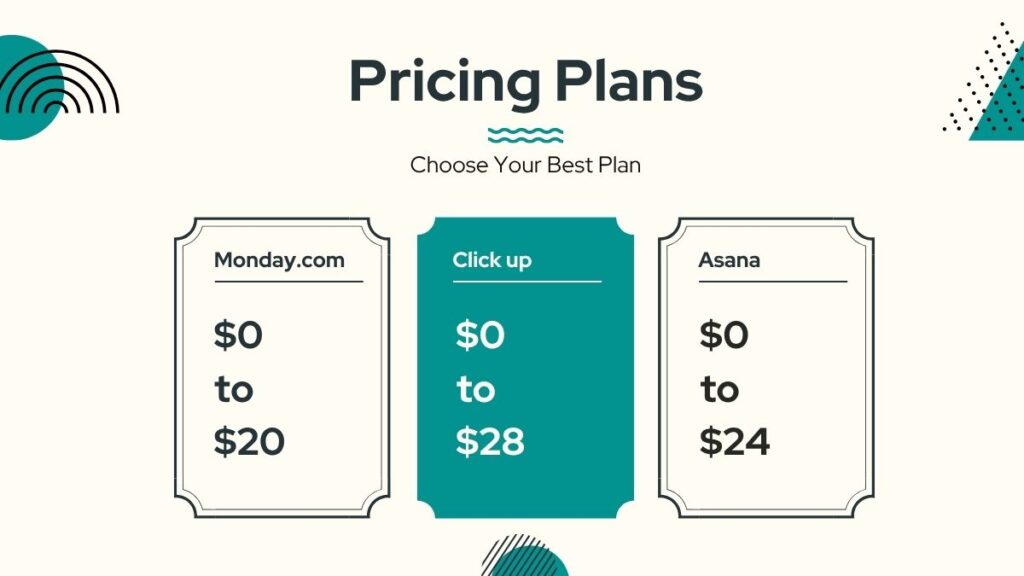
| Starting Paid Price | $10.99/user/month | $12/seat/month (Basic) | $7/user/month |
| Unlimited Tasks | ✅ All plans | ✅ All plans | ✅ Free plan |
| Views Available | 6 (Starter) | 9+ (varies by plan) | 15+ (most on free) |
| Unlimited Automations | ✅ Starter+ | ⚠️ 25K/month limit | ✅ Business+ |
| Native Time Tracking | ✅ Advanced plan | ✅ Pro plan | ✅ All plans |
| AI Features | AI Studio (Starter+) | Sidekick (credits-based) | Brain ($9+/user add-on) |
| Best For | Strategic planning, PMOs | Visual workflows, fast setup | Maximum value, complex workflows |
Pricing Comparison: Which Offers the Best Value?
Headline prices are consistently misleading across all three platforms. The tier where you get the features your team actually needs is almost always two steps above the advertised starting price.
Asana Pricing
| Plan | Price | Key Features |
|---|---|---|
| Personal | Free (up to 10 users) | Basic tasks, unlimited projects |
| Starter | $10.99/user/month | Timelines, workflows, AI Studio Basic, unlimited automations |
| Advanced | $24.99/user/month | Goals, Portfolios, proofing, native time tracking |
| Enterprise | Custom | Advanced security, SAML, data residency |
2026 update: Asana includes AI Studio Basic at no extra cost on all paid plans — the most accessible AI entry point of the three platforms. Goals and Portfolios require the Advanced tier.
monday.com Pricing
| Plan | Price | Key Features |
|---|---|---|
| Free | $0 (up to 2 users) | 3 boards, basic views only |
| Basic | $12/seat/month | Unlimited boards, 5GB storage |
| Standard | $14/seat/month | Calendar, Timeline, automations (250/month), integrations |
| Pro | $19/seat/month | Time tracking, formula columns, full automation suite |
| Enterprise | Custom | HIPAA, audit log, advanced permissions |
Reality check: monday.com’s free plan is effectively unusable for real teams — capped at 2 seats, 3 boards, and no automations or integrations. The Pro tier at $19/seat is where the platform genuinely delivers, making monday.com the highest entry cost of the three for fully-featured use.
ClickUp Pricing
| Plan | Price | Key Features |
|---|---|---|
| Free Forever | $0 | Unlimited users, tasks, members, 100MB storage |
| Unlimited | $7/user/month | Unlimited storage, integrations, Gantt, time tracking |
| Business | $12/user/month | Advanced automations, custom fields, goals |
| Enterprise | Custom | White labeling, advanced security, dedicated support |
| ClickUp Brain | +$9–$28/user/month add-on | AI across tasks, docs, and workspace search |
ClickUp’s value advantage is real: For a 10-user team, ClickUp Business costs $1,440/year versus Asana Starter at $1,320/year and monday.com Pro at $2,280/year. Add ClickUp Brain at the base tier and ClickUp still comes in at roughly the same annual cost as monday.com Pro without AI.
Pricing Verdict
ClickUp wins on price-to-feature ratio. At $7–$12/user/month, you get 15+ views, unlimited tasks, native time tracking, and Docs included. Asana justifies its premium with smoother onboarding and unlimited automations on Starter. monday.com’s pricing only makes sense if visual simplicity and fast adoption outweigh the higher per-seat cost.
Ease of Use: Which Tool Has the Shortest Learning Curve?

Asana: Clean, Opinionated, and Fast to Learn
Asana has a deliberate, opinionated interface. The hierarchy is simple: Teams → Projects → Tasks → Subtasks. Features like Goals and Portfolios require navigating menus that new users may not discover immediately — but once you know where things are, Asana’s day-to-day workflow is efficient and predictable. Most users are productive within one to two days.
monday.com: Visual, Intuitive, and Flexible
monday.com’s board-based interface feels immediately familiar to anyone who has used a spreadsheet or kanban board. Color-coded status columns, drag-and-drop task movement, and visual dashboards make it the easiest platform to demo to non-technical stakeholders. Onboarding new team members typically takes hours, not days — the fastest adoption rate of the three.
ClickUp: Powerful, Complex, and Feature-Dense
ClickUp’s depth is its greatest strength and its biggest UX liability. The hierarchy runs six levels deep — Workspace, Space, Folder, List, Task, Subtask, Checklist — and the interface surfaces more options at every level than most users need initially. With 15+ views, dozens of settings per Space, and features like Whiteboards, Mind Maps, and built-in Docs, first-time users consistently feel overwhelmed. Budget two to four weeks for meaningful team adoption.
Ease of Use Verdict
monday.com wins on adoption speed. Asana is second — clean but requires some feature discovery. ClickUp is third — the most powerful but the most demanding to configure. If your team will genuinely invest in learning it, ClickUp’s depth pays off. If you need people productive by Friday, monday.com gets there faster.
Views and Layouts: How Do You Visualize Your Work?

View Availability by Platform
| View | Asana | monday.com | ClickUp |
|---|---|---|---|
| List | ✅ | ✅ | ✅ |
| Board / Kanban | ✅ | ✅ | ✅ |
| Timeline / Gantt | ✅ Starter+ | ✅ Standard+ | ✅ Free |
| Calendar | ✅ | ✅ Standard+ | ✅ Free |
| Table / Spreadsheet | ✅ | ✅ | ✅ |
| Mind Map | ❌ | ❌ | ✅ |
| Workload / Capacity | ✅ Advanced | ✅ Pro | ✅ Business |
| Whiteboard | ❌ | ❌ | ✅ |
| Map | ❌ | ✅ | ✅ |
| Sprint | ❌ | ❌ | ✅ |
Views Verdict
ClickUp wins on view breadth — 15+ views including Mind Maps, Whiteboards, and Sprints available across most plans. monday.com’s visual first approach makes its 9 views the most immediately understandable. Asana’s 6 views are polished and sufficient for most traditional project workflows.
Automation: What Can You Automate and at What Cost?
Automation Capabilities Comparison
| Automation Feature | Asana | monday.com | ClickUp |
|---|---|---|---|
| Monthly Action Limit | Unlimited (Starter+) | 250–25,000 (plan-dependent) | Unlimited (Business+) |
| Visual Builder | ✅ Yes | ✅ Yes | ✅ Yes |
| Trigger Types | Status, date, field changes | Status, date, dependency | Status, field, time, dependency |
| Cross-Project Automation | ✅ | ⚠️ Limited | ✅ |
| AI-Powered Automation | ✅ AI Studio | ✅ Sidekick | ✅ Brain |
Automation Verdict
Asana wins for automation reliability. Unlimited automations on Starter with a clean rule builder is the strongest offer at that price tier. monday.com’s visual automation builder is the easiest to configure but hits a 25,000-action monthly wall on non-Enterprise plans that becomes a real cost problem for active teams. ClickUp’s automations are powerful but require Business-tier access for the full suite.
Integrations: Which Tool Plays Best with Others?
Integration Comparison
| Platform | Native Integrations | Zapier Support | Slack | Microsoft | |
|---|---|---|---|---|---|
| Asana | 200+ | ✅ | ✅ | ✅ | ✅ |
| monday.com | 200+ | ✅ | ✅ | ✅ | ✅ |
| ClickUp | 1,000+ | ✅ | ✅ | ✅ | ✅ |
All three integrate with Slack, Google Workspace, Microsoft Teams, Zoom, HubSpot, Salesforce, and GitHub. ClickUp’s 1,000+ integrations give it a numerical edge, though Asana and monday.com cover every common business integration. monday.com’s board-based data model makes some CRM integrations more intuitive — particularly Salesforce and HubSpot pipelines mapped to visual boards.
Integrations Verdict
ClickUp wins on integration breadth. Asana and monday.com cover all standard business integrations cleanly. For niche or specialized tool connectivity, ClickUp’s larger marketplace gives it the edge.
Reporting and Dashboards: How Do You Track Progress?

Reporting Features Comparison
| Reporting Feature | Asana | monday.com | ClickUp |
|---|---|---|---|
| Portfolio Dashboards | ✅ Advanced | ✅ Pro | ✅ Business |
| Goal Tracking | ✅ Advanced | ✅ Pro | ✅ Business |
| Custom Charts | ✅ | ✅ | ✅ |
| Workload Reports | ✅ | ✅ | ✅ |
| AI Status Summaries | ✅ AI Studio | ✅ Sidekick | ✅ Brain |
| Time Tracking Reports | ✅ Advanced | ✅ Pro | ✅ All plans |
Reporting Verdict
Asana wins for goal-oriented tracking — its Portfolios and Goals features map directly to business objectives across projects. monday.com’s visual dashboards are the most immediately comprehensible for non-technical stakeholders. ClickUp provides maximum data but requires configuration effort before the dashboards become useful.
Collaboration Features: How Do Teams Work Together?
Collaboration Features Comparison
| Feature | Asana | monday.com | ClickUp |
|---|---|---|---|
| Task Comments | ✅ | ✅ | ✅ |
| @Mentions | ✅ | ✅ | ✅ |
| Built-in Docs | ❌ | ✅ Workdocs | ✅ Docs |
| Proofing / Approvals | ✅ Advanced | ✅ | ✅ |
| Video Messaging | ❌ | ❌ | ✅ Clips |
| Guest Access | ✅ | ✅ | ✅ |
| Real-time Editing | ✅ | ✅ | ✅ |
Collaboration Verdict
ClickUp wins on collaboration breadth — built-in Docs, Whiteboards, and video Clips create a genuinely unified workspace. monday.com’s Workdocs are well-integrated and easy to use. Asana’s collaboration is clean and focused but lacks native docs and video messaging.
Scalability: Which Tool Grows with You?
Scalability Comparison
| Metric | Asana | monday.com | ClickUp |
|---|---|---|---|
| Free plan user limit | 10 | 2 | Unlimited |
| Enterprise tier available | ✅ | ✅ | ✅ |
| HIPAA compliance | ✅ Enterprise | ✅ Enterprise | ✅ Enterprise |
| SOC 2 Type II | ✅ | ✅ | ✅ |
| SAML SSO | ✅ Enterprise | ✅ Enterprise | ✅ Enterprise |
| Data residency | ✅ | ✅ | ✅ |
Asana is deployed at enterprise scale across financial services, healthcare, and technology organizations with complex compliance requirements. monday.com has expanded its enterprise compliance posture significantly in 2026 — HIPAA, audit logs, and advanced permissions are available on Enterprise. ClickUp scales well functionally but has faced reported performance issues in very large deployments (10,000+ tasks across active workspaces).
Scalability Verdict
Asana and monday.com are strongest at genuine enterprise scale. ClickUp scales effectively for most teams but requires performance monitoring at very high task volumes.
Mobile Experience: How Do They Perform on the Go?
Mobile App Comparison
| Mobile Feature | Asana | monday.com | ClickUp |
|---|---|---|---|
| iOS & Android | ✅ | ✅ | ✅ |
| Offline Mode | ✅ | ✅ | ✅ |
| Notification Quality | ✅ High | ✅ High | ⚠️ Mixed |
| App Performance | ✅ Fast | ✅ Fast | ⚠️ Variable |
Mobile Verdict
Asana and monday.com both deliver polished, reliable mobile experiences. ClickUp’s mobile app covers the feature set but receives consistent user feedback about performance and navigation complexity on smaller screens.
Support and Training: How Do You Get Help?
Support Comparison
| Support Type | Asana | monday.com | ClickUp |
|---|---|---|---|
| Live Chat | ✅ Paid plans | ✅ All plans | ✅ 24/7 |
| Email Support | ✅ | ✅ | ✅ |
| Phone Support | ✅ Enterprise | ✅ Enterprise | ✅ Enterprise |
| Help Center | ✅ Comprehensive | ✅ Comprehensive | ✅ Extensive |
| Academy / Training | ✅ Asana Academy | ✅ monday.com Academy | ✅ ClickUp University |
| Community Forum | ✅ | ✅ | ✅ |
Support Verdict
All three provide solid support infrastructure. monday.com has the fastest response times on standard plans. Asana’s support is consistently rated professional and thorough by enterprise customers. ClickUp’s 24/7 support availability is valuable, though response quality has received mixed reviews during high-traffic periods.
The Honest Breakdown: What You Should Actually Know
When Asana Is the Right Choice
- Your team manages cross-functional work with multiple stakeholders and needs clean accountability at every step
- Leadership requires portfolio-level visibility across multiple projects and clear goal tracking tied to business objectives
- Automation reliability is critical — you cannot afford arbitrary monthly action limits hitting mid-month
- Your industry has compliance requirements (healthcare, finance, legal) and you need an enterprise-grade audit trail
- You value UX stability and predictability over maximum feature density
When monday.com Is the Right Choice
- Your team includes non-technical members who need to get productive immediately without any training investment
- Visual status boards and real-time dashboards are how leadership actually wants to review progress
- Your workflows are non-standard — monday.com’s flexible board structure adapts to almost any process without forcing your work into a predefined hierarchy
- Speed of adoption outweighs cost per seat — monday.com consistently achieves the highest adoption rates of the three platforms
- You are a marketing, creative, or operations team that thinks visually and updates status constantly
When ClickUp Is the Right Choice
- Your team is technically capable and will invest two to four weeks in configuring a tool properly
- You need the broadest possible feature set from a single subscription — 15+ views, built-in Docs, Whiteboards, Mind Maps, time tracking, and goals without add-ons
- Cost efficiency is the priority — ClickUp delivers the most features per dollar of the three platforms
- Your workflows are non-standard or complex enough that other tools’ opinionated structures create friction
- You want workspace-wide AI that connects tasks, docs, and conversations in a single knowledge layer (ClickUp Brain)
The Real Trade-Offs
Here is what most comparison articles will not tell you directly:
Headline prices are misleading for all three. The tier where you get the AI features, automation limits, and reporting tools your team actually needs is consistently two steps above the advertised starting price. Evaluate based on the tier you will realistically land on — not the lowest listed number.
AI features are a tiebreaker, not a decider. In documented adoption studies, the single strongest predictor of successful PM tool deployment was not AI capability or feature breadth — it was whether the team adopted the tool at all. Choose the platform your team will actually use daily. Everything else is secondary.
Frequently Asked Questions
Which is better: Asana, monday.com, or ClickUp?
There is no single best — Asana is best for strategic planning, monday.com for fast adoption, and ClickUp for maximum features per dollar. Match the platform to how your team actually works.
Which is cheapest: Asana, monday.com, or ClickUp?
ClickUp is the cheapest at $7/user/month for paid plans. monday.com is the most expensive at $19/seat/month (Pro) for the full feature set. Asana sits in the middle at $10.99–$24.99/user/month.
Can Asana replace monday.com or ClickUp?
Asana can replace monday.com for most workflow types. Replacing ClickUp with Asana loses features like built-in Docs, Whiteboards, and Mind Maps — check whether those gaps matter for your team before switching.
Which has the best mobile app: Asana, monday.com, or ClickUp?
Asana and monday.com are consistently rated the best mobile experiences. ClickUp’s mobile app is feature-complete but receives criticism for performance and navigation complexity.
Which tool is best for small teams (5–10 people)?
Asana’s free plan supports up to 10 users and is genuinely useful. ClickUp’s free plan supports unlimited users. monday.com’s free plan caps at 2 users, making it the weakest option for small teams on a budget.
Do Asana, monday.com, and ClickUp integrate with Slack?
Yes, all three have native Slack integrations that support task creation, status updates, and notifications directly from Slack channels.
Which is best for remote teams?
ClickUp is the strongest remote team platform — built-in Docs, video Clips, Whiteboards, and workspace-level AI create a unified async collaboration environment. Asana and monday.com both support strong remote workflows through third-party integrations.
Can I migrate from Asana to ClickUp or monday.com?
Yes. ClickUp and monday.com both offer Asana import tools that transfer projects, tasks, assignments, and due dates. Custom fields and automations require manual rebuilding. Budget two to four weeks for a complete migration.
Which tool has the best automation?
Asana wins on automation reliability — unlimited automations on Starter with no monthly action cap. monday.com’s visual builder is the easiest to configure but hits usage limits on non-Enterprise plans. ClickUp offers unlimited automations on Business-tier and above.
Which is better for agencies: Asana, monday.com, or ClickUp?
monday.com is the most popular choice for agencies — its client-facing boards are intuitive for non-technical stakeholders and white labeling is available on Enterprise. ClickUp is increasingly popular for larger agencies that need time tracking, billing integrations, and robust reporting without paying for multiple tools.
Final Verdict: Which Should You Choose?
Choose Asana if:
- You need unlimited automations at an accessible price point
- Strategic planning, goal tracking, and portfolio visibility are central to how leadership operates
- Your team values reliability and a clean, predictable interface over maximum feature density
- Enterprise compliance (HIPAA, SOC 2, SAML) is a non-negotiable requirement
Choose monday.com if:
- Fast adoption and visual simplicity are more important than cost per seat
- Non-technical stakeholders need to understand project status at a glance without any training
- Your workflows are flexible or non-standard and benefit from the board-based, no-hierarchy structure
- You need the strongest out-of-the-box mobile and reporting experience for executive dashboards
Choose ClickUp if:
- Budget efficiency is the priority and your team will invest time in proper configuration
- You want Docs, Whiteboards, time tracking, and 15+ views included without add-ons
- Your workflows are complex, cross-functional, or non-standard enough that opinionated tools create friction
- You plan to use AI heavily — ClickUp Brain’s workspace-wide connectivity is the most versatile AI layer of the three
The Simple Decision Framework
Ask yourself one question: Will my team actually use this tool daily?
If your team is technical and motivated to configure a powerful system — ClickUp. If your team needs to be productive immediately with minimal setup — monday.com. If you need strategic planning tools, clean UX, and reliable automation at enterprise scale — Asana.
The right tool is the one your team opens every morning without being asked to.
Disclaimer: Content on Next Byte Blog is for informational purposes only. Pricing and features mentioned are based on data available at the time of writing and may have changed. We are not affiliated with any tools or platforms mentioned unless stated. Some links may be affiliate links. Always verify information directly with the official source before making decisions.
- Flock Review 2026: Ease of Use, Pricing, and Features
 Since 2014, Flock has been quietly catering to small and mid-sized businesses, lacking in name recognition compared to Slack and…
 - Webex Pricing Guide for 2026: Free, Unlimited, and Business Plans Explained
 Webex is the enterprise communication solution offered by Cisco, one of the most reliable brands in video conferences, calls, and…
 - Zenzap Review 2026: Best Communication Tool For Business, Communities, and Groups?
 It is an unfortunate reality that every team faces at some point: key business decisions lost in a WhatsApp thread…
 - Top 10 Affordable and Easy-to-Use Jira Alternatives in 2026 (Based on Real Testing)
 If you’ve ever spent 30 minutes trying to figure out how to configure Jira for a basic task board, you…
 - Slack Pricing Explained in 2026: Free Plan, and Paid Plans
 When considering using Slack for your organization, the initial thing that comes to your mind would definitely be the cost…
 - Top 10 monday.com Alternatives That Are Actually Affordable and Scalable (2026): Based on Real Testing
 monday.com is undoubtedly an excellent visual project management tool. Thanks to its visual features like color-coding of the status boards,…

Muneeb Azhar is the founder, publisher, and lead author of Next Byte Blog. A full-time professional freelancer specializing in SaaS, developer tools, and software reviews, he brings hands-on product experience to every piece he writes. His work covers best-of tool roundups, in-depth comparisons, and honest reviews of both free and paid software — helping readers make smarter decisions without the guesswork.


3 thoughts on “Asana vs monday.com vs ClickUp 2026: The Big Three PM Tools Compared”