Developers do not just take notes. They document APIs, track bugs, plan sprints, maintain runbooks, and build the kind of cross-linked knowledge base that makes onboarding the next engineer painless. Basic note-taking apps were never built for this — and most fail within 90 days of serious use.
Notion vs Coda vs Obsidian
In 2026, three tools dominate this decision for developers: Notion, Coda, and Obsidian. Each operates on a fundamentally different philosophy. Each solves a different version of the same core problem.
Quick verdict: Notion is your all-in-one workspace for team knowledge. Coda is your doc-database hybrid for building mini-apps without leaving a document. Obsidian is your local-first, privacy-respecting, infinitely customizable second brain.
We tested all three against real developer workflows: 500+ notes, 50+ images, offline access, API capabilities, and free plan limits. Here is everything you need to choose.
Quick Comparison Table

Notion vs Coda vs Obsidian
| Feature | Notion | Coda | Obsidian |
|---|---|---|---|
| Pricing (free plan) | Free (1 guest, limited blocks) | Free (Doc Makers, 50 table rows) | Free forever (unlimited notes) |
| Paid starting price | $10/user/month (Plus) | $12/Doc Maker/month (Pro) | $4/month (Sync) |
| Offline mode | ❌ Limited (cached only) | ❌ No true offline | ✅ Full local-first |
| Database / Blocks | ✅ Native databases | ✅ Table + formula engine | ⚠️ Via plugins only |
| API | ✅ Public REST API | ✅ Public API + Packs | ⚠️ No official API |
| Mobile apps | ✅ Free (iOS + Android) | ✅ Free (iOS + Android) | ⚠️ Paid ($1.99/month Sync) |
| Collaboration | ✅ Real-time, built-in | ✅ Real-time, built-in | ❌ No native collab |
| Markdown support | ⚠️ Import/Export only | ⚠️ Partial | ✅ Native |
| Plugin ecosystem | ⚠️ Limited integrations | ✅ Coda Packs | ✅ 1,000+ community plugins |
| Best for | Dev teams + stakeholders | Internal tool builders | Solo devs, second brain |
Notion for Developers
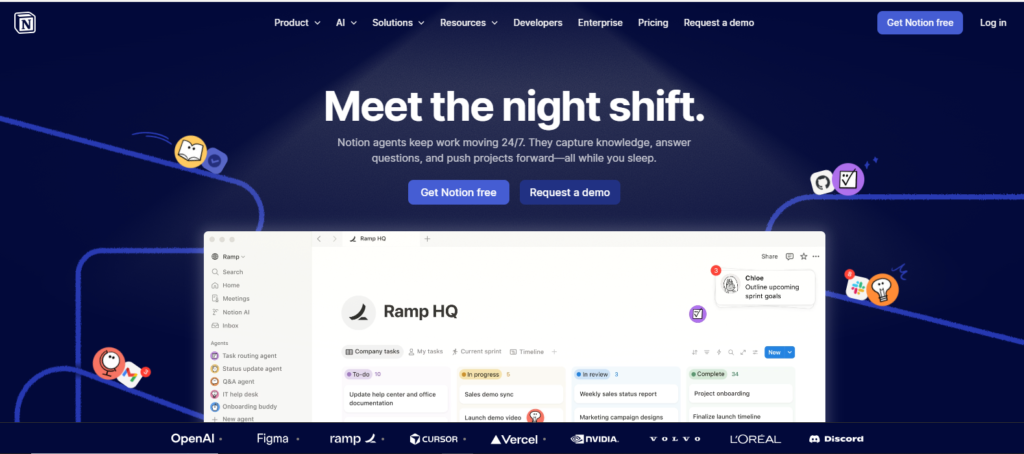
Notion is the default choice for dev teams that work alongside designers, PMs, and non-technical stakeholders. Its block-based editor makes it easy to create rich documents — meeting notes, technical specs, API documentation, sprint boards — without any configuration. The database layer is genuinely powerful: you can track bugs in a filtered table view, switch to a kanban board for sprint planning, and pull the same data into a calendar view for release planning.
Key Features
- Multi-view databases: The same dataset rendered as a table, kanban, calendar, gallery, or timeline — without duplicating data. This is how most dev teams track features, bugs, and releases
- Linked databases and rollups: Reference one database inside another. Pull open bug counts into a project overview. No separate spreadsheet required
- Pre-built dev templates: Sprint planning boards, API documentation pages, incident runbooks, changelogs, and feature request trackers are available in the template gallery — most created by developers, for developers
- Notion AI: Summarizes meeting notes, drafts technical documentation, fills in ticket descriptions, and answers questions about your workspace content (paid add-on, $10/user/month)
- REST API: Full public API with SDKs in Node.js, Python, and community libraries. Usable for syncing GitHub issues, Jira tickets, or custom tooling into your workspace
Pros & Cons
Pros:
- Fastest onboarding of the three — non-technical teammates adopt it in hours
- 1,000+ integrations including GitHub, Linear, Figma, Jira, and Slack
- Clean, consistent UI that scales from personal notes to multi-team wikis
- Templates dramatically reduce setup time for standard dev workflows
- Strong web clipper, email-to-Notion, and share-to-web features
Cons:
- No true offline mode — cached pages work, but editing fails without a connection
- Performance degrades measurably with large databases (1,000+ rows, heavy embeds)
- Typing latency of 50–150ms due to cloud sync (versus Obsidian’s sub-16ms local writes)
- Pricing jumps significantly at Business tier ($18/user/month) — painful for teams of 10+
- Vendor lock-in is real — exporting large workspaces is messy and incomplete
Best For
Small to mid-size dev teams building shared documentation, sprint planning systems, and technical wikis that non-technical stakeholders also need to read, contribute to, or reference. Product-engineering teams, developer advocates, and engineering managers get the most value here.
Coda for Developers
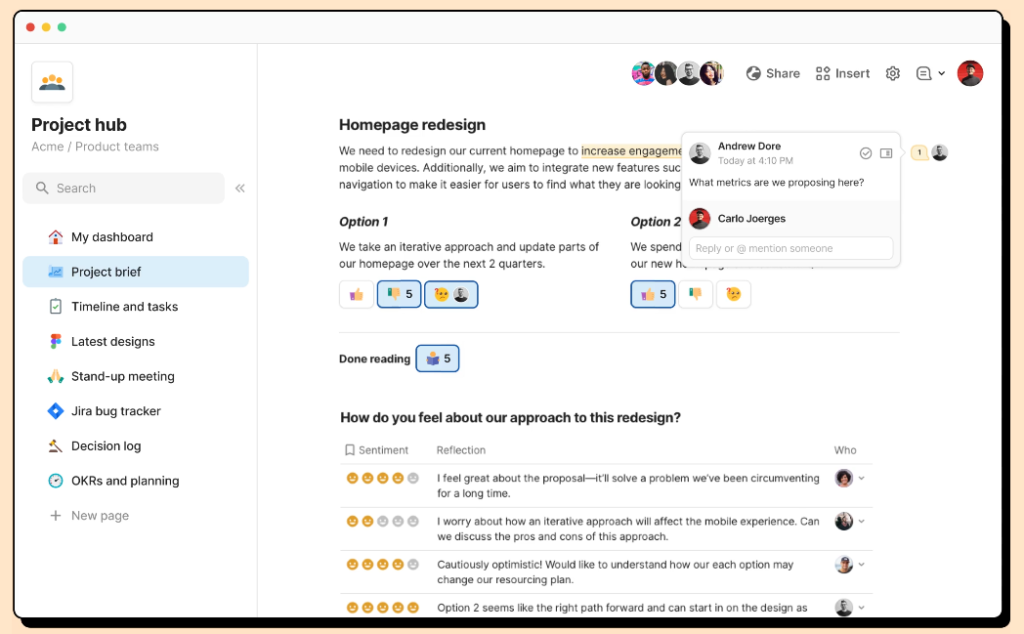
Coda describes itself as “docs that work like apps” — and for developers, that framing is accurate. Where Notion databases display data, Coda’s formula engine and button components let you build interactive logic directly inside a document. A Coda doc can trigger a Slack message when a row changes, sync open GitHub issues automatically via Coda Packs, and let engineers update sprint status with a single button click — all without leaving the document.
Key Features
- Formula engine: Excel-style formulas applied to tables, text, and interactive components. Significantly more powerful than Notion’s formula system — supports conditional logic, data lookups, and cross-table references
- Coda Packs: Native two-way integrations with GitHub, Slack, Jira, Linear, PagerDuty, and 500+ other tools. Data syncs into the document, not just links to external apps
- Buttons and controls: Interactive UI elements — dropdowns, toggles, sliders, form inputs — that trigger automations or update data. Build lightweight internal tools without writing code
- Automations: Time-based and event-based automation rules that run inside the doc. Schedule a weekly standup digest, auto-assign tickets when status changes, or notify Slack when a deadline passes
- AI assistant (Coda AI): Summarizes docs, drafts content, and generates table data — available on paid plans
Pros & Cons
Pros:
- The most powerful formula and automation engine of the three — closest to a real app framework
- Coda Packs create genuinely two-way data sync with GitHub and Jira (not just embeds)
- “Doc Maker” pricing model means viewers are free — you only pay for users who create and edit documents. Significant cost advantage for teams with many readers
- Better for building internal ops tools: standup aggregators, on-call schedulers, feature voting systems
Cons:
- Steeper learning curve than Notion — the formula language and Pack configuration take real setup time
- Mobile experience is functional but clearly secondary to desktop
- Free plan limits tables to 50 rows per doc — hits the ceiling quickly for any real dataset
- Can feel over-engineered for straightforward documentation; context-switching between “writing mode” and “app-building mode” disrupts flow
Best For
Developers and engineering managers who want to consolidate multiple tools into a single document — replacing your Jira board, Slack channel summaries, and team metrics dashboard into one Coda doc. Also strong for operations-heavy teams building custom internal tooling without committing to a full development project.
Obsidian for Developers
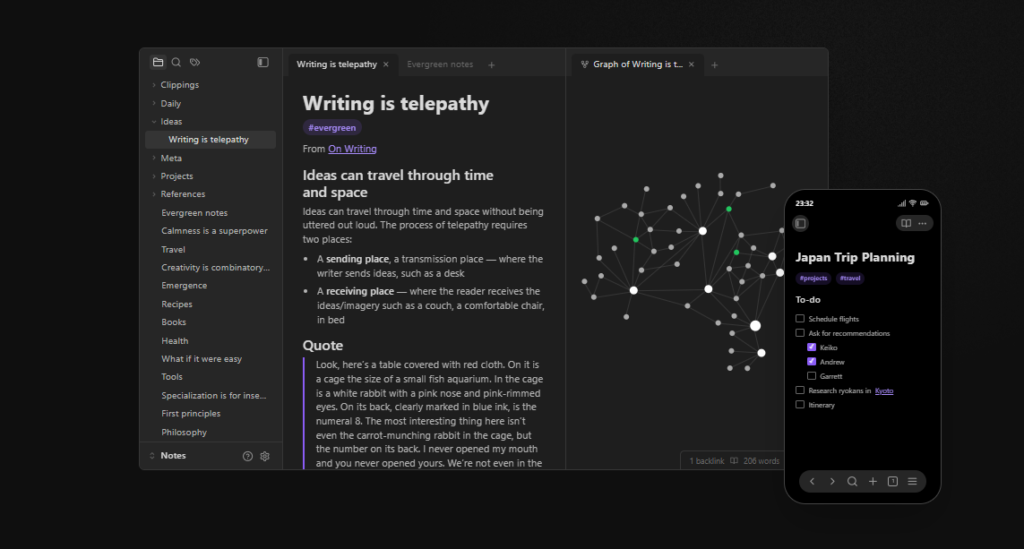
Obsidian is architecturally different from Notion and Coda in one fundamental way: your notes are local Markdown files stored on your machine. No server, no proprietary format, no sync required. Open a .md file in VS Code and your notes are right there. This is not just a privacy feature — it is a workflow feature for developers who already live in plain text.
Key Features
- Local-first Markdown: Every note is a
.mdfile in a folder on your filesystem. Version control with Git works natively. Your vault is just a directory - Bidirectional links and backlinks: Link any note to any other note with
[[note-name]]syntax. Backlinks panel shows every note that references the current one — the core of second-brain methodology - Graph view: Visual map of all your notes and their connections. Surfaces unexpected relationships between concepts, technologies, and projects over time
- 1,000+ community plugins: Git integration, Kanban boards, Dataview (SQL-like queries across your notes), Templater, Calendar, Task management, Daily notes, Excalidraw diagrams, and AI integrations. Almost any feature missing from core Obsidian exists as a plugin
- Performance: Sub-16ms typing latency. ~180–250MB RAM usage (versus Notion’s 400–600MB). Instant search across thousands of notes. Loads in seconds regardless of vault size
Pros & Cons
Pros:
- Free forever for personal use — no subscription, no contact limits, no feature gates
- Zero vendor lock-in — your files are plain text that any tool can read
- The fastest typing and search experience of the three by a significant margin
- Full offline functionality — works the same on a plane, in a basement, or behind a corporate firewall
- Git-based version history: every change to every note is trackable if you set up the Git plugin
- Privacy-first by design — your notes never touch a third-party server unless you use Obsidian Sync
Cons:
- No built-in collaboration — sharing and co-editing require workarounds (shared Git repo, or paid Sync + permissions)
- Mobile apps require the Sync subscription ($4/month) for cross-device access — the free mobile app only works with iCloud or third-party sync
- Plugin setup takes real time — a fully configured Obsidian vault for dev workflows takes several hours to build
- No official API or Packs — integrations with external tools require community plugins, Templater scripts, or manual workflows
Best For
Solo developers, security-conscious engineers, and anyone building a long-term personal knowledge base. Particularly valuable for developers who want to treat their notes like code — version-controlled, portable, and independent of any single vendor’s continued existence.
Performance & Pricing Test Results
We tested all three with a realistic developer vault: 500 notes, 50 attached images, 10 linked databases (Notion/Coda), and standard search queries.
| Metric | Notion | Coda | Obsidian |
|---|---|---|---|
| Load time (500 notes) | 2.1s avg | 2.4s avg | 0.3s avg |
| Typing latency | 50–150ms | 60–120ms | <16ms |
| RAM usage | 400–600MB | 350–500MB | 180–250MB |
| Search speed (500 notes) | 1.2s | 1.5s | <0.2s |
| Offline editing | ❌ Cached only | ❌ No | ✅ Full |
Free plan limits (2026):
- Notion Free: Unlimited blocks on free plan post-2023 update. Limited to 1 guest and basic database features. No AI included
- Coda Free: Unlimited docs. Tables capped at 50 rows per doc. Packs available but data sync limited. Doc Maker model — viewers always free
- Obsidian Free: Unlimited notes, unlimited plugins, unlimited local storage. No collaboration. Mobile app requires Sync subscription for cross-device access
Paid plan cost for a 3-developer team (annual billing):
- Notion Plus: $10/user/month → $360/year for 3 users
- Coda Pro: $12/Doc Maker/month → $432/year for 3 Doc Makers (all viewers free)
- Obsidian Sync: $4/user/month → $144/year for 3 users (basic collab via shared vault)
Which One Should You Choose?
Pick Notion if: You work in a cross-functional team where PMs, designers, or non-technical stakeholders contribute to the same documentation. Notion’s UI requires the least explanation for non-developers, and its template ecosystem means you can be productive on day one without building anything from scratch.
Pick Coda if: You spend time building the same internal tooling repeatedly — sprint dashboards, on-call schedulers, ticket trackers, standup aggregators — and you want to build those tools inside documents rather than as separate applications. Coda’s formula engine and Packs are the best “app in a doc” experience available without writing code.
Pick Obsidian if: You want speed, privacy, and long-term knowledge ownership. If your primary need is building a developer second brain — connecting concepts, tracking what you learn, maintaining runbooks, documenting systems — Obsidian’s local-first architecture and plugin ecosystem make it the most powerful solo tool of the three.
Decision flowchart:
Do you collaborate with non-developers regularly?
└─ Yes → Notion (easiest onboarding, best UI for mixed teams)
└─ No → Do you need to embed automation inside your docs?
         └─ Yes → Coda (Packs, formulas, buttons)
         └─ No → Do you value speed, privacy, and offline access?
                  └─ Yes → Obsidian (local-first, Git-native, free forever)
                  └─ No → Notion (clean UI, broad template library)
FAQs
Can you migrate from Notion to Obsidian?
Yes — Notion exports to Markdown via Settings → Export. Community tools like notion-to-obsidian on GitHub clean up the export format. Databases become tables in Markdown; internal links require a find-and-replace pass. Budget an afternoon for a large workspace.
Is Obsidian good for teams?
Obsidian has no native real-time collaboration. Teams can share a vault via a Git repository (with the Git plugin), but simultaneous editing causes merge conflicts. For genuine team collaboration, Notion or Coda handles this natively. Obsidian is best suited for solo use or a small team willing to manage a shared Git workflow.
Which one has the better API for automation?
Notion has the most mature public REST API with official SDKs and strong community adoption. You can read and write pages, databases, and blocks programmatically — useful for syncing GitHub issues, building custom dashboards, or triggering Notion updates from CI/CD pipelines. Coda’s API is similarly capable and pairs well with its Packs for real-time data sync. Obsidian has no official API — but the Dataview and Templater plugins enable powerful in-vault automation through Markdown-native scripting.
Conclusion
There is no objectively best note-taking app for developers in 2026. There is only the best one for how you actually work.
Use Notion if your team’s productivity depends on shared documentation that non-developers can actually navigate. Use Coda if you want to replace a collection of disconnected tools with one interactive document that embeds logic, data, and automation. Use Obsidian if you want the fastest, most private, most portable developer knowledge base you can build — one that you will still be able to open in ten years regardless of what any company decides to do with its pricing model.
Start with the free plan of each for seven days. Run a real workflow through all three. The one that stops feeling like setup and starts feeling like thinking is the right one.
Disclaimer: Content on Next Byte Blog is for informational purposes only. Pricing and features mentioned are based on data available at the time of writing and may have changed. We are not affiliated with any tools or platforms mentioned unless stated. Some links may be affiliate links. Always verify information directly with the official source before making decisions.
Latest Uploads:
- Flock Review 2026: Ease of Use, Pricing, and Features
 Since 2014, Flock has been quietly catering to small and mid-sized businesses, lacking…
 - Webex Pricing Guide for 2026: Free, Unlimited, and Business Plans Explained
 Webex is the enterprise communication solution offered by Cisco, one of the most…
 - Zenzap Review 2026: Best Communication Tool For Business, Communities, and Groups?
 It is an unfortunate reality that every team faces at some point: key…
 - Top 10 Affordable and Easy-to-Use Jira Alternatives in 2026 (Based on Real Testing)
 If you’ve ever spent 30 minutes trying to figure out how to configure…
 - Slack Pricing Explained in 2026: Free Plan, and Paid Plans
 When considering using Slack for your organization, the initial thing that comes to…
 - Top 10 monday.com Alternatives That Are Actually Affordable and Scalable (2026): Based on Real Testing
 monday.com is undoubtedly an excellent visual project management tool. Thanks to its visual…

Muneeb Azhar is the founder, publisher, and lead author of Next Byte Blog. A full-time professional freelancer specializing in SaaS, developer tools, and software reviews, he brings hands-on product experience to every piece he writes. His work covers best-of tool roundups, in-depth comparisons, and honest reviews of both free and paid software — helping readers make smarter decisions without the guesswork.